Kubernetes - Docker Principle
All articles on this blog are licensed under CC BY-NC-SA 4.0 unless otherwise stated.
Related Articles
2022-07-08
Kubernetes - Dockerfile
2022-07-01
Kubernetes - Docker Overview
2022-10-01
Kubernetes - Container Interconnection
拷贝数据123456$ docker run -d --rm redis450662153d83e6e1b30af57443ccfe68d798d5c7f4f8e50d2d287fdde2c1645c$ docker psCONTAINER ID IMAGE COMMAND CREATED STATUS PORTS NAMES450662153d83 redis "docker-entrypoint.s…" 7 seconds ago Up 6 seconds 6379/tcp cranky_wilbur 拷贝宿主机文件到容器 1234567891011$ md5sum a.txtd41d8cd98f00b204e9800998ecf8427e a.txt$ docker cp a.txt 450:/tmp$ docker exec -it 450 sh# ls /tmpa.txt# md5sum /tmp/a.txtd41d8cd98f00b204e98009...

2022-07-09
Kubernetes - Registry
2022-09-19
Kubernetes - Dockerfile
Image 镜像由多层 Layer 组成,Layer 是一组只读不可修改的文件,Layer 可以在镜像间共享Image = Layer + Union FS 1234567891011121314$ docker inspect nginx:alpine... "RootFS": { "Type": "layers", "Layers": [ "sha256:e5e13b0c77cbb769548077189c3da2f0a764ceca06af49d8d558e759f5c232bd", "sha256:07099189e7ec257e501d9625507b55e0ea32c330e38c90d8533b3fa2a7a97069", "sha256:fcf860bf48b4e20f24f44ba02...
2022-09-16
Kubernetes - Docker Nature
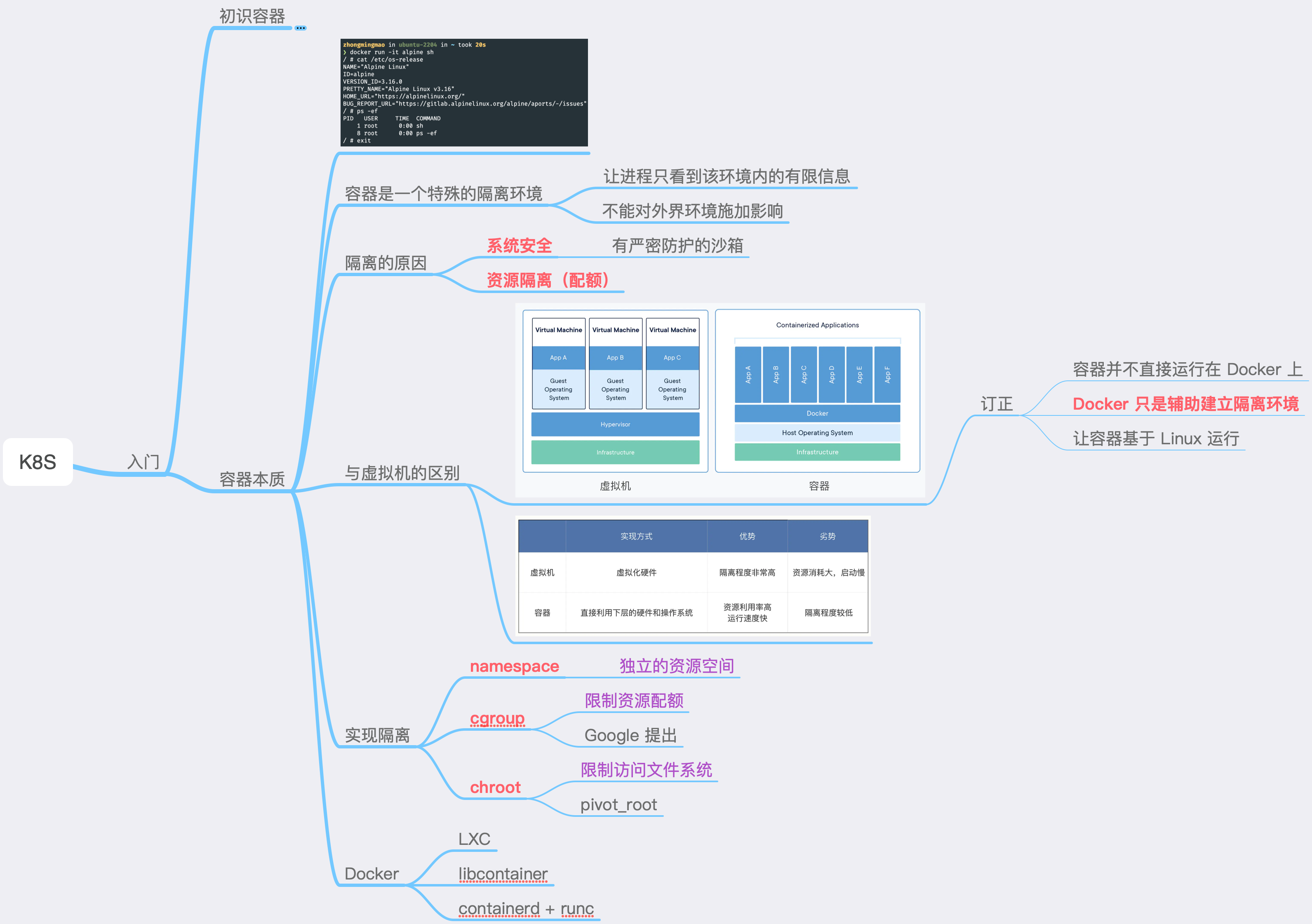
本质 容器,是一个特殊的隔离环境,能够让进程只看到这个环境内的有限信息,不能对外界环境施加影响隔离的原因:系统安全隔离的实现:namespace + cgroup + chroot(rootfs) Container vs VM 容器并不是直接运行在 Docker 上,Docker 只是辅助建立隔离环境,让容器基于 Linux 运行 VM 虚拟化出来的是硬件,需要在上面再安装一个 Guest OS 才能运行应用程序,会消耗大量的系统资源 容器则直接利用了下层的计算机硬件和操作系统,非常轻量级,但多个容器共用 OS Kernel,隔离程度不如 VM 实现方式 优势 劣势 VM 虚拟化硬件 隔离程度非常高 资源消耗大,启动慢 Container 直接利用下层的硬件和操作系统 资源利用率高运行速度快 隔离程度较低