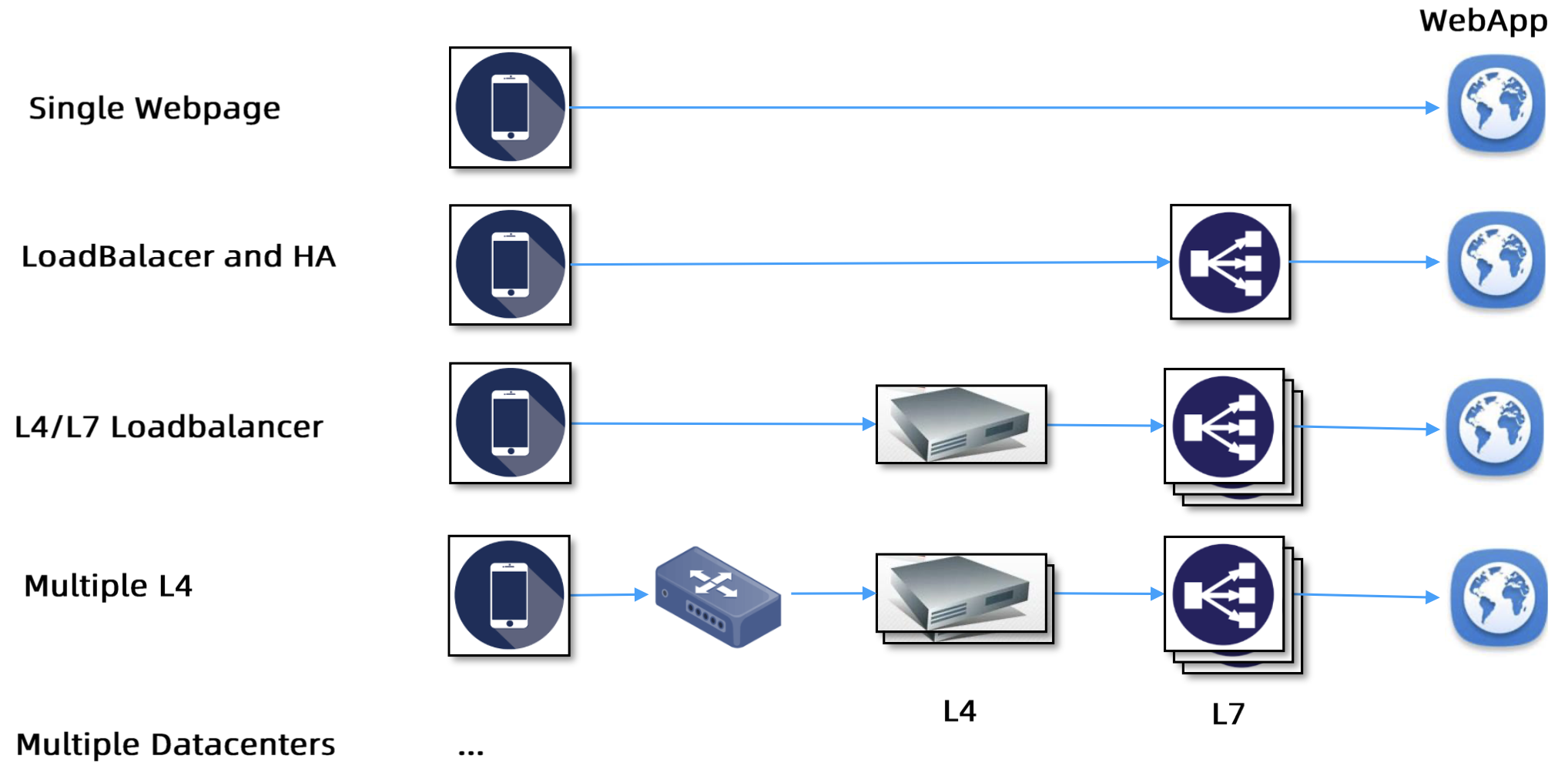
基本概念

发展历程

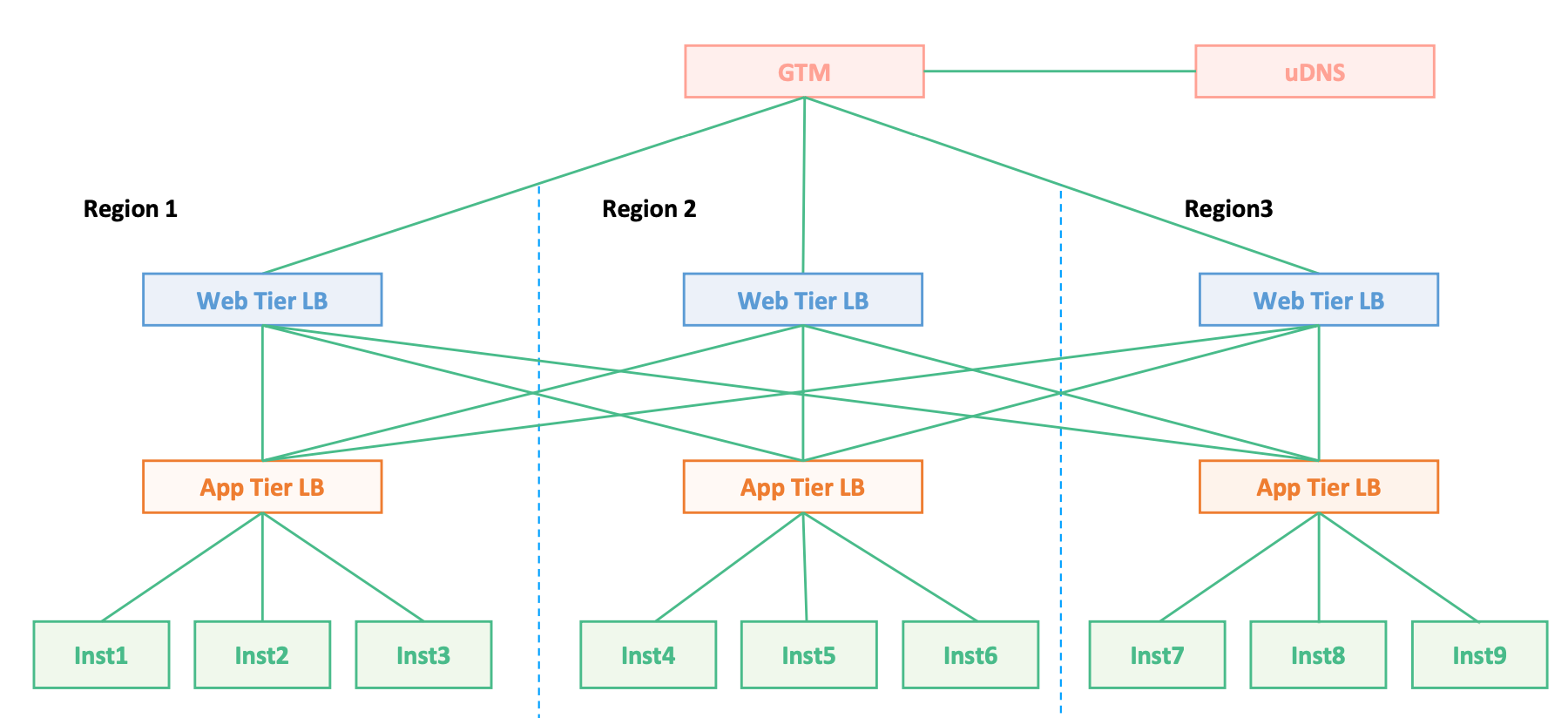
image-20230920204247842

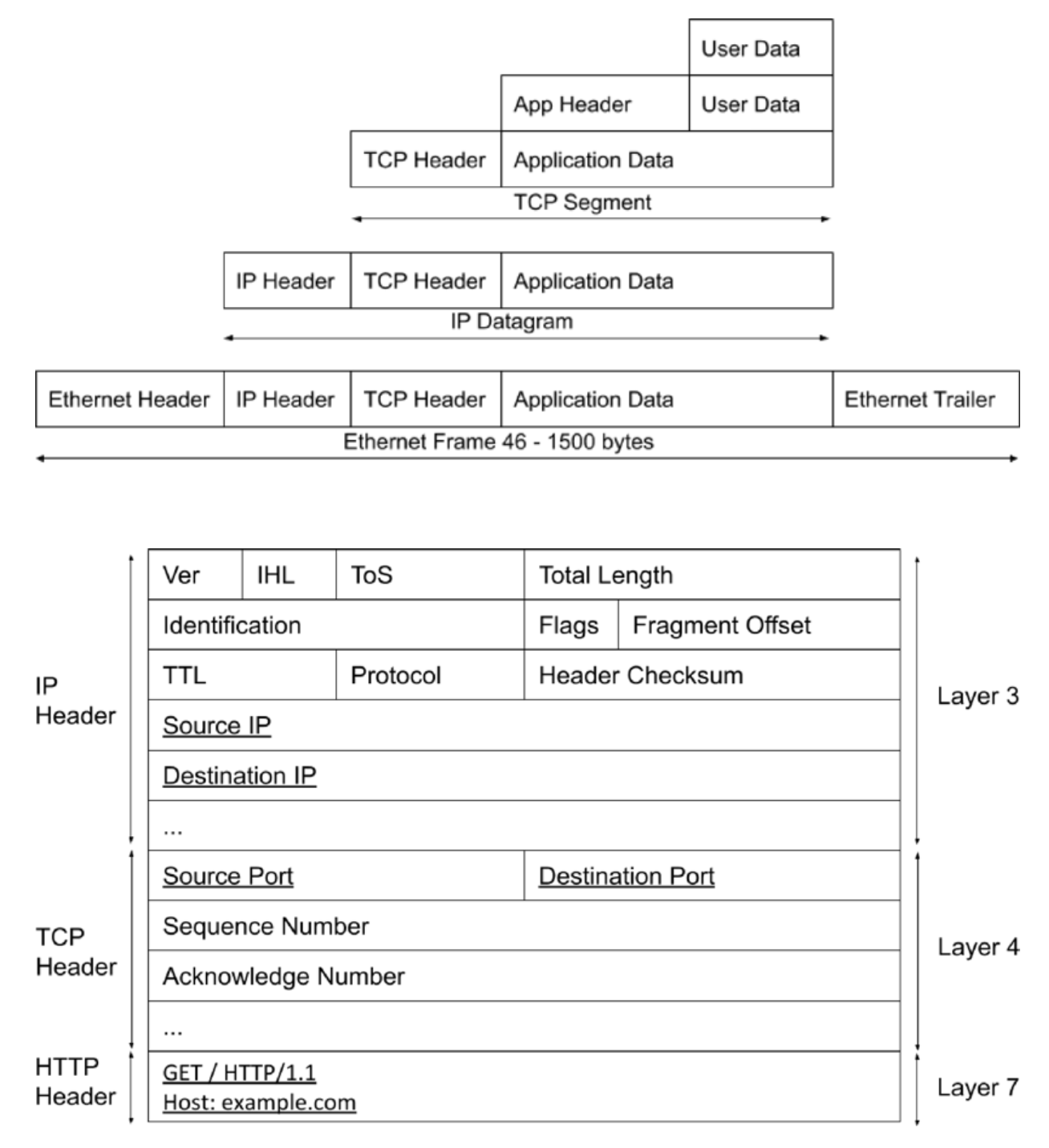
数据包

负载均衡的核心原理 - 修改包头数据

image-20230830203557222

通过浏览器访问某网站的过程(组包应用层,传包内核层)

  1. 在浏览器输入网站的网址
    • 浏览器本质上是一个 HTTP 客户端,组装成 HTTP 包
  2. 做 DNS 解析(递归)
  3. 封装 TCP 包(源端口 + 目标端口)
  4. 封装 IP 包(源 IP + 目标 IP - 来自于 DNS

负载均衡

面向连接的负载均衡不一定能保证平均,如 grpc 是基于 http/2,会复用 TCP 连接,L4 的负载均衡就无法实现平均

方案

集中式

F5(HLB) / Nginx(SLB) - 接入集群外部流量
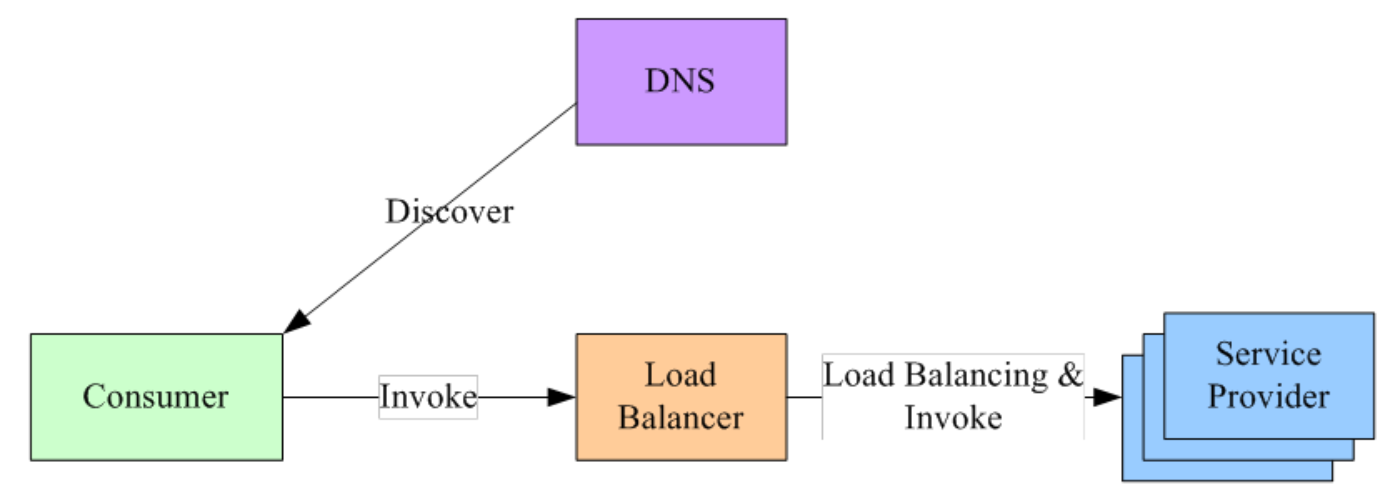
image-20230920205129072

  1. 在服务消费者和服务提供者之间有一个独立的 LB
  2. LB 上有所有服务的地址映射表,通常由运维配置注册
  3. 当服务消费者调用某个目标服务时,向 LB 发起请求,由 LB 以某种策略做负载均衡后将请求转发到目标服务
  4. LB 一般具备健康检查的能力,能自动摘除不健康的服务实例
  5. 服务消费者通过 DNS 发现 LB,运维人员配置一个指向该 LB 的 DNS 域名
  6. 优缺点
    • 优点
      • 方案简单,在 LB 上容易实现集中式的访问控制,为业界主流
    • 缺点
      • 单点问题,LB 容易成为性能瓶颈
      • 服务调用增加 1 跳的性能开销

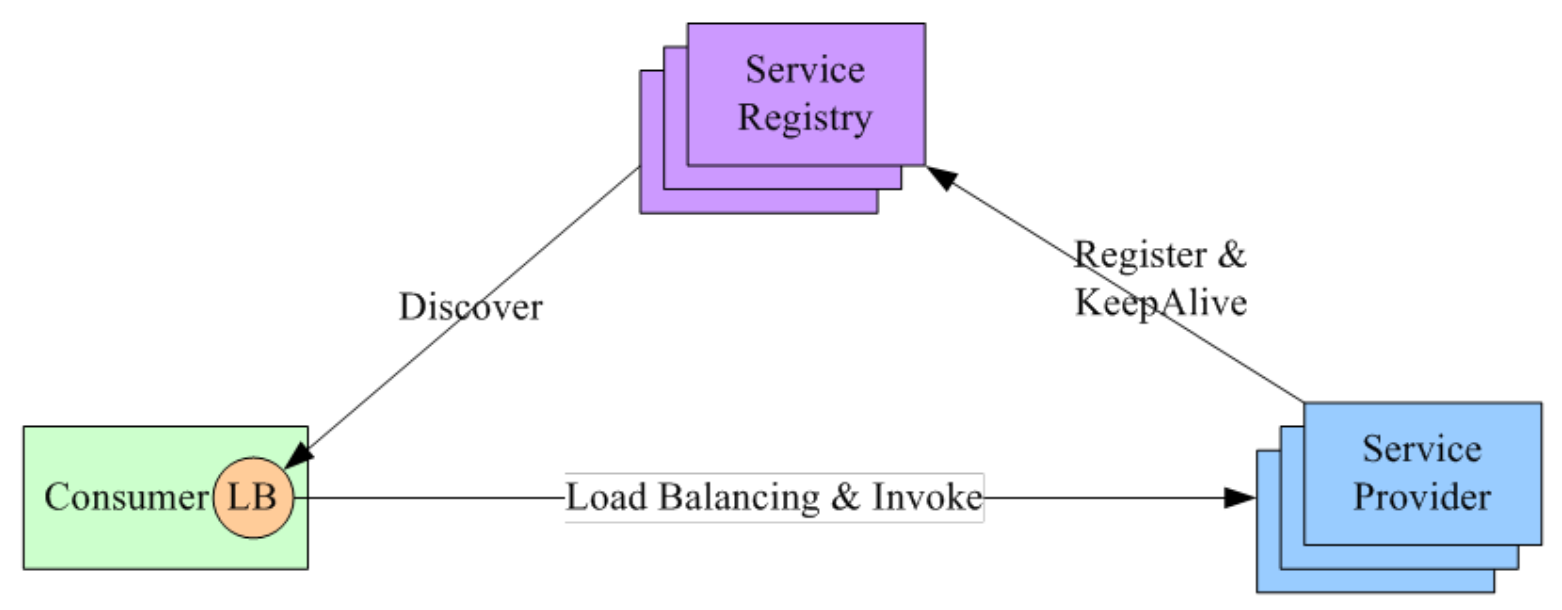
进程内

集群内部 - 微服务流量治理

image-20230920210850551

  1. 将 LB 的功能以的形式集成到服务消费者进程里面,也称为客户端负载均衡
  2. Service Registry 配合支持服务注册服务发现
    • 服务提供者启动时,首先将服务地址注册到 Service Registry,并定时上报心跳保活
  3. 服务消费者要访问某个服务时
    • 通过内置的 LB 组件向 Service Registry 查询(同时缓存定时刷新)目标服务的地址列表
    • 然后以某种负载均衡策略选择一个目标服务地址,最后向目标服务发起请求
  4. 对 Service Registry 的 HA 要求很高,常用为 zookeeper、consul、etcd 等
  5. 优缺点
    • 优点
      • 性能较好 - LB 和服务发现能力被分散到每一个服务消费者的进程内部,同时直接进行服务调用,没有额外开销
    • 缺点
      • 可能需要维护多种语言的客户端
      • 内嵌到服务消费者,客户端升级成本较大

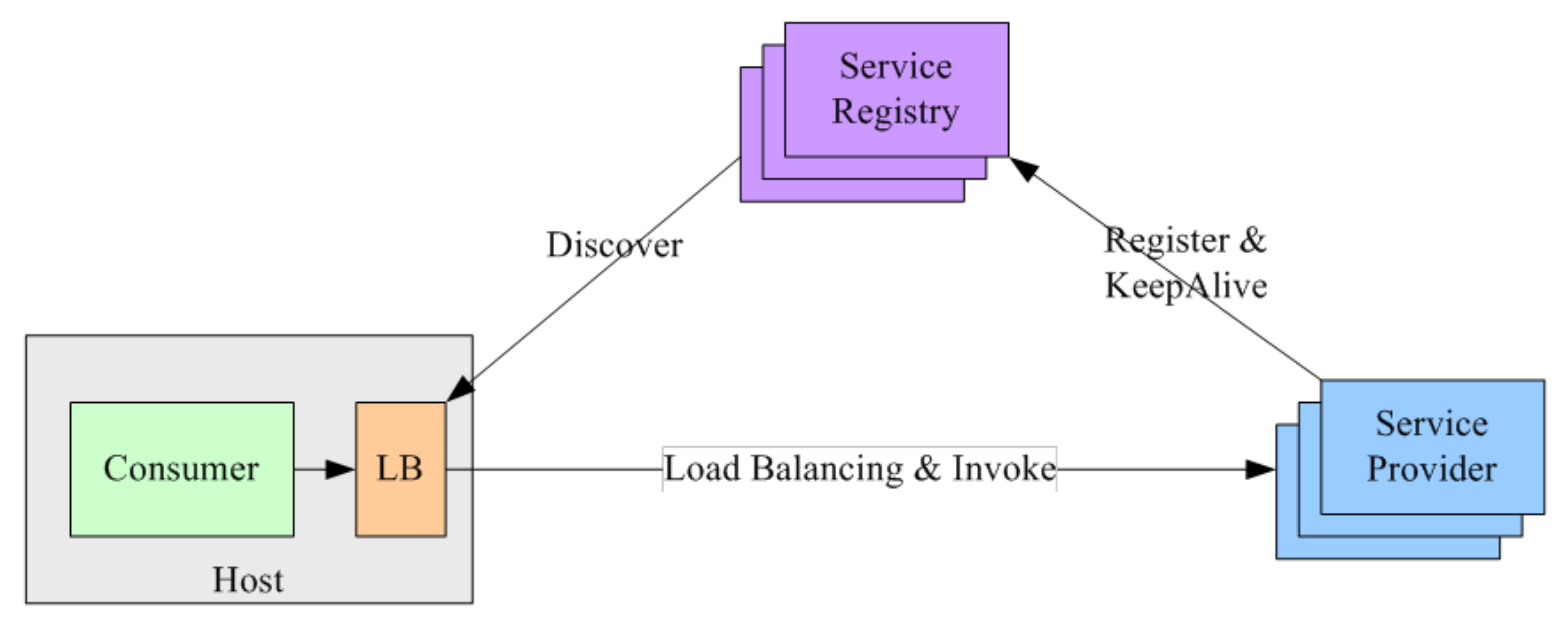
Sidecar

image-20230920212859960

  1. 将 LB 和服务发现功能从服务消费者进程剥离,变成主机上的一个独立进程
    • 服务消费者要访问目标服务时,需要通过同一主机上独立的 LB 进程做服务发现和负载均衡
  2. LB 独立进程可以进一步与服务消费者进行解耦,以独立集群的形式提供高可用的负载均衡服务
  3. 优缺点
    • 优点
      • 无单点问题,只会影响同一主机上的服务消费者
      • 服务消费者和 LB 之间是进程间调用,性能好
      • 不需要为不同的语言开发不同的库,LB 可单独升级
    • 缺点
      • 部署复杂,问题排查不方便

作用

  1. 解决并发压力,提高应用处理性能,增加吞吐量,加强网络处理能力
  2. 提供 Failover,实现 HA
  3. 实现横向扩展,增强应用的弹性能力
  4. 安全防护,可以在 LB 上做一些过滤等处理

DNS

最早的负载均衡技术,在 DNS 服务器,配置多个 A 记录,这些 A 记录对应的服务器构成集群
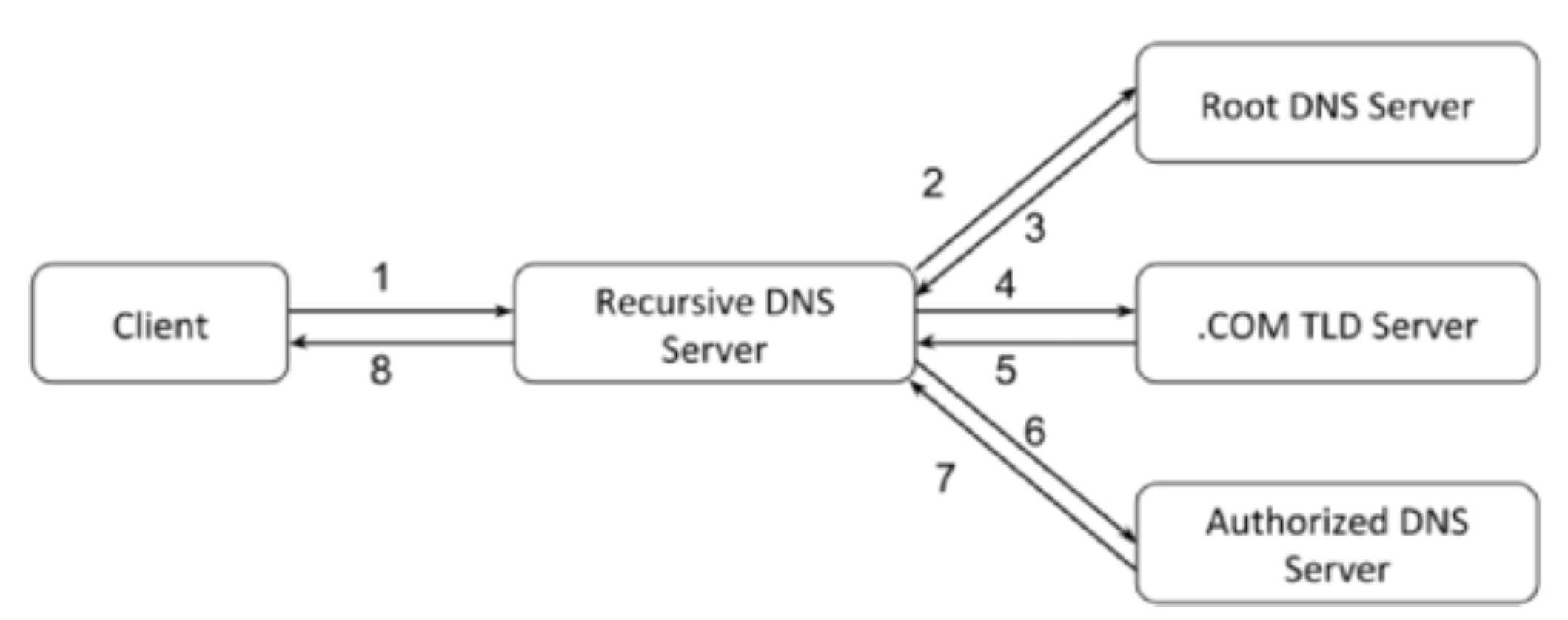
image-20230920215022414

  1. 优点

    • 使用简单,负载均衡交给 DNS 服务器
    • 加速访问,可以实现基于地址的域名解析
  2. 缺点

    • TTL

      • 进程有可能一直使用第一个 A 记录,直到该 A 记录失效
    • 可用性差

      • DNS 解析为多级解析,修改 DNS 后,解析时间较长,解析过程中,用户访问网站将失败
    • 扩展性低

      • 控制权在域名商
    • 维护性差

      • 不能反映服务器的当前运行状态,支持算法少,不能区分服务器的差异

相关技术

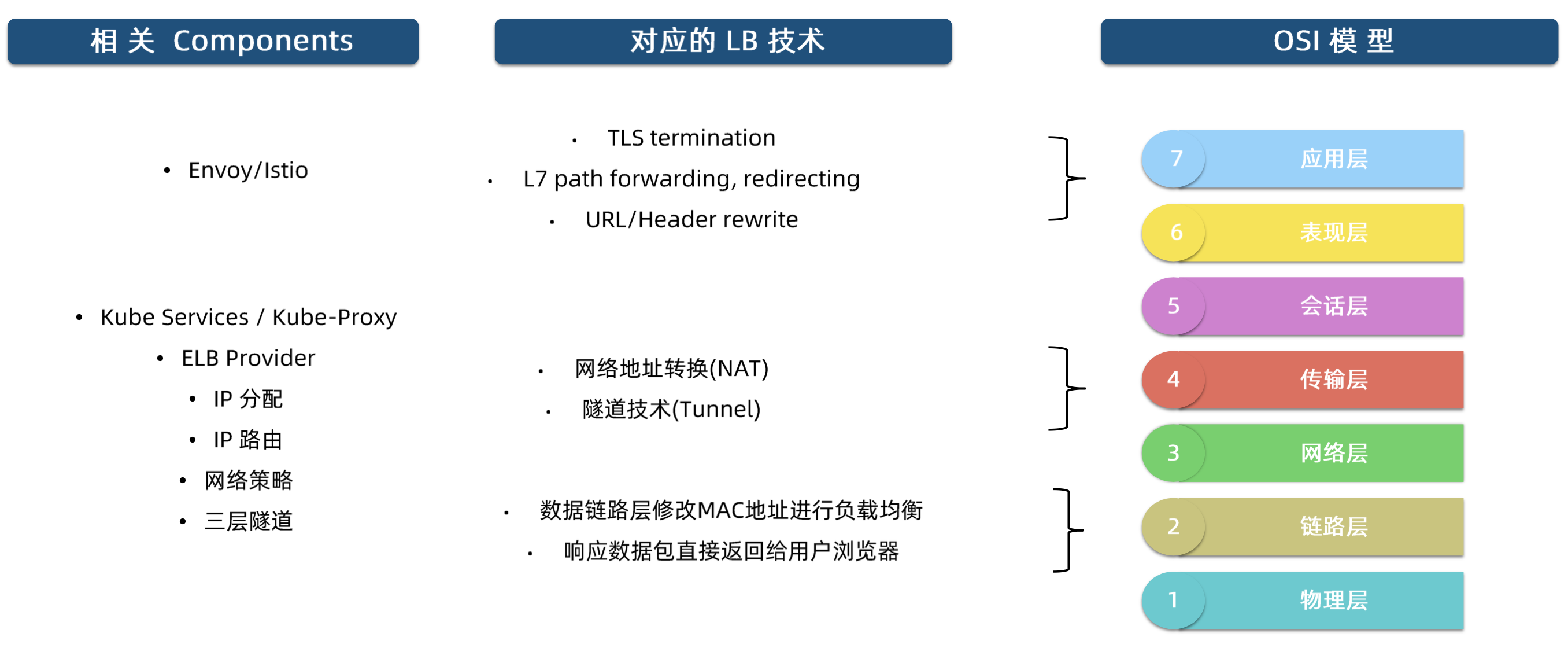
现阶段,重点关注 NATTunnel 即可

image-20230920220311289

网络层 - NAT

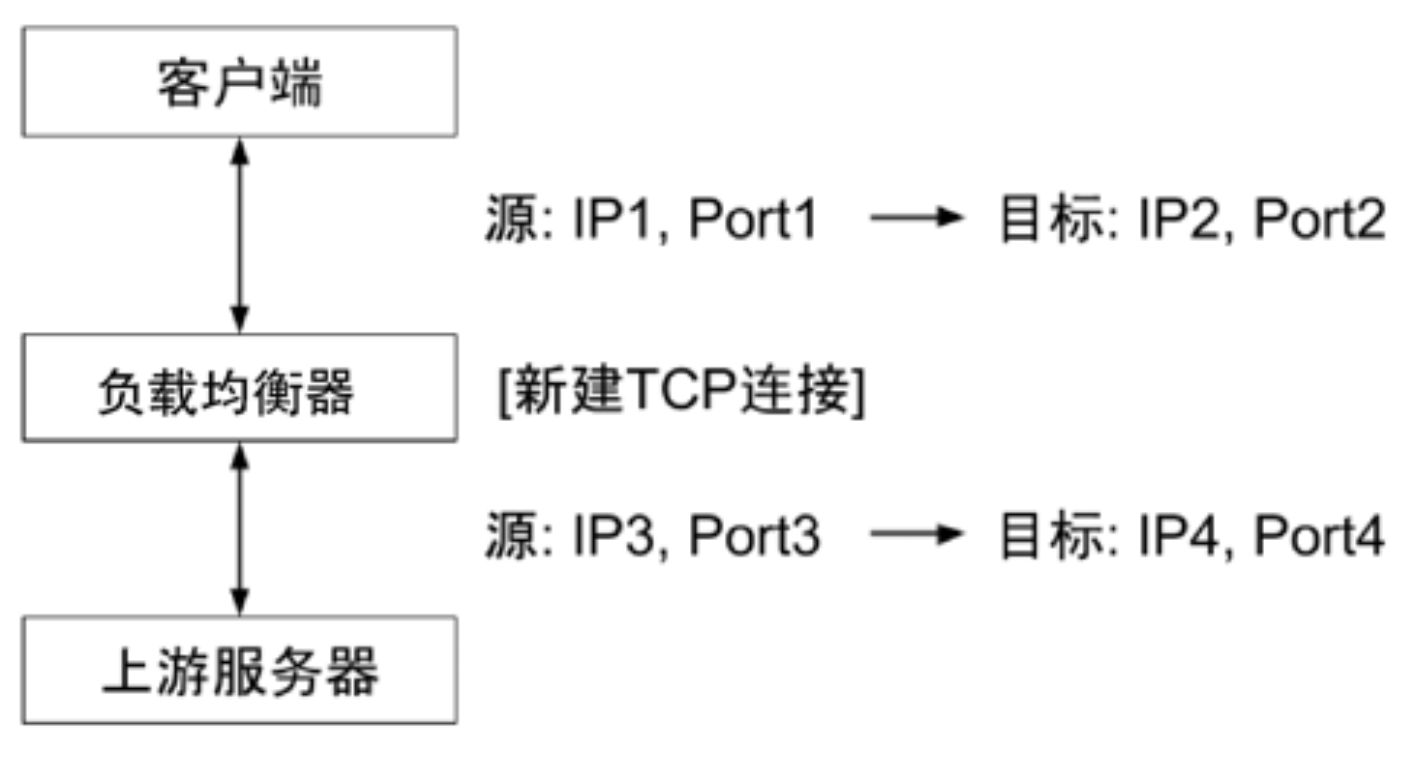
不修改 TCP 连接,通过修改数据包的源地址(SNAT)或目标地址(DNAT)来控制数据包的转发行为

丢失原始客户端的 IP 地址,上游服务器只能感知到负载均衡器,而无法感知到原始客户端
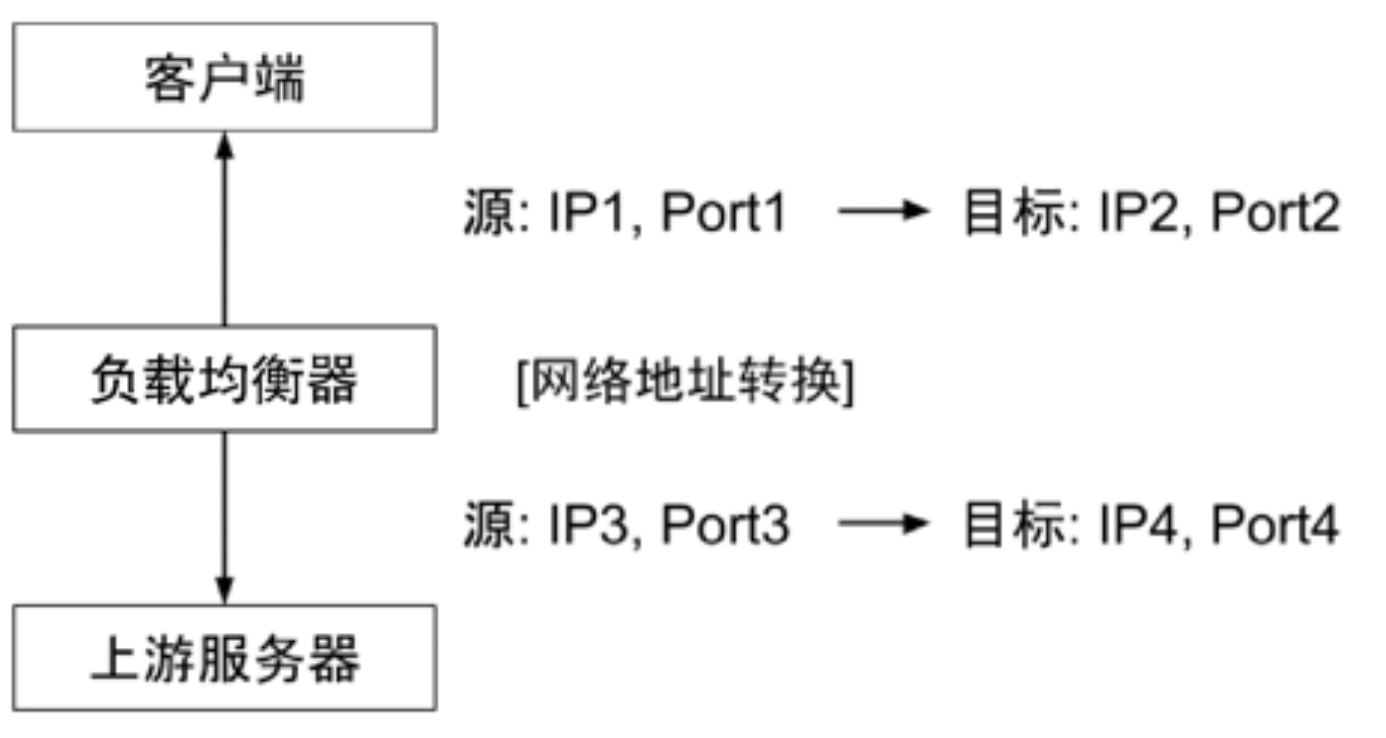
image-20230920221310309

  1. 客户端访问负载均衡器的 VIP,即 IP2:PORT2
  2. 负载均衡器不会修改 TCP 连接
    • 而是修改数据包包头的源地址和目标地址为负载均衡器自身的 IP 端口(即 IP3:PORT3)和上游服务器的 IP 端口
  3. 上游服务器处理完后,再将数据包返回给负载均衡器
  4. 负载均衡器会记录 Connection Table,会找到 3-4 对应的连接是 1-2,最终将数据返回给原始客户端

传输层

让上游服务器能够感知到原始客户端,基于传输层的负载均衡,将相关信息写入新建 TCP 连接的数据包

image-20230920222414654

  1. 负载均衡器真实监听端口 IP2:PORT2
  2. 实现方式
    • 利用空闲的 TCP Options 记录原始的客户端信息 - 需要 Linux Kernel 支持
      • Tcp Proxy Protocol 也预留了空间,在 TCP 数据包的前段

链路层

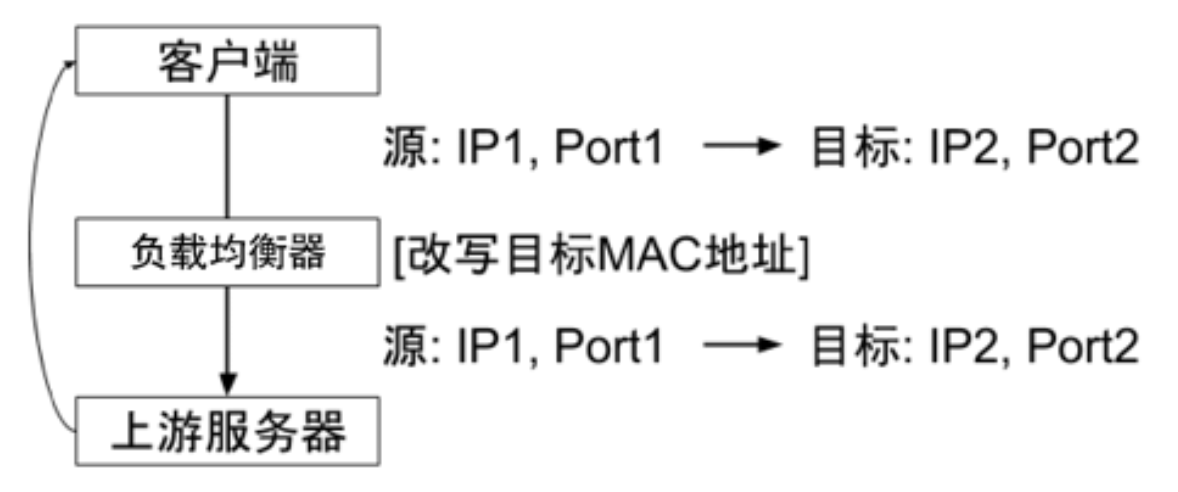
image-20230920223804880

  1. 数据分发时,不修改 IP 地址,而是修改目标 Mac 地址

    • 上游服务器 VIP负载均衡器 VIP 要保持一致
    • 不修改数据包的源地址和目标地址,进行数据分发
  2. 实际处理服务器 IP 和数据请求目的 IP 一致

    • 回包不再需要经过负载均衡器进行地址转换,可将响应数据包直接返回给用户浏览器

    • 避免负载均衡服务器网卡带宽成为瓶颈,也称为直接路由模式

  3. 只改 Mac 地址,源地址和目标地址没有改变,可以直接回包

    • 进包 - 负载均衡,修改 Mac 地址
    • 出包 - 直接路由回包
  4. 优缺点

    • 优点
      • 性能很好
    • 缺点
      • 客户端、负载均衡器、上游服务器都必须在同一个子网,且配置很复杂,不常用

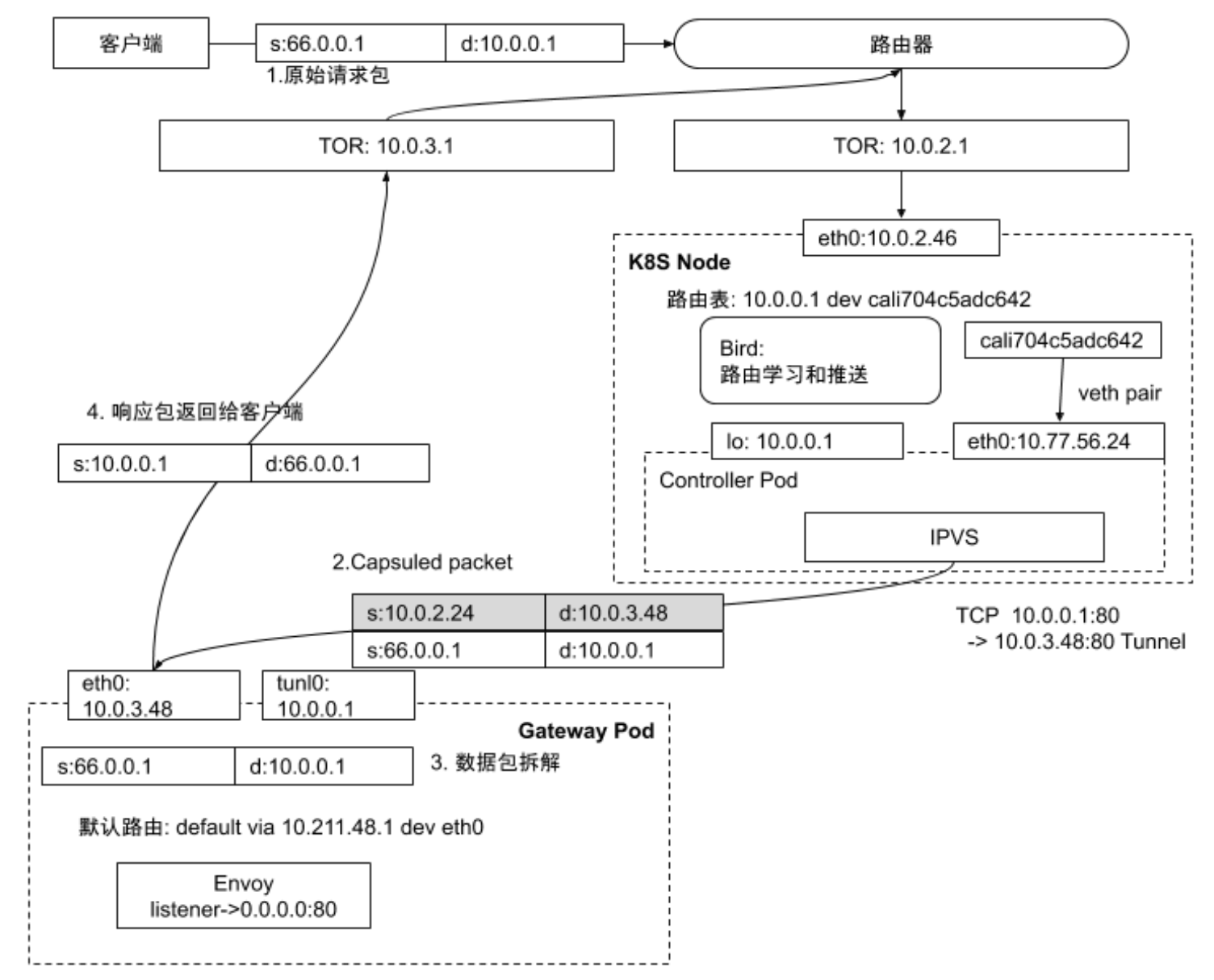
隧道 - Tunnel

链路与链路层负载均衡类似,负载均衡器负责封包上游服务器解包后,直接回包给客户端,性能也很好

  1. 负载均衡中常用的隧道技术是 IP in IP Tunneling
    • 保持原始数据包的 IP 头不变,在 IP 头外层增加额外的 IP 头后转发到上游服务器
  2. 上游服务器接收到 IP 数据包后,解开外层 IP 包头后,剩下的是原始数据包
  3. 上游服务器处理完数据请求后,响应包通过网关直接返回给客户端

Service

Service

用于描述负载均衡

1
2
3
4
5
6
7
8
9
10
11
apiVersion: v1
kind: Service
metadata:
name: nginx-service
spec:
selector:
app: nginx
ports:
- protocol: TCP
port: 80
targetPort: 80
  1. Selector
    • Kubernetes 允许将 Pod 对象通过 Label 进行标记
    • 通过 Service Selector 定义基于 Pod Label过滤规则,来选择 Service 的 Upstream
  2. Ports
    • 定义协议端口

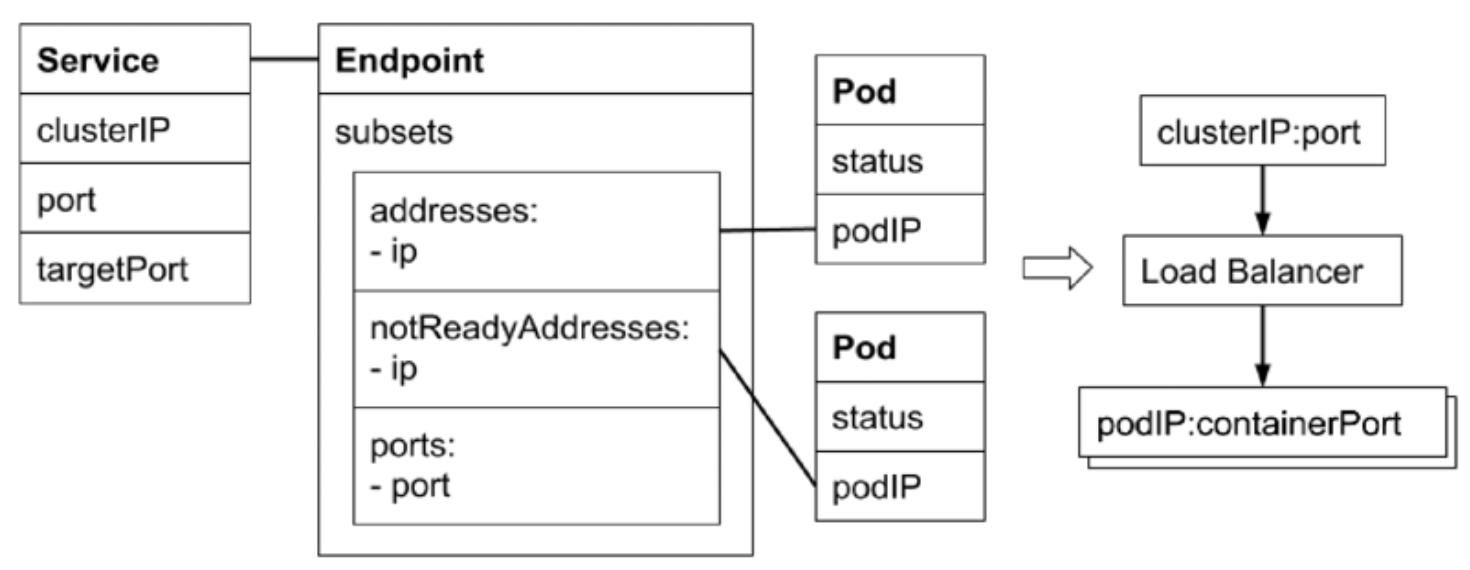
Service 实际上是要配置负载均衡,监听一个 VIP:PORT,然后做 NAT
Upstream 的 Port 即 targetPort,Upstream 的 IP 即 Selector 匹配到的 Pod IP

Endpoint

Endpoint 是中间对象,用于处理多对多ServicePod)的关系

kube-proxy 会监听 Service 对象和 Endpoint 对象,调用本机的接口去配置本机的负载均衡
kube-proxy 的配置在所有 Node 上要一致

1
2
3
4
5
6
7
8
9
10
11
12
13
14
apiVersion: v1
kind: Endpoint
metadata:
name: nginx-service
subsets:
- addresses:
- ip: 10.1.1.21
nodeName: minikube
targetRef:
kind: Pod
name: nginx-deployment-5754944d6c-hnw27
namespace: default
resourceVersion: '722191'
uid: 8a3390ae-2f8e-47bf-b8dd-70fae7fb0d32
  1. 当 Service 的 Selector 不为空时
    • Kubernetes Endpoint Controller 会监听 Service创建事件,创建与 Service 同名的 Endpoint 对象
  2. Selector 能够选取的所有 Pod IP 都会被配置到 Address 属性中
    • 如果 Selector 查询不到匹配的 Pod,则 Address 列表为
    • 默认情况下,如果对应的 Pod 为 Not Ready 状态,对应的 Pod IP 只会出现在 subsets 的 notReadyAddresses
      • 意味着对应的 Pod 还未准备好提供服务,不能作为流量转发的目标
    • 如果设置了 PublishNotReadyAddress 为 true,则无论 Pod 是否就绪都会被加入 addresses(接收流量)

Deployment

nginx-deploy.yaml
1
2
3
4
5
6
7
8
9
10
11
12
13
14
15
16
17
18
19
20
21
22
23
24
apiVersion: apps/v1
kind: Deployment
metadata:
name: nginx-deployment
spec:
replicas: 1
selector:
matchLabels:
app: nginx
template:
metadata:
labels:
app: nginx
spec:
containers:
- name: nginx
image: nginx:1.25.2
readinessProbe:
exec:
command:
- cat
- /tmp/healthy
initialDelaySeconds: 5
periodSeconds: 5
1
2
3
4
5
6
7
8
9
10
11
12
13
14
15
16
17
$ k apply -f nginx-deploy.yaml
deployment.apps/nginx-deployment created

$ k get po -owide
NAME READY STATUS RESTARTS AGE IP NODE NOMINATED NODE READINESS GATES
nginx-deployment-7b89c988df-tmpl8 0/1 Running 0 7s 192.168.185.14 mac-k8s <none> <none>

$ k describe po nginx-deployment-7b89c988df-tmpl8
...
Events:
Type Reason Age From Message
---- ------ ---- ---- -------
Normal Scheduled 38s default-scheduler Successfully assigned default/nginx-deployment-7b89c988df-tmpl8 to mac-k8s
Normal Pulled 38s kubelet Container image "nginx:1.25.2" already present on machine
Normal Created 38s kubelet Created container nginx
Normal Started 38s kubelet Started container nginx
Warning Unhealthy 4s (x6 over 29s) kubelet Readiness probe failed: cat: /tmp/healthy: No such file or directory

Service

service.yaml
1
2
3
4
5
6
7
8
9
10
11
12
apiVersion: v1
kind: Service
metadata:
name: nginx-basic
spec:
type: ClusterIP
ports:
- port: 80
protocol: TCP
name: http
selector:
app: nginx
1
2
3
4
5
6
7
8
9
10
11
12
13
14
15
16
17
18
19
$ k apply -f service.yaml
service/nginx-basic created

$ k get service -owide
NAME TYPE CLUSTER-IP EXTERNAL-IP PORT(S) AGE SELECTOR
kubernetes ClusterIP 10.96.0.1 <none> 443/TCP 24d <none>
nginx-basic ClusterIP 10.100.49.21 <none> 80/TCP 20s app=nginx

$ k get endpoints -owide
NAME ENDPOINTS AGE
kubernetes 192.168.191.153:6443 24d
nginx-basic 47s

$ curl -v 10.100.49.21:80
* Trying 10.100.49.21:80...
* connect to 10.100.49.21 port 80 failed: Connection refused
* Failed to connect to 10.100.49.21 port 80 after 1006 ms: Connection refused
* Closing connection 0
curl: (7) Failed to connect to 10.100.49.21 port 80 after 1006 ms: Connection refused
1
2
3
4
5
6
7
8
9
10
11
12
13
14
15
16
17
18
19
20
21
22
23
24
25
26
27
28
29
30
apiVersion: v1
kind: Service
metadata:
annotations:
kubectl.kubernetes.io/last-applied-configuration: |
{"apiVersion":"v1","kind":"Service","metadata":{"annotations":{},"name":"nginx-basic","namespace":"default"},"spec":{"ports":[{"name":"http","port":80,"protocol":"TCP"}],"selector":{"app":"nginx"},"type":"ClusterIP"}}
creationTimestamp: "2022-09-21T14:26:13Z"
name: nginx-basic
namespace: default
resourceVersion: "11697"
uid: e67ad8a5-36f7-421e-9ebf-27618ae92207
spec:
clusterIP: 10.100.49.21
clusterIPs:
- 10.100.49.21
internalTrafficPolicy: Cluster
ipFamilies:
- IPv4
ipFamilyPolicy: SingleStack
ports:
- name: http
port: 80
protocol: TCP
targetPort: 80
selector:
app: nginx
sessionAffinity: None
type: ClusterIP
status:
loadBalancer: {}
1
2
3
4
5
6
7
8
9
10
11
12
13
14
15
16
17
18
19
20
21
22
23
24
apiVersion: v1
kind: Endpoints
metadata:
annotations:
endpoints.kubernetes.io/last-change-trigger-time: "2022-09-21T14:26:13Z"
creationTimestamp: "2022-09-21T14:26:13Z"
name: nginx-basic
namespace: default
resourceVersion: "11698"
uid: 9401e4ba-612f-49aa-8404-c418863407f5
subsets:
- notReadyAddresses:
- ip: 192.168.185.14
nodeName: mac-k8s
targetRef:
kind: Pod
name: nginx-deployment-7b89c988df-tmpl8
namespace: default
resourceVersion: "11433"
uid: 0d47f22e-c5b9-4852-adac-10eb5ffaaf61
ports:
- name: http
port: 80
protocol: TCP
1
2
3
4
5
6
7
$ k scale deployment nginx-deployment --replicas=2
deployment.apps/nginx-deployment scaled

$ k get po -owide
NAME READY STATUS RESTARTS AGE IP NODE NOMINATED NODE READINESS GATES
nginx-deployment-7b89c988df-tmpl8 0/1 Running 0 8m8s 192.168.185.14 mac-k8s <none> <none>
nginx-deployment-7b89c988df-z86bc 0/1 Running 0 18s 192.168.185.15 mac-k8s <none> <none>
1
2
3
4
5
6
7
8
9
10
11
12
13
14
15
16
17
18
19
20
21
22
23
24
25
26
27
28
29
30
31
32
apiVersion: v1
kind: Endpoints
metadata:
annotations:
endpoints.kubernetes.io/last-change-trigger-time: "2022-09-21T14:31:41Z"
creationTimestamp: "2022-09-21T14:26:13Z"
name: nginx-basic
namespace: default
resourceVersion: "12281"
uid: 9401e4ba-612f-49aa-8404-c418863407f5
subsets:
- notReadyAddresses:
- ip: 192.168.185.14
nodeName: mac-k8s
targetRef:
kind: Pod
name: nginx-deployment-7b89c988df-tmpl8
namespace: default
resourceVersion: "11433"
uid: 0d47f22e-c5b9-4852-adac-10eb5ffaaf61
- ip: 192.168.185.15
nodeName: mac-k8s
targetRef:
kind: Pod
name: nginx-deployment-7b89c988df-z86bc
namespace: default
resourceVersion: "12280"
uid: 1df5dd0a-dccf-41e3-93bb-7313f5a9c51e
ports:
- name: http
port: 80
protocol: TCP

使得某个 Pod 变成 Ready

1
2
3
4
5
6
7
8
9
10
11
$ k exec -it nginx-deployment-7b89c988df-tmpl8 -- touch /tmp/healthy

$ k get po -owide
NAME READY STATUS RESTARTS AGE IP NODE NOMINATED NODE READINESS GATES
nginx-deployment-7b89c988df-tmpl8 1/1 Running 0 11m 192.168.185.14 mac-k8s <none> <none>
nginx-deployment-7b89c988df-z86bc 0/1 Running 0 3m50s 192.168.185.15 mac-k8s <none> <none>

$ k get endpoints -owide
NAME ENDPOINTS AGE
kubernetes 192.168.191.153:6443 24d
nginx-basic 192.168.185.14:80 9m47s
1
2
3
4
5
6
7
8
9
10
11
12
13
14
15
16
17
18
19
20
21
22
23
24
25
26
27
28
29
30
31
32
33
apiVersion: v1
kind: Endpoints
metadata:
annotations:
endpoints.kubernetes.io/last-change-trigger-time: "2022-09-21T14:35:16Z"
creationTimestamp: "2022-09-21T14:26:13Z"
name: nginx-basic
namespace: default
resourceVersion: "12670"
uid: 9401e4ba-612f-49aa-8404-c418863407f5
subsets:
- addresses:
- ip: 192.168.185.14
nodeName: mac-k8s
targetRef:
kind: Pod
name: nginx-deployment-7b89c988df-tmpl8
namespace: default
resourceVersion: "12669"
uid: 0d47f22e-c5b9-4852-adac-10eb5ffaaf61
notReadyAddresses:
- ip: 192.168.185.15
nodeName: mac-k8s
targetRef:
kind: Pod
name: nginx-deployment-7b89c988df-z86bc
namespace: default
resourceVersion: "12280"
uid: 1df5dd0a-dccf-41e3-93bb-7313f5a9c51e
ports:
- name: http
port: 80
protocol: TCP
1
2
3
4
5
6
7
8
9
10
$ curl -sI 10.100.49.21:80
HTTP/1.1 200 OK
Server: nginx/1.25.2
Date: Thu, 21 Sep 2022 14:37:08 GMT
Content-Type: text/html
Content-Length: 615
Last-Modified: Tue, 15 Aug 2022 17:03:04 GMT
Connection: keep-alive
ETag: "64dbafc8-267"
Accept-Ranges: bytes

将 Service 的 PublishNotReadyAddress 设置为 true

1
2
3
4
5
6
7
8
$  k get po -owide
NAME READY STATUS RESTARTS AGE IP NODE NOMINATED NODE READINESS GATES
nginx-deployment-7b89c988df-tmpl8 1/1 Running 0 18m 192.168.185.14 mac-k8s <none> <none>
nginx-deployment-7b89c988df-z86bc 0/1 Running 0 10m 192.168.185.15 mac-k8s <none> <none>

$ k get endpoints nginx-basic -owide
NAME ENDPOINTS AGE
nginx-basic 192.168.185.14:80,192.168.185.15:80 16m
1
2
3
4
5
6
7
8
9
10
11
12
13
14
15
16
17
18
19
20
21
22
23
24
25
26
27
28
29
30
31
apiVersion: v1
kind: Service
metadata:
annotations:
kubectl.kubernetes.io/last-applied-configuration: |
{"apiVersion":"v1","kind":"Service","metadata":{"annotations":{},"name":"nginx-basic","namespace":"default"},"spec":{"ports":[{"name":"http","port":80,"protocol":"TCP"}],"selector":{"app":"nginx"},"type":"ClusterIP"}}
creationTimestamp: "2022-09-21T14:26:13Z"
name: nginx-basic
namespace: default
resourceVersion: "13365"
uid: e67ad8a5-36f7-421e-9ebf-27618ae92207
spec:
clusterIP: 10.100.49.21
clusterIPs:
- 10.100.49.21
internalTrafficPolicy: Cluster
ipFamilies:
- IPv4
ipFamilyPolicy: SingleStack
ports:
- name: http
port: 80
protocol: TCP
targetPort: 80
publishNotReadyAddresses: true
selector:
app: nginx
sessionAffinity: None
type: ClusterIP
status:
loadBalancer: {}
1
2
3
4
5
6
7
8
9
10
11
12
13
14
15
16
17
18
19
20
21
22
23
24
25
26
27
28
29
30
apiVersion: v1
kind: Endpoints
metadata:
creationTimestamp: "2022-09-21T14:26:13Z"
name: nginx-basic
namespace: default
resourceVersion: "13366"
uid: 9401e4ba-612f-49aa-8404-c418863407f5
subsets:
- addresses:
- ip: 192.168.185.14
nodeName: mac-k8s
targetRef:
kind: Pod
name: nginx-deployment-7b89c988df-tmpl8
namespace: default
resourceVersion: "12669"
uid: 0d47f22e-c5b9-4852-adac-10eb5ffaaf61
- ip: 192.168.185.15
nodeName: mac-k8s
targetRef:
kind: Pod
name: nginx-deployment-7b89c988df-z86bc
namespace: default
resourceVersion: "12280"
uid: 1df5dd0a-dccf-41e3-93bb-7313f5a9c51e
ports:
- name: http
port: 80
protocol: TCP

EndpointSlice

1
2
3
4
5
6
7
8
9
10
11
12
13
14
15
16
17
18
19
20
apiVersion: discovery.k8s.io/v1beta1
kind: EndpointSlice
metadata:
name: example-abc
labels:
kubernetes.io/service-name: example
addressType: IPv4
ports:
- name: http
protocol: TCP
port: 80
endpoints:
- addresses:
- "10.1.2.3"
conditions:
ready: true
hostname: pod-1
topology:
kubernetes.io/hostname: node-1
topology.kubernetes.io/zone: us-west2-a
  1. 当某个 Service 对应的 Backend Pod 较多时,Endpoint 对象会因为保存的地址信息过多而变得庞大
  2. Pod 状态的变更会引起 Endpoint 的变更,而 Endpoint 的变更会被推送到所有的 Node,占用大量的网络带宽
  3. EndpointSlice 对 Pod 较多的 Endpoint 进行切片,切片大小可自定义

No Selector

创建了 Service 但不定义 Selector

  1. Kubernetes Endpoint Controller 不会为该 Service 自动创建 Endpoint
  2. 可以手动创建 Endpoint 对象(需要与 Service 同名),并设置任意 IP 地址Address
  3. 可以为集群外的一组 Endpoint 创建服务
service-without-selector.yaml
1
2
3
4
5
6
7
8
9
apiVersion: v1
kind: Service
metadata:
name: service-without-selector
spec:
ports:
- port: 80
protocol: TCP
name: http
1
2
3
4
5
6
7
8
9
10
11
12
13
$ k apply -f service-without-selector.yaml
service/service-without-selector created

$ k get services -owide
NAME TYPE CLUSTER-IP EXTERNAL-IP PORT(S) AGE SELECTOR
kubernetes ClusterIP 10.96.0.1 <none> 443/TCP 24d <none>
nginx-basic ClusterIP 10.100.49.21 <none> 80/TCP 42m app=nginx
service-without-selector ClusterIP 10.98.161.143 <none> 80/TCP 7s <none>

$ k get endpoints -owide
NAME ENDPOINTS AGE
kubernetes 192.168.191.153:6443 24d
nginx-basic 192.168.185.14:80,192.168.185.15:80 43m

指向集群外站点

1
2
3
4
5
6
7
8
9
10
11
12
13
14
15
16
17
18
19
20
21
22
23
24
25
26
$ nslookup blog.zhongmingmao.top
Server: 127.0.0.53
Address: 127.0.0.53#53

Non-authoritative answer:
Name: blog.zhongmingmao.top
Address: 172.67.185.241
Name: blog.zhongmingmao.top
Address: 104.21.36.56
Name: blog.zhongmingmao.top
Address: 2606:4700:3030::6815:2438
Name: blog.zhongmingmao.top
Address: 2606:4700:3031::ac43:b9f1

$ curl -sI 172.67.185.241:80
HTTP/1.1 403 Forbidden
Date: Thu, 21 Sep 2022 15:17:20 GMT
Content-Type: text/plain; charset=UTF-8
Content-Length: 16
Connection: close
X-Frame-Options: SAMEORIGIN
Referrer-Policy: same-origin
Cache-Control: private, max-age=0, no-store, no-cache, must-revalidate, post-check=0, pre-check=0
Expires: Thu, 01 Jan 1970 00:00:01 GMT
Server: cloudflare
CF-RAY: 80a3464328b96e3f-HKG
service-without-selector-ep.yaml
1
2
3
4
5
6
7
8
9
10
11
12
apiVersion: v1
kind: Endpoints
metadata:
name: service-without-selector
namespace: default
subsets:
- addresses:
- ip: 172.67.185.241
ports:
- name: http
port: 80
protocol: TCP
1
2
3
4
5
6
7
8
9
10
11
12
13
14
15
16
17
18
19
20
21
22
23
24
25
26
27
$ k apply -f service-without-selector-ep.yaml
endpoints/service-without-selector created

$ k get services -owide
NAME TYPE CLUSTER-IP EXTERNAL-IP PORT(S) AGE SELECTOR
kubernetes ClusterIP 10.96.0.1 <none> 443/TCP 24d <none>
nginx-basic ClusterIP 10.100.49.21 <none> 80/TCP 54m app=nginx
service-without-selector ClusterIP 10.98.161.143 <none> 80/TCP 11m <none>

$ k get endpoints -owide
NAME ENDPOINTS AGE
kubernetes 192.168.191.153:6443 24d
nginx-basic 192.168.185.14:80,192.168.185.15:80 54m
service-without-selector 172.67.185.241:80 47s

$ curl -sI 10.98.161.143:80
HTTP/1.1 403 Forbidden
Date: Thu, 21 Sep 2022 15:21:04 GMT
Content-Type: text/plain; charset=UTF-8
Content-Length: 16
Connection: close
X-Frame-Options: SAMEORIGIN
Referrer-Policy: same-origin
Cache-Control: private, max-age=0, no-store, no-cache, must-revalidate, post-check=0, pre-check=0
Expires: Thu, 01 Jan 1970 00:00:01 GMT
Server: cloudflare
CF-RAY: 80a34bb85a43195f-HKG

对应关系

image-20230921232228822

分类

包含关系:ClusterIP -> NodePort -> LoadBalancer

ClusterIP

  1. Service 的默认类型,服务被发布到仅集群内部可见VIP
  2. API Server 启动时,需要通过 service-cluster-ip-range 参数来配置 VIP 地址段
    • API Server 中有用于分配 IP 地址和端口的组件,当该组件捕获 Service 对象并创建事件
    • 会从配置的 VIP 地址段中取一个有效的 IP 地址,分配给该 Service 对象
  3. 通过 API Server 创建 Service 时,ClusterIP 本身为空
1
2
$ sudo cat /etc/kubernetes/manifests/kube-apiserver.yaml | grep 'service-cluster-ip-range'
- --service-cluster-ip-range=10.96.0.0/12

NodePort

  1. API Server 启动时,需要通过 node-port-range 参数配置 NodePort 的范围(默认值为 30000 ~ 32767
    • API Server 组件会捕获 Service 对象并创建事件
    • 会从配置好的 NodePort 范围取一个有效端口,分配被该 Service
  2. 每个 Node 上的 kube-proxy 会尝试在 Service 分配的 NodePort 上建立监听器接收请求
    • 并转发给 Service 对应的 Backend Pod

LoadBalancer

  1. IDC 一般会采购一些负载均衡器,作为外网请求进入 IDC 的统一流量入口
    • 需要配置外部的 LB,一般由云厂商提供
  2. 针对不同的基础架构云平台,Kubernetes Cloud Manager 提供支持不同供应商 API 的 Service Controller

Headless Service

不配置 VIP,不需要负载均衡的能力

  1. ClusterIP 显式定义为 None
  2. Kubernetes 不会为 Headless Service 分配统一入口,包括 ClusterIP、NodePort 等
headless-svc.yaml
1
2
3
4
5
6
7
8
9
10
11
12
apiVersion: v1
kind: Service
metadata:
name: nginx-headless
spec:
clusterIP: None
ports:
- port: 80
protocol: TCP
name: http
selector:
app: nginx
1
2
3
4
5
6
7
8
9
10
11
12
13
14
15
16
$ k apply -f headless-svc.yaml
service/nginx-headless created

$ k get services -owide
NAME TYPE CLUSTER-IP EXTERNAL-IP PORT(S) AGE SELECTOR
kubernetes ClusterIP 10.96.0.1 <none> 443/TCP 24d <none>
nginx-basic ClusterIP 10.100.49.21 <none> 80/TCP 167m app=nginx
nginx-headless ClusterIP None <none> 80/TCP 26s app=nginx
service-without-selector ClusterIP 10.98.161.143 <none> 80/TCP 125m <none>

$ k get endpoints -owide
NAME ENDPOINTS AGE
kubernetes 192.168.191.153:6443 24d
nginx-basic 192.168.185.14:80,192.168.185.15:80 168m
nginx-headless 192.168.185.14:80 40s
service-without-selector 172.67.185.241:80 114m

访问有 ClusterIP 的 Service,DNS 解析出其 VIP一条 A 记录),再通过 ipvs 或者 iptables负载均衡
而访问 Headless Service,DNS 解析出来的是 Pod IP多条 A 记录,本质上是通过 DNS负载均衡

1
2
3
4
5
6
7
8
9
10
11
12
13
14
15
16
17
18
19
20
21
22
23
24
25
26
27
28
29
30
31
32
33
34
35
36
37
38
39
40
41
42
43
44
45
46
47
48
49
50
51
52
53
54
55
56
57
58
59
$ k exec -it nginx-deployment-7b89c988df-tmpl8 -- curl -vsI nginx-basic.default
* Trying 10.100.49.21:80...
* Connected to nginx-basic.default (10.100.49.21) port 80 (#0)
> HEAD / HTTP/1.1
> Host: nginx-basic.default
> User-Agent: curl/7.88.1
> Accept: */*
>
< HTTP/1.1 200 OK
HTTP/1.1 200 OK
< Server: nginx/1.25.2
Server: nginx/1.25.2
< Date: Thu, 21 Sep 2022 17:19:25 GMT
Date: Thu, 21 Sep 2022 17:19:25 GMT
< Content-Type: text/html
Content-Type: text/html
< Content-Length: 615
Content-Length: 615
< Last-Modified: Tue, 15 Aug 2022 17:03:04 GMT
Last-Modified: Tue, 15 Aug 2022 17:03:04 GMT
< Connection: keep-alive
Connection: keep-alive
< ETag: "64dbafc8-267"
ETag: "64dbafc8-267"
< Accept-Ranges: bytes
Accept-Ranges: bytes

<
* Connection #0 to host nginx-basic.default left intact

$ k exec -it nginx-deployment-7b89c988df-tmpl8 -- curl -vsI nginx-headless.default
* Trying 192.168.185.14:80...
* Connected to nginx-headless.default (192.168.185.14) port 80 (#0)
> HEAD / HTTP/1.1
> Host: nginx-headless.default
> User-Agent: curl/7.88.1
> Accept: */*
>
< HTTP/1.1 200 OK
HTTP/1.1 200 OK
< Server: nginx/1.25.2
Server: nginx/1.25.2
< Date: Thu, 21 Sep 2022 17:19:59 GMT
Date: Thu, 21 Sep 2022 17:19:59 GMT
< Content-Type: text/html
Content-Type: text/html
< Content-Length: 615
Content-Length: 615
< Last-Modified: Tue, 15 Aug 2022 17:03:04 GMT
Last-Modified: Tue, 15 Aug 2022 17:03:04 GMT
< Connection: keep-alive
Connection: keep-alive
< ETag: "64dbafc8-267"
ETag: "64dbafc8-267"
< Accept-Ranges: bytes
Accept-Ranges: bytes

<
* Connection #0 to host nginx-headless.default left intact

ExternalName Service

相当于外部服务的 cname

service-external-name.yaml
1
2
3
4
5
6
7
8
apiVersion: v1
kind: Service
metadata:
name: external-service
namespace: default
spec:
type: ExternalName
externalName: tencent.com

Service Topology

  1. Kubernetes 提供通用标签来标记 Node 所处的物理位置
    • topology.kubernetes.io/zone: us-west2-a
    • failure-domain.beta.kubernetes.io/region: us-west
    • failure-domain.tess.io/network-device: us-west05-ra053
    • failure-domain.tess.io/rack: us_west02_02-314_19_12
    • kubernetes.io/hostname: node-1
  2. Service 引入 topologyKeys 来控制流量
    • [“kubernetes.io/hostname“]
      • 调用 Service 的客户端所在 Node 上如果有该 Service 的服务实例正在运行
      • 则该服务实例处理请求,否则调用失败
    • [“kubernetes.io/hostname“, “topology.kubernetes.io/zone“, “topology. kubernetes.io/region
      • 若同一 Node 上有对应的服务实例,则请求优先转发到该实例
      • 否则,顺序查找当前 zone 以及当前 region 是否有该服务实例,并将请求按顺序转发
    • [“topology. kubernetes.io/region“, “*”]
      • 请求会被优先转发到当前 region 的服务实例
      • 如果当前 region 不存在服务实例,则请求会被转发到任意服务实例

只在本机转发

topology-nodelocal.yaml
1
2
3
4
5
6
7
8
9
10
11
12
13
apiVersion: v1
kind: Service
metadata:
name: nodelocal
spec:
ports:
- port: 80
protocol: TCP
name: http
selector:
app: nginx
topologyKeys:
- "kubernetes.io/hostname"

优先选择本机转发

topology-prefer-nodelocal.yaml
1
2
3
4
5
6
7
8
9
10
11
12
13
14
15
16
apiVersion: v1
kind: Service
metadata:
name: prefer-nodelocal
spec:
ports:
- port: 80
protocol: TCP
name: http
selector:
app: nginx
topologyKeys:
- "kubernetes.io/hostname"
- "topology.kubernetes.io/zone"
- "topology.kubernetes.io/region"
- "*"

kube-proxy

kube-proxy 为控制面组件,运行模式为 Control-Loop

iptables 专注于防火墙,而 ipvs 专注于负载均衡

  1. 每个 Node 上都运行一个 kube-proxy 服务
    • 监听 API Server 中的 ServiceEndpoint 的变化
    • 并通过 iptables 等来为 Service 配置负载均衡(仅支持 TCPUDP
  2. kube-proxy 可以直接运行在 Node 上,也可以通过 Static Pod 或者 DaemonSet 的方式运行
  3. kube-proxy 支持的实现方式
    • userspace
      • 最早的负载均衡方案
      • 用户空间监听一个端口,所有服务通过 iptables 转发到该端口,然后在其内部负载均衡到实际的 Pod
      • 缺点
        • 效率低,有明显的性能瓶颈
        • 数据包先到 Kernel,再转到 kube-proxy(通过负载均衡选择一个 Pod IP),最后又回到 Kernel
    • winuserspace
      • 同 userspace,仅工作在 Windows 上
    • iptables
      • 目前推荐的方案,完全以 iptables 规则的方式来实现 Service 的负载均衡
      • Kernel 中的 TCP 协议栈本身可以通过 Netfilter 框架对数据包(三层 / 四层)做转发
      • 缺点
        • 在 Service 多的时候会产生太多的 iptables 规则
        • 非增量式更新会引入一定的延时,在大规模的情况下会有明显的性能问题
    • ipvs
      • 为了解决 iptables 模式的性能问题
        • v1.8 新增了 ipvs 模式,采用增量式更新,并保证 Service 更新期间连接保持不断开
      • ipvs 专注于数据包处理,但能力没有 iptables 丰富,因此很多能力需要依托于 iptables
1
2
3
$ k get ds -n kube-system -owide
NAME DESIRED CURRENT READY UP-TO-DATE AVAILABLE NODE SELECTOR AGE CONTAINERS IMAGES SELECTOR
kube-proxy 1 1 1 1 1 kubernetes.io/os=linux 26d kube-proxy registry.aliyuncs.com/google_containers/kube-proxy:v1.23.3 k8s-app=kube-proxy

Cilium 基于 eBPF,完全绕过TCP 协议栈(Netfilter)

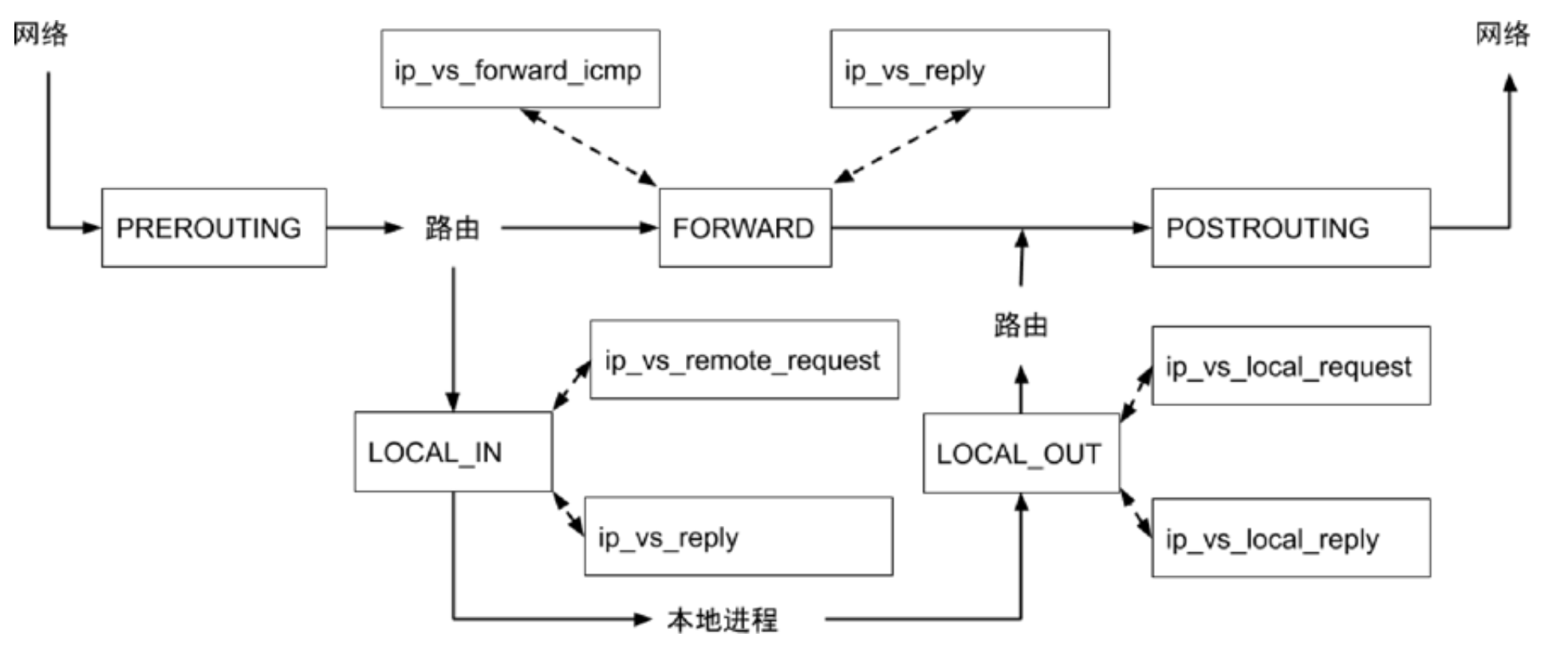
Netfilter

NAT - 实现 Service 的负载均衡

routing decision 之前只能 nat 而不能 filter
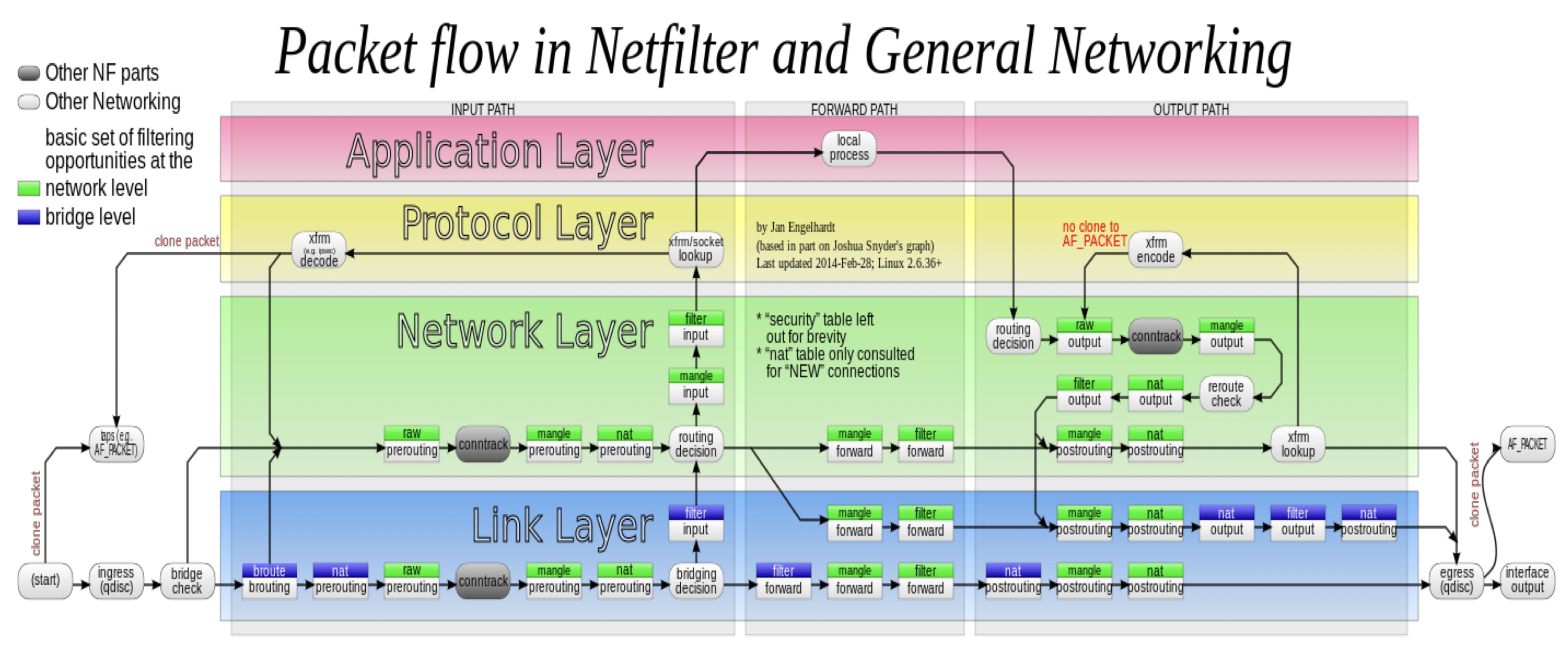
image-20230923151325785

iptables

image-20230923153743183

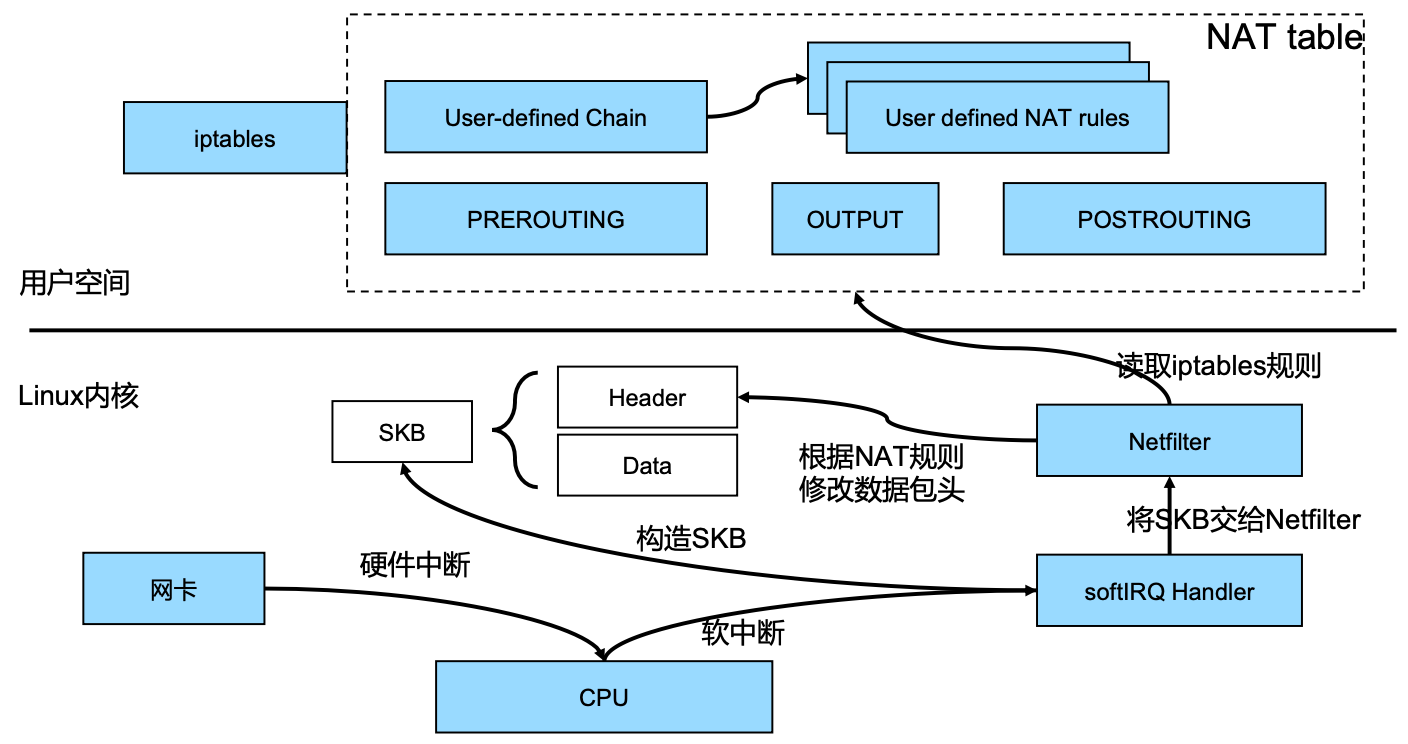
  1. 网卡接收到数据包后,会给 CPU 发送硬件中断,唤醒 CPU
  2. 但 CPU 不会直接读取和处理数据包,响应硬件中断时,无法处理其它事项,效率非常低
  3. 因此 CPU 会软中断 Kernel,触发 SoftIRQ Handler 去读取数据包
  4. SoftIRQ Handler 会在 Kernel 构造 SKB,然后再将 SKB 交给 Netfilter (TCP 协议栈)
  5. Netfilter 会去读取并执行 kube-proxy 在用户空间定义的一些 iptables 规则

重点关注 natfilter 规则

image-20230923164856642

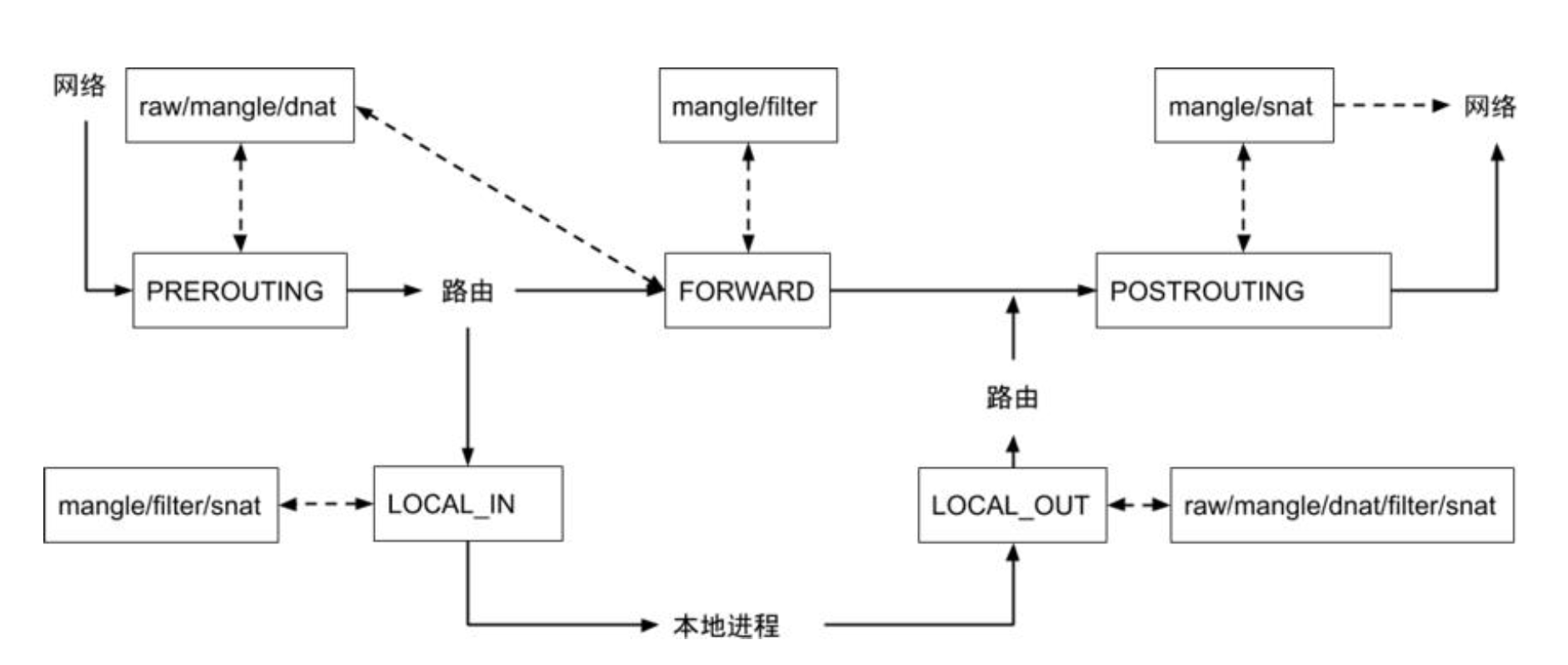
锚点 - 针对负载均衡,主要关注 PREROUTINGOUTPUT

table / chain PREROUTING INPUT FOREORD OUTPUT POSTROUTING
raw Y Y
mangle Y Y Y Y Y
dnat Y Y
filter Y Y Y
snat Y Y Y

工作原理

image-20230923170710358

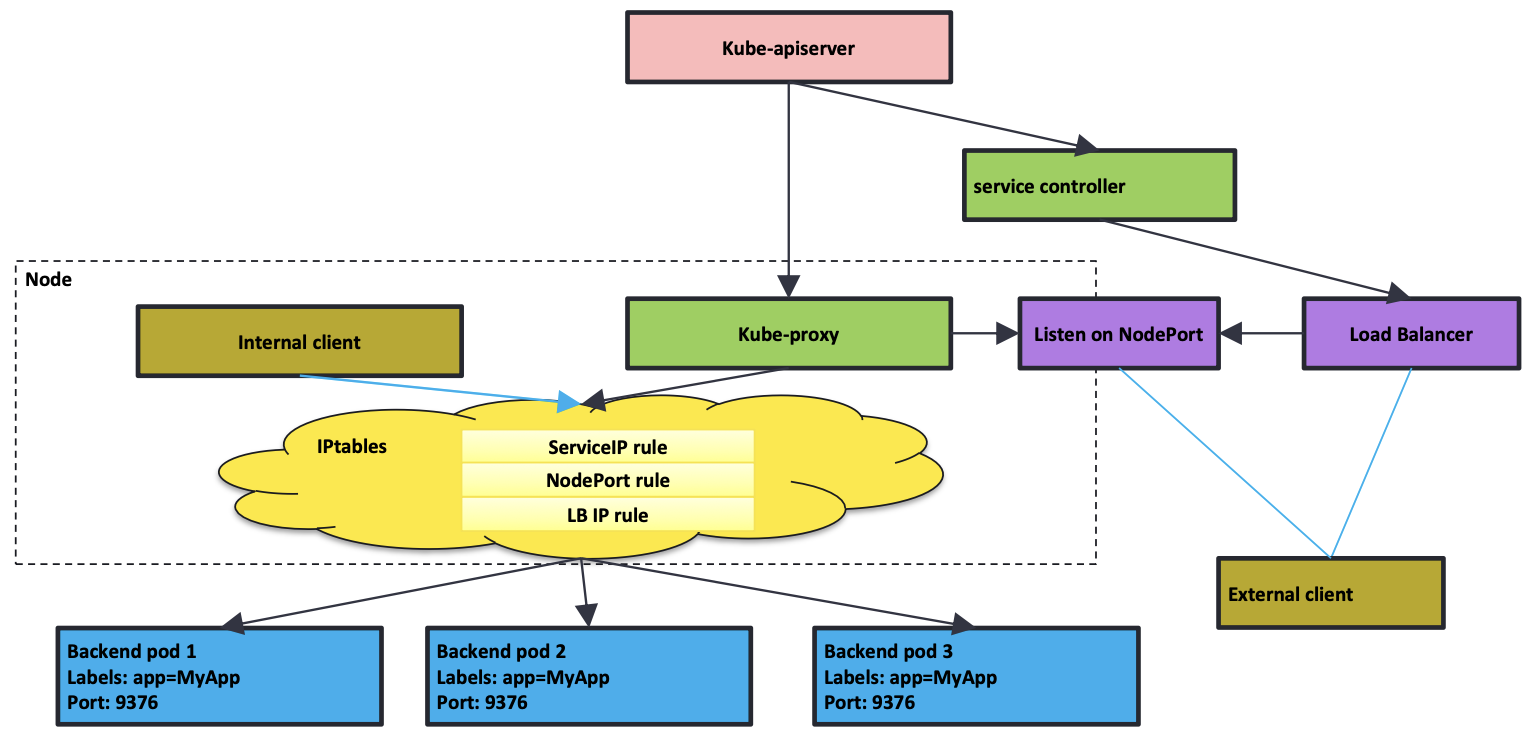
  1. API Server 接收请求
    • 创建 Service 或者 Endpoint,对应的 Service Controller 或者 Endpoint Controller 会执行对应的动作
  2. kube-proxy 会通过 API Server 监听 Service 或者 Endpoint 的变化
  3. 如果 kube-proxy 采用 iptables 模式,会创建对应的 iptables 规则
    • iptables 不会感知不同类型的 Service(ClusterIP、NodePort 等),都是一视同仁地创建 iptables 规则
  4. Load Balancer 一般在集群外部,跟 Kubernetes 集群不在一个网络体系
    • Pod IP 一般为私有 IP,对 Load Balancer 来说不可达,此时要借助 NodePort
    • Node 可能会出故障,Load Balancer 相当于 NodePort 的负载均衡
      • 在 Node 上打 Label,配置 Load Balancer 时得出对应的 NodeIP + NodePort
    • 如果 Load Balancer 对 Pod 可见,可以定制 Service Controller,让 Load Balancer 直连 Pod,从而绕过 NodePort

所有 Node 上的 kube-proxy 的行为是完全一致的,形成分布式负载均衡 - Node 本地就能完成负载均衡

image-20230923184757261

ClusterIP

1
2
3
4
5
6
7
8
9
10
$ k get services -owide
NAME TYPE CLUSTER-IP EXTERNAL-IP PORT(S) AGE SELECTOR
kubernetes ClusterIP 10.96.0.1 <none> 443/TCP 26d <none>
nginx-basic ClusterIP 10.100.49.21 <none> 80/TCP 32s app=nginx

$ k get po -l app=nginx -owide
NAME READY STATUS RESTARTS AGE IP NODE NOMINATED NODE READINESS GATES
nginx-deployment-57cdf669d6-8lnzt 1/1 Running 0 12s 192.168.185.15 mac-k8s <none> <none>
nginx-deployment-57cdf669d6-clpll 1/1 Running 0 12s 192.168.185.14 mac-k8s <none> <none>
nginx-deployment-57cdf669d6-pk4z7 1/1 Running 0 3m24s 192.168.185.13 mac-k8s <none> <none>
1
2
3
4
5
6
7
8
9
10
11
12
13
14
15
16
17
18
19
20
21
22
23
24
25
26
27
28
29
30
apiVersion: v1
kind: Service
metadata:
annotations:
kubectl.kubernetes.io/last-applied-configuration: |
{"apiVersion":"v1","kind":"Service","metadata":{"annotations":{},"name":"nginx-basic","namespace":"default"},"spec":{"ports":[{"name":"http","port":80,"protocol":"TCP"}],"selector":{"app":"nginx"},"type":"ClusterIP"}}
creationTimestamp: "2022-09-23T09:18:31Z"
name: nginx-basic
namespace: default
resourceVersion: "20688"
uid: becfd869-1437-4d90-9c00-461c31ad05e7
spec:
clusterIP: 10.100.49.21
clusterIPs:
- 10.100.49.21
internalTrafficPolicy: Cluster
ipFamilies:
- IPv4
ipFamilyPolicy: SingleStack
ports:
- name: http
port: 80
protocol: TCP
targetPort: 80
selector:
app: nginx
sessionAffinity: None
type: ClusterIP
status:
loadBalancer: {}
VIP Backend
10.100.49.21:80 192.168.185.15:80
192.168.185.14:80
192.168.185.13:80

sudo iptables-save -t nat

1
2
3
4
5
6
7
8
9
10
:PREROUTING ACCEPT [454:20430]
:INPUT ACCEPT [0:0]
:OUTPUT ACCEPT [929:57021]
:POSTROUTING ACCEPT [1380:77271]
:KUBE-SERVICES - [0:0]

-A PREROUTING -m comment --comment "kubernetes service portals" -j KUBE-SERVICES
-A OUTPUT -m comment --comment "kubernetes service portals" -j KUBE-SERVICES

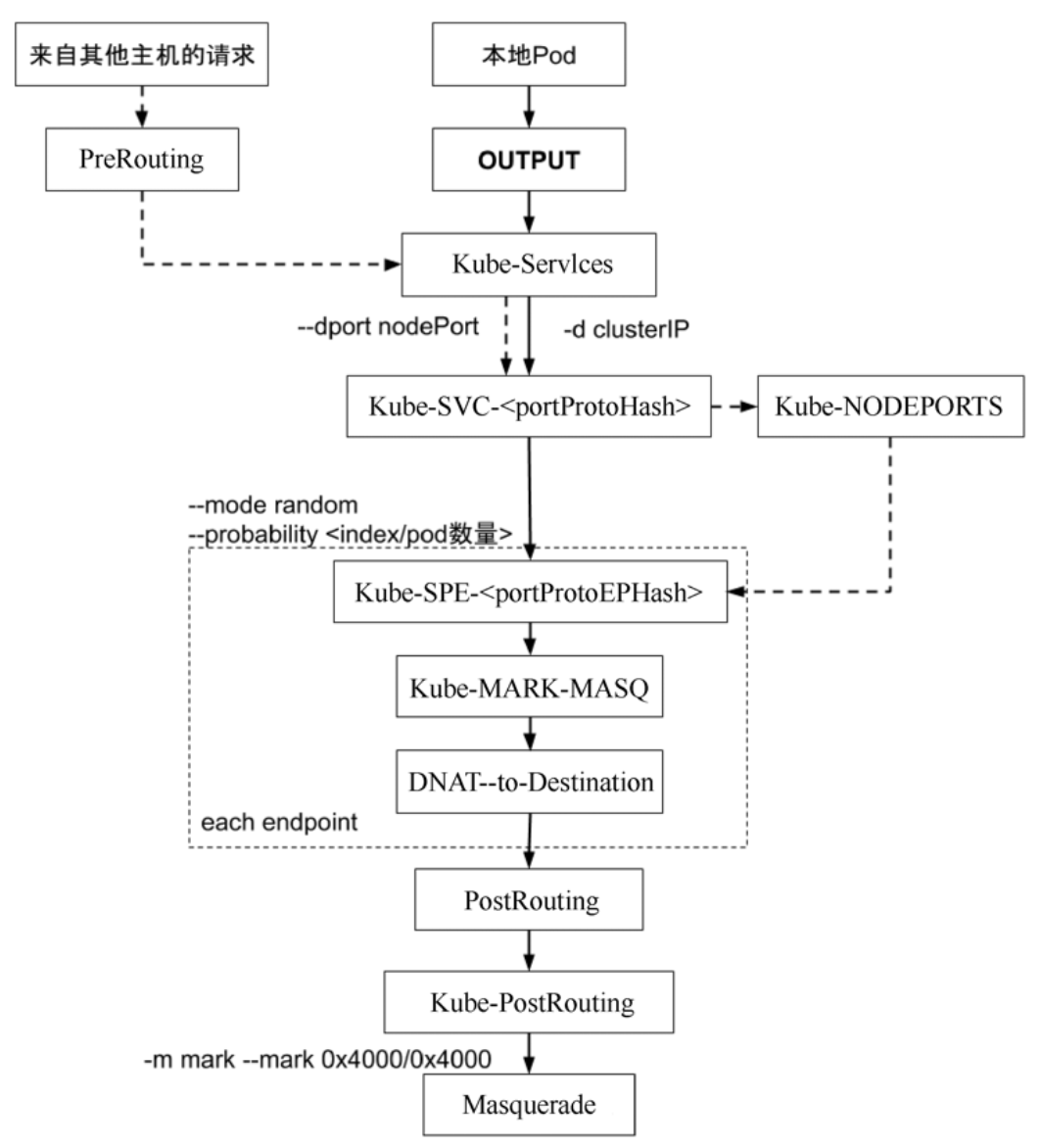
-A KUBE-SERVICES -d 10.100.49.21/32 -p tcp -m comment --comment "default/nginx-basic:http cluster IP" -m tcp --dport 80 -j KUBE-SVC-WWRFY3PZ7W3FGMQW
Key Desc
-A Add
-j Jump
-d Destination
–dport Destination Port
-p Protocol

iptables 为规则引擎,自上而下逐条执行

随机实现平均ipvs 支持 round robin

  1. 第1条 33%
  2. 第1条不命中后,第2条 50%(总体上还是 33%)
  3. 第2条不命中后,第3条 100%(总体上还是 33%)

如果有 N 个 Pod,就会有 N 条类似的规则,时间复杂度为 O(N)
首包慢 - 未建立 TCP 连接,首包需要逐条匹配,匹配成功后,会在 raw 表中记录(Kernel Connection Checking)

不支持增量更新
一旦 Service 或者 Endpoint 发生变化,需要重新生成整个 iptables 表 - 触发 CPU Soft Lock,影响应用

1
2
3
4
-A KUBE-SVC-WWRFY3PZ7W3FGMQW ! -s 192.168.0.0/16 -d 10.100.49.21/32 -p tcp -m comment --comment "default/nginx-basic:http cluster IP" -m tcp --dport 80 -j KUBE-MARK-MASQ
-A KUBE-SVC-WWRFY3PZ7W3FGMQW -m comment --comment "default/nginx-basic:http" -m statistic --mode random --probability 0.33333333349 -j KUBE-SEP-C6OXGZ6X74U4SWF2
-A KUBE-SVC-WWRFY3PZ7W3FGMQW -m comment --comment "default/nginx-basic:http" -m statistic --mode random --probability 0.50000000000 -j KUBE-SEP-D5OXRFJGQH2C25YK
-A KUBE-SVC-WWRFY3PZ7W3FGMQW -m comment --comment "default/nginx-basic:http" -j KUBE-SEP-2W6OV52L6MRXKJPO

DNAT

1
2
3
4
5
6
7
8
9
10
11
:KUBE-SEP-C6OXGZ6X74U4SWF2 - [0:0]
-A KUBE-SEP-C6OXGZ6X74U4SWF2 -s 192.168.185.13/32 -m comment --comment "default/nginx-basic:http" -j KUBE-MARK-MASQ
-A KUBE-SEP-C6OXGZ6X74U4SWF2 -p tcp -m comment --comment "default/nginx-basic:http" -m tcp -j DNAT --to-destination 192.168.185.13:80

:KUBE-SEP-D5OXRFJGQH2C25YK - [0:0]
-A KUBE-SEP-D5OXRFJGQH2C25YK -s 192.168.185.14/32 -m comment --comment "default/nginx-basic:http" -j KUBE-MARK-MASQ
-A KUBE-SEP-D5OXRFJGQH2C25YK -p tcp -m comment --comment "default/nginx-basic:http" -m tcp -j DNAT --to-destination 192.168.185.14:80

:KUBE-SEP-2W6OV52L6MRXKJPO - [0:0]
-A KUBE-SEP-2W6OV52L6MRXKJPO -s 192.168.185.15/32 -m comment --comment "default/nginx-basic:http" -j KUBE-MARK-MASQ
-A KUBE-SEP-2W6OV52L6MRXKJPO -p tcp -m comment --comment "default/nginx-basic:http" -m tcp -j DNAT --to-destination 192.168.185.15:80

NodePort

将 ClusterIP 修改为 NodePort

1
2
3
4
5
6
7
8
9
10
11
12
apiVersion: v1
kind: Service
metadata:
name: nginx-basic
spec:
type: NodePort
ports:
- port: 80
protocol: TCP
name: http
selector:
app: nginx

监听端口 31195

1
2
3
4
5
6
7
8
9
10
11
12
13
14
15
16
17
18
19
20
21
22
23
24
25
26
27
28
29
30
31
32
apiVersion: v1
kind: Service
metadata:
annotations:
kubectl.kubernetes.io/last-applied-configuration: |
{"apiVersion":"v1","kind":"Service","metadata":{"annotations":{},"name":"nginx-basic","namespace":"default"},"spec":{"ports":[{"name":"http","port":80,"protocol":"TCP"}],"selector":{"app":"nginx"},"type":"NodePort"}}
creationTimestamp: "2022-09-23T09:18:31Z"
name: nginx-basic
namespace: default
resourceVersion: "25300"
uid: becfd869-1437-4d90-9c00-461c31ad05e7
spec:
clusterIP: 10.100.49.21
clusterIPs:
- 10.100.49.21
externalTrafficPolicy: Cluster
internalTrafficPolicy: Cluster
ipFamilies:
- IPv4
ipFamilyPolicy: SingleStack
ports:
- name: http
nodePort: 31195
port: 80
protocol: TCP
targetPort: 80
selector:
app: nginx
sessionAffinity: None
type: NodePort
status:
loadBalancer: {}
1
2
3
4
5
6
7
8
9
10
11
12
13
14
15
16
17
18
19
20
$ ss -lt
State Recv-Q Send-Q Local Address:Port Peer Address:Port Process
...
LISTEN 0 4096 0.0.0.0:31195 0.0.0.0:*
...

$ sudo lsof -i:31195
COMMAND PID USER FD TYPE DEVICE SIZE/OFF NODE NAME
kube-prox 16369 root 12u IPv4 1275439 0t0 TCP *:31195 (LISTEN)

$ curl -sI 192.168.191.153:31195
HTTP/1.1 200 OK
Server: nginx/1.25.2
Date: Sat, 23 Sep 2022 10:32:56 GMT
Content-Type: text/html
Content-Length: 615
Last-Modified: Tue, 15 Aug 2022 17:03:04 GMT
Connection: keep-alive
ETag: "64dbafc8-267"
Accept-Ranges: bytes

与前面 ClusterIP 的 KUBE-SVC-WWRFY3PZ7W3FGMQW 能串联起来,复用 ClusterIP 的负载均衡能力

1
2
3
4
5
6
7
8
9
:KUBE-NODEPORTS - [0:0]

-A KUBE-NODEPORTS -p tcp -m comment --comment "default/nginx-basic:http" -m tcp --dport 31195 -j KUBE-SVC-WWRFY3PZ7W3FGMQW

-A KUBE-SVC-WWRFY3PZ7W3FGMQW ! -s 192.168.0.0/16 -d 10.100.49.21/32 -p tcp -m comment --comment "default/nginx-basic:http cluster IP" -m tcp --dport 80 -j KUBE-MARK-MASQ
-A KUBE-SVC-WWRFY3PZ7W3FGMQW -p tcp -m comment --comment "default/nginx-basic:http" -m tcp --dport 31195 -j KUBE-MARK-MASQ
-A KUBE-SVC-WWRFY3PZ7W3FGMQW -m comment --comment "default/nginx-basic:http" -m statistic --mode random --probability 0.33333333349 -j KUBE-SEP-C6OXGZ6X74U4SWF2
-A KUBE-SVC-WWRFY3PZ7W3FGMQW -m comment --comment "default/nginx-basic:http" -m statistic --mode random --probability 0.50000000000 -j KUBE-SEP-D5OXRFJGQH2C25YK
-A KUBE-SVC-WWRFY3PZ7W3FGMQW -m comment --comment "default/nginx-basic:http" -j KUBE-SEP-2W6OV52L6MRXKJPO

VIP

iptables 模式下,VIP 不会绑定任何设备(ping 不通,ICMP 包),只会存在于 iptables 规则中

1
2
3
4
5
6
7
8
9
10
11
12
13
14
15
16
17
$ ping -c 1 10.100.49.21
PING 10.100.49.21 (10.100.49.21) 56(84) bytes of data.
From 10.192.4.116 icmp_seq=1 Time to live exceeded

--- 10.100.49.21 ping statistics ---
1 packets transmitted, 0 received, +1 errors, 100% packet loss, time 0ms

$ curl -sI 10.100.49.21
HTTP/1.1 200 OK
Server: nginx/1.25.2
Date: Sat, 23 Sep 2022 10:22:23 GMT
Content-Type: text/html
Content-Length: 615
Last-Modified: Tue, 15 Aug 2022 17:03:04 GMT
Connection: keep-alive
ETag: "64dbafc8-267"
Accept-Ranges: bytes

IPVS

image-20230923185021559

  1. ipvs 和 iptables 都是 Netfilter 插件,但只支持 LOCAL_IN / LOCAL_OUT / FORWARD
  2. 不支持 PREROUTINGdnat
    • 在 ipvs 模式下,会在 Node 上启动一个虚拟网卡 kube-ipvs0,并绑定所有的 ClusterIP
    • 当接收到数据包时(请求 VIP),Kernel 能识别是否为本机 IP,进而转发到 LOCAL_IN(再做后续的 DNAT

切换

将 kube-proxy 的 mode 修改为 ipvs

1
2
3
4
$ k edit cm -n kube-system kube-proxy
...
data:
mode: "ipvs"

重建 kube-proxy

1
2
$  k delete po -n kube-system kube-proxy-vz9p8
pod "kube-proxy-vz9p8" deleted

刷新 iptables 规则,减少了很多在 iptables 模式下产生的 iptables 规则

1
2
3
4
5
6
7
8
9
10
11
12
13
14
15
16
17
18
19
20
21
22
23
24
25
26
27
28
29
30
31
32
33
34
35
36
37
38
39
40
41
42
43
44
45
46
47
48
49
50
51
52
53
54
55
56
57
58
59
60
61
62
63
64
65
66
67
68
69
70
71
$ sudo iptables -F -t nat

$ sudo iptables-save -t nat
# Generated by iptables-save v1.8.4 on Sat Sep 23 20:25:37 2022
*nat
:PREROUTING ACCEPT [6:270]
:INPUT ACCEPT [0:0]
:OUTPUT ACCEPT [15:900]
:POSTROUTING ACCEPT [21:1170]
:DOCKER - [0:0]
:KUBE-FIREWALL - [0:0]
:KUBE-KUBELET-CANARY - [0:0]
:KUBE-LOAD-BALANCER - [0:0]
:KUBE-MARK-DROP - [0:0]
:KUBE-MARK-MASQ - [0:0]
:KUBE-NODE-PORT - [0:0]
:KUBE-NODEPORTS - [0:0]
:KUBE-POSTROUTING - [0:0]
:KUBE-PROXY-CANARY - [0:0]
:KUBE-SEP-2QTYKTXAEZZXTHRU - [0:0]
:KUBE-SEP-2W6OV52L6MRXKJPO - [0:0]
:KUBE-SEP-3BKZQAKRFZP5XGF6 - [0:0]
:KUBE-SEP-5JU4MOHAISY5VNTG - [0:0]
:KUBE-SEP-AUSLFFF7R44XU4TT - [0:0]
:KUBE-SEP-C6OXGZ6X74U4SWF2 - [0:0]
:KUBE-SEP-D5OXRFJGQH2C25YK - [0:0]
:KUBE-SEP-FVZ3XY4ZSUKGBNTC - [0:0]
:KUBE-SEP-FWQL7FVUECLM7ENQ - [0:0]
:KUBE-SEP-H7MAFNHDOGBTEIBX - [0:0]
:KUBE-SEP-KKZZ4SVFDMI2QRXA - [0:0]
:KUBE-SEP-U5T5YS3CUAKLO7V4 - [0:0]
:KUBE-SEP-YKN5KDPQYGFRMCEV - [0:0]
:KUBE-SERVICES - [0:0]
:KUBE-SVC-ERIFXISQEP7F7OF4 - [0:0]
:KUBE-SVC-I24EZXP75AX5E7TU - [0:0]
:KUBE-SVC-JD5MR3NA4I4DYORP - [0:0]
:KUBE-SVC-NPX46M4PTMTKRN6Y - [0:0]
:KUBE-SVC-RK657RLKDNVNU64O - [0:0]
:KUBE-SVC-TCOU7JCQXEZGVUNU - [0:0]
:KUBE-SVC-WWRFY3PZ7W3FGMQW - [0:0]
:cali-OUTPUT - [0:0]
:cali-POSTROUTING - [0:0]
:cali-PREROUTING - [0:0]
:cali-fip-dnat - [0:0]
:cali-fip-snat - [0:0]
:cali-nat-outgoing - [0:0]
-A PREROUTING -m comment --comment "cali:6gwbT8clXdHdC1b1" -j cali-PREROUTING
-A PREROUTING -m comment --comment "kubernetes service portals" -j KUBE-SERVICES
-A OUTPUT -m comment --comment "cali:tVnHkvAo15HuiPy0" -j cali-OUTPUT
-A OUTPUT -m comment --comment "kubernetes service portals" -j KUBE-SERVICES
-A POSTROUTING -m comment --comment "cali:O3lYWMrLQYEMJtB5" -j cali-POSTROUTING
-A POSTROUTING -m comment --comment "kubernetes postrouting rules" -j KUBE-POSTROUTING
-A KUBE-FIREWALL -j KUBE-MARK-DROP
-A KUBE-LOAD-BALANCER -j KUBE-MARK-MASQ
-A KUBE-MARK-MASQ -j MARK --set-xmark 0x4000/0x4000
-A KUBE-NODE-PORT -p tcp -m comment --comment "Kubernetes nodeport TCP port for masquerade purpose" -m set --match-set KUBE-NODE-PORT-TCP dst -j KUBE-MARK-MASQ
-A KUBE-POSTROUTING -m comment --comment "Kubernetes endpoints dst ip:port, source ip for solving hairpin purpose" -m set --match-set KUBE-LOOP-BACK dst,dst,src -j MASQUERADE
-A KUBE-POSTROUTING -m mark ! --mark 0x4000/0x4000 -j RETURN
-A KUBE-POSTROUTING -j MARK --set-xmark 0x4000/0x0
-A KUBE-POSTROUTING -m comment --comment "kubernetes service traffic requiring SNAT" -j MASQUERADE --random-fully
-A KUBE-SERVICES ! -s 192.168.0.0/16 -m comment --comment "Kubernetes service cluster ip + port for masquerade purpose" -m set --match-set KUBE-CLUSTER-IP dst,dst -j KUBE-MARK-MASQ
-A KUBE-SERVICES -m addrtype --dst-type LOCAL -j KUBE-NODE-PORT
-A KUBE-SERVICES -m set --match-set KUBE-CLUSTER-IP dst,dst -j ACCEPT
-A cali-OUTPUT -m comment --comment "cali:GBTAv2p5CwevEyJm" -j cali-fip-dnat
-A cali-POSTROUTING -m comment --comment "cali:Z-c7XtVd2Bq7s_hA" -j cali-fip-snat
-A cali-POSTROUTING -m comment --comment "cali:nYKhEzDlr11Jccal" -j cali-nat-outgoing
-A cali-POSTROUTING -o vxlan.calico -m comment --comment "cali:e9dnSgSVNmIcpVhP" -m addrtype ! --src-type LOCAL --limit-iface-out -m addrtype --src-type LOCAL -j MASQUERADE --random-fully
-A cali-PREROUTING -m comment --comment "cali:r6XmIziWUJsdOK6Z" -j cali-fip-dnat
-A cali-nat-outgoing -m comment --comment "cali:flqWnvo8yq4ULQLa" -m set --match-set cali40masq-ipam-pools src -m set ! --match-set cali40all-ipam-pools dst -j MASQUERADE --random-fully
COMMIT
# Completed on Sat Sep 23 20:25:37 2022

查看 ipvs 规则(rr = round robin

1
2
3
4
5
6
7
8
9
10
11
12
13
14
15
16
17
18
19
20
21
22
23
24
25
26
27
28
29
30
31
32
33
34
35
36
$ sudo ipvsadm -L -n
IP Virtual Server version 1.2.1 (size=4096)
Prot LocalAddress:Port Scheduler Flags
-> RemoteAddress:Port Forward Weight ActiveConn InActConn
TCP 172.17.0.1:31195 rr
-> 192.168.185.13:80 Masq 1 0 0
-> 192.168.185.14:80 Masq 1 0 0
-> 192.168.185.15:80 Masq 1 0 0
TCP 192.168.185.0:31195 rr
-> 192.168.185.13:80 Masq 1 0 0
-> 192.168.185.14:80 Masq 1 0 0
-> 192.168.185.15:80 Masq 1 0 0
TCP 192.168.191.153:31195 rr
-> 192.168.185.13:80 Masq 1 0 0
-> 192.168.185.14:80 Masq 1 0 0
-> 192.168.185.15:80 Masq 1 0 0
TCP 10.96.0.1:443 rr
-> 192.168.191.153:6443 Masq 1 0 0
TCP 10.96.0.10:53 rr
-> 192.168.185.1:53 Masq 1 0 0
-> 192.168.185.3:53 Masq 1 0 0
TCP 10.96.0.10:9153 rr
-> 192.168.185.1:9153 Masq 1 0 0
-> 192.168.185.3:9153 Masq 1 0 0
TCP 10.99.180.41:5473 rr
-> 192.168.191.153:5473 Masq 1 0 0
TCP 10.100.49.21:80 rr
-> 192.168.185.13:80 Masq 1 0 0
-> 192.168.185.14:80 Masq 1 0 0
-> 192.168.185.15:80 Masq 1 0 0
TCP 10.101.177.188:443 rr
-> 192.168.185.5:5443 Masq 1 1 1
-> 192.168.185.6:5443 Masq 1 1 0
UDP 10.96.0.10:53 rr
-> 192.168.185.1:53 Masq 1 0 0
-> 192.168.185.3:53 Masq 1 0 0

查看 kube-ipvs0 虚拟网卡

1
2
3
4
5
6
7
8
9
10
11
12
13
14
$ ip a
...
26: kube-ipvs0: <BROADCAST,NOARP> mtu 1500 qdisc noop state DOWN group default
link/ether 5a:1e:de:69:7f:c7 brd ff:ff:ff:ff:ff:ff
inet 10.96.0.10/32 scope global kube-ipvs0
valid_lft forever preferred_lft forever
inet 10.99.180.41/32 scope global kube-ipvs0
valid_lft forever preferred_lft forever
inet 10.101.177.188/32 scope global kube-ipvs0
valid_lft forever preferred_lft forever
inet 10.100.49.21/32 scope global kube-ipvs0
valid_lft forever preferred_lft forever
inet 10.96.0.1/32 scope global kube-ipvs0
valid_lft forever preferred_lft forever

测试 Service

1
2
3
4
5
6
7
8
9
10
11
12
13
14
15
16
17
18
19
20
21
22
23
24
25
26
$ k get service -owide
NAME TYPE CLUSTER-IP EXTERNAL-IP PORT(S) AGE SELECTOR
kubernetes ClusterIP 10.96.0.1 <none> 443/TCP 26d <none>
nginx-basic NodePort 10.100.49.21 <none> 80:31195/TCP 147m app=nginx

$ curl -sI 10.100.49.21:80
HTTP/1.1 200 OK
Server: nginx/1.25.2
Date: Sat, 23 Sep 2022 11:46:01 GMT
Content-Type: text/html
Content-Length: 615
Last-Modified: Tue, 15 Aug 2022 17:03:04 GMT
Connection: keep-alive
ETag: "64dbafc8-267"
Accept-Ranges: bytes

$ curl -sI 192.168.191.153:31195
HTTP/1.1 200 OK
Server: nginx/1.25.2
Date: Sat, 23 Sep 2022 11:46:27 GMT
Content-Type: text/html
Content-Length: 615
Last-Modified: Tue, 15 Aug 2022 17:03:04 GMT
Connection: keep-alive
ETag: "64dbafc8-267"
Accept-Ranges: bytes

在 ipvs 模式下,由于 ClusterIP 会绑定在 kube-ipvs0 的虚拟网卡下,所以能 ping 通

1
2
3
4
5
6
7
$ ping -c 1 10.100.49.21
PING 10.100.49.21 (10.100.49.21) 56(84) bytes of data.
64 bytes from 10.100.49.21: icmp_seq=1 ttl=64 time=0.073 ms

--- 10.100.49.21 ping statistics ---
1 packets transmitted, 1 received, 0% packet loss, time 0ms
rtt min/avg/max/mdev = 0.073/0.073/0.073/0.000 ms

iptables

结合 ipset(减少 iptables 规则),通过一条 iptables 规则实现 IP 伪装(snat)

1
2
3
4
5
6
7
8
9
10
11
12
13
14
15
16
17
18
$ ipset -L
...
Name: KUBE-CLUSTER-IP
Type: hash:ip,port
Revision: 5
Header: family inet hashsize 1024 maxelem 65536
Size in memory: 640
References: 2
Number of entries: 7
Members:
10.100.49.21,tcp:80
10.101.177.188,tcp:443
10.96.0.10,tcp:53
10.96.0.1,tcp:443
10.96.0.10,udp:53
10.99.180.41,tcp:5473
10.96.0.10,tcp:9153
...

避免了原本在 iptables 模式下产生很多 iptables 规则的情况

1
2
3
4
5
6
$ iptables-save -t nat

:KUBE-SERVICES - [0:0]
-A PREROUTING -m comment --comment "kubernetes service portals" -j KUBE-SERVICES
-A OUTPUT -m comment --comment "kubernetes service portals" -j KUBE-SERVICES
-A KUBE-SERVICES -m set --match-set KUBE-CLUSTER-IP dst,dst -j ACCEPT

DNS

Kubernetes 提供了内置的域名服务,Service 会自动获得域名
无论 Service 重建多少次,只要 Service 名称不变,对应的域名也不会发生改变

DNS 主要与 Service 配合,而 Service 工作在四层

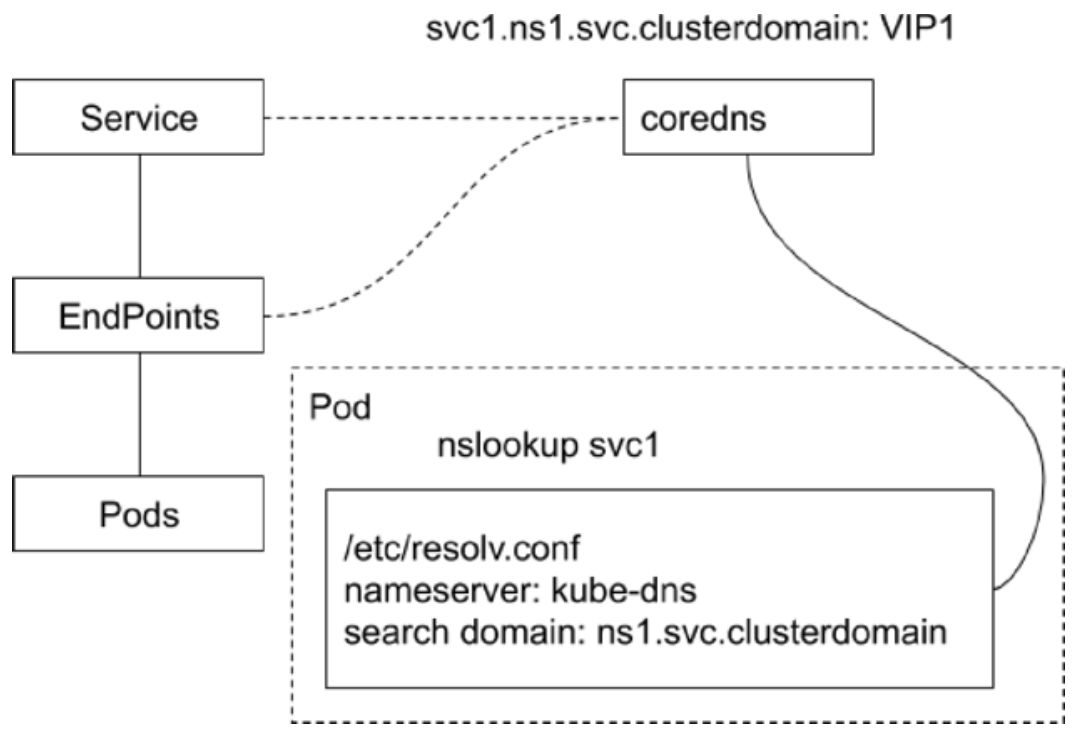
CoreDNS

image-20230923213744058

  1. CoreDNS 包含一个内存态 DNS,并且本身也是一个控制器
  2. 工作原理
    • 控制器监听 ServiceEndpoint 的变化并配置 DNS
    • 客户端 Pod 在进行域名解析时,会从 CoreDNS 中查询 Service 对应的地址记录
  3. 递归查询
    • 查询 CoreDNS 本身的 A 记录,如果不存在,则转发到 CoreDNS 的上游 DNS 服务器(配置来自于 Node

kube-proxy 采用 DaemonSet 部署,CoreDNS 采用 Deployment 部署

1
2
3
$ k get deployments.apps -n kube-system -owide
NAME READY UP-TO-DATE AVAILABLE AGE CONTAINERS IMAGES SELECTOR
coredns 2/2 2 2 26d coredns registry.aliyuncs.com/google_containers/coredns:v1.8.6 k8s-app=kube-dns
1
2
3
4
5
6
7
8
9
10
11
12
13
14
15
16
17
18
19
20
$ k get po
NAME READY STATUS RESTARTS AGE
centos 1/1 Running 0 6s
nginx-deployment-57cdf669d6-8lnzt 1/1 Running 0 4h26m
nginx-deployment-57cdf669d6-clpll 1/1 Running 0 4h26m
nginx-deployment-57cdf669d6-pk4z7 1/1 Running 0 4h29m

$ k get services -owide
NAME TYPE CLUSTER-IP EXTERNAL-IP PORT(S) AGE SELECTOR
kubernetes ClusterIP 10.96.0.1 <none> 443/TCP 26d <none>
nginx-basic NodePort 10.100.49.21 <none> 80:31195/TCP 4h29m app=nginx

$ k get svc -n kube-system -owide
NAME TYPE CLUSTER-IP EXTERNAL-IP PORT(S) AGE SELECTOR
kube-dns ClusterIP 10.96.0.10 <none> 53/UDP,53/TCP,9153/TCP 26d k8s-app=kube-dns

$ k get po -A -l k8s-app=kube-dns -owide
NAMESPACE NAME READY STATUS RESTARTS AGE IP NODE NOMINATED NODE READINESS GATES
kube-system coredns-6d8c4cb4d-jmk8s 1/1 Running 0 26d 192.168.185.3 mac-k8s <none> <none>
kube-system coredns-6d8c4cb4d-vxcs8 1/1 Running 0 26d 192.168.185.1 mac-k8s <none> <none>

ndots:5 - 如果提供的域名少于 5 个 .,则会认为是短名,尝试从 search domain依次匹配

1
2
3
4
5
6
7
8
9
10
11
12
13
14
15
16
17
18
19
20
21
22
23
24
25
26
27
28
29
30
31
32
33
34
35
36
37
38
$ k exec -it centos -- bash
[root@centos /]# cat /etc/resolv.conf
nameserver 10.96.0.10
search default.svc.cluster.local svc.cluster.local cluster.local localdomain
options ndots:5
[root@centos /]#
[root@centos /]# ping -c 1 nginx-basic
PING nginx-basic.default.svc.cluster.local (10.100.49.21) 56(84) bytes of data.
64 bytes from nginx-basic.default.svc.cluster.local (10.100.49.21): icmp_seq=1 ttl=64 time=0.039 ms

--- nginx-basic.default.svc.cluster.local ping statistics ---
1 packets transmitted, 1 received, 0% packet loss, time 0ms
rtt min/avg/max/mdev = 0.039/0.039/0.039/0.000 ms
[root@centos /]#
[root@centos /]# ping -c 1 nginx-basic.default
PING nginx-basic.default.svc.cluster.local (10.100.49.21) 56(84) bytes of data.
64 bytes from nginx-basic.default.svc.cluster.local (10.100.49.21): icmp_seq=1 ttl=64 time=0.047 ms

--- nginx-basic.default.svc.cluster.local ping statistics ---
1 packets transmitted, 1 received, 0% packet loss, time 0ms
rtt min/avg/max/mdev = 0.047/0.047/0.047/0.000 ms
[root@centos /]#
[root@centos /]# ping -c 1 nginx-basic.default.svc
PING nginx-basic.default.svc.cluster.local (10.100.49.21) 56(84) bytes of data.
64 bytes from nginx-basic.default.svc.cluster.local (10.100.49.21): icmp_seq=1 ttl=64 time=0.023 ms

--- nginx-basic.default.svc.cluster.local ping statistics ---
1 packets transmitted, 1 received, 0% packet loss, time 0ms
rtt min/avg/max/mdev = 0.023/0.023/0.023/0.000 ms
[root@centos /]#
[root@centos /]# ping -c 1 nginx-basic.default.svc.cluster.local
PING nginx-basic.default.svc.cluster.local (10.100.49.21) 56(84) bytes of data.
64 bytes from nginx-basic.default.svc.cluster.local (10.100.49.21): icmp_seq=1 ttl=64 time=0.067 ms

--- nginx-basic.default.svc.cluster.local ping statistics ---
1 packets transmitted, 1 received, 0% packet loss, time 0ms
rtt min/avg/max/mdev = 0.067/0.067/0.067/0.000 ms
[root@centos /]#

CoreDNS 会使用 Node 上的 /etc/resolv.conf 文件

1
2
3
4
5
6
7
8
9
10
11
12
13
14
15
16
17
18
19
20
21
22
$ cat /etc/resolv.conf 
options timeout:2 attempts:3 rotate single-request-reopen
; generated by /usr/sbin/dhclient-script
nameserver 10.192.33.32
nameserver 10.192.26.32
search cluster.local

$ docker ps | grep coredns
d910c836fc10 9e06444eed17 "/coredns -conf /etc…" 6 weeks ago Up 6 weeks k8s_coredns_coredns-ccd4fb7b9-5szdn_kube-system_d978dd5b-f438-4269-8733-ce2f29b94ae2_0
59475c9aee07 registry-vpc.cn-hangzhou.aliyuncs.com/acs/pause:3.2 "/pause" 6 weeks ago Up 6 weeks k8s_POD_coredns-ccd4fb7b9-5szdn_kube-system_d978dd5b-f438-4269-8733-ce2f29b94ae2_0

$ docker inspect d910c836fc10 | grep Pid
"Pid": 1392519,
"PidMode": "",
"PidsLimit": null,

$ nsenter -t 1392519 -n cat /etc/resolv.conf
options timeout:2 attempts:3 rotate single-request-reopen
; generated by /usr/sbin/dhclient-script
nameserver 10.192.33.32
nameserver 10.192.26.32
search cluster.local

DNS Record

依赖 ClusterIP 来做服务调用,相对稳定

  1. Common Service
    • ClusterIP、NodePort、LoadBalancer 类型的 Service 都拥有 API Server 分配的 ClusterIP
    • CoreDNS 会为其创建 FQDN 格式的 A 记录PTR 记录,并为端口创建 SRV 记录
      • FQDN - fully qualified domain name,即 ${svcname}.${ns}.svc.${clusterdomain}
  2. Headless Service
    • 显式指定 ClusterIP 为 None,所以 API Server 不会为其分配 ClusterIP
      • 但还是会创建同名的 Endpoint,只有 Selector 为空才不会自动创建 Endpoint
    • CoreDNS 需为此类 Service 创建多条 A 记录,目标为每个就绪的 Pod IP
      • 如果某个 Pod 不 Ready,CoreDNS 会把对应的 A 记录移除
    • 每个 Pod 会拥有一个 FQDNA 记录指向 Pod IP
      • ${podname}.${svcname}.${ns}.svc.${clusterdomain}
    • Pod 的属性 hostnamesubdomain 组成 ${podname}
      • ${hostname}.${subdomain}.${svcname}.${ns}.svc.${clusterdomain}
      • 如 StatefulSet
    • 客户端通过 CoreDNS 拿到的就是 Pod IP,对 Pod IP 请求不再需要经过 ipvs 或者 iptables
  3. ExternalName Service
    • 此类 Service 用来引用一个已经存在的域名
    • CoreDNS 会为该 Service 创建一个 CName 记录指向该目标域名
Type DNS Key Value Count
Common a ${svcname}.${ns}.svc.${clusterdomain} ClusterIP 1
Headless a ${podname}.${svcname}.${ns}.svc.${clusterdomain}
${hostname}.${subdomain}.${svcname}.${ns}.svc.${clusterdomain}
Ready PodIP N
ExternalName cname Alias Existed Domain 1

Resolution

  1. Pod 默认的 DNSPolicyClusterFirst(即 CoreDNS
    • 如果使用 Default,则采用 Node 上的 /etc/resolv.conf
  2. Pod 启动后的 /etc/resolv.conf 会被改写,所有的地址解析优先发送到 CoreDNS
  3. 当 Pod 启动时,同一 Namespace 的所有 Service 都会以环境变量的形式设置到容器内
1
2
3
4
5
6
7
8
9
10
11
12
13
$ k get svc -owide
NAME TYPE CLUSTER-IP EXTERNAL-IP PORT(S) AGE SELECTOR
kubernetes ClusterIP 10.96.0.1 <none> 443/TCP 26d <none>
nginx-basic NodePort 10.100.49.21 <none> 80:31195/TCP 5h49m app=nginx

$ k exec -it centos -- bash
[root@centos /]# env | grep SERVICE | sort
KUBERNETES_SERVICE_HOST=10.96.0.1
KUBERNETES_SERVICE_PORT=443
KUBERNETES_SERVICE_PORT_HTTPS=443
NGINX_BASIC_SERVICE_HOST=10.100.49.21
NGINX_BASIC_SERVICE_PORT=80
NGINX_BASIC_SERVICE_PORT_HTTP=80

自定义 DNSPolicy

1
2
3
4
5
6
7
8
9
10
spec:
dnsPolicy: "None"
dnsConfig:
nameservers:
- 1.2.3.4
searchs:
- xx.yy.zz
options:
- name: ndots
values: "2"

生产落地

  1. Service 在集群内通过 CoreDNS 寻址,在集群外通过企业 DNS 寻址,Service 在集群内外有统一标识
  2. Service 需要发布到企业 DNS
    • 在企业 DNS,同样创建 A/PTR/SRV 记录(通常解析地址为 LoadBalancer VIP
    • Headless Service
      • Pod IP全局路由的前提下,按需创建 DNS 记录
        • 否则对企业 DNS 是很大的冲击(DNS 不是专门用于负载均衡
      • CoreDNS 支持横向扩展,而一般的企业 DNS 不具备这个扩展能力

Ingress

负载均衡

Kubernetes 中的负载均衡技术

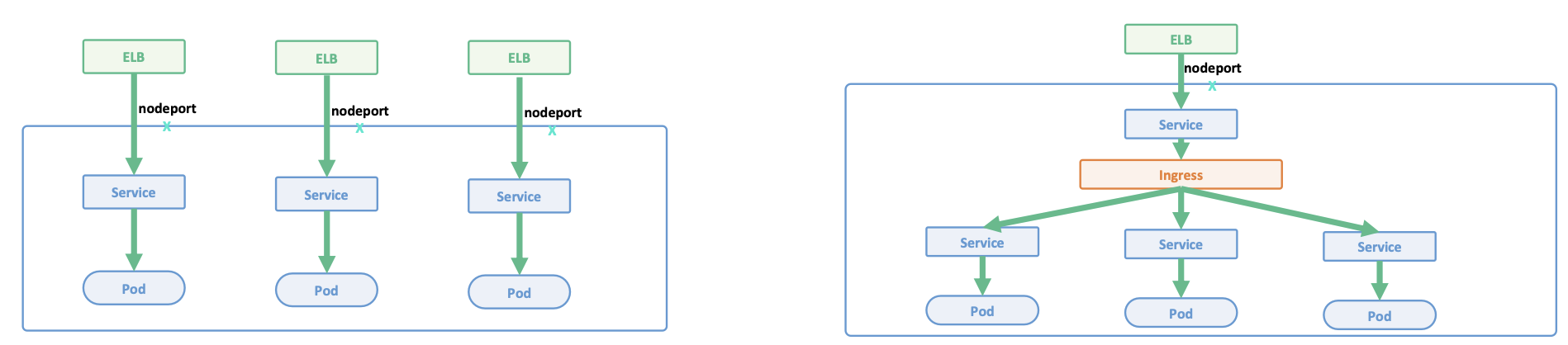
L4 Service L7 Ingress
基于 iptables / ipvs分布式四层负载均衡技术(五元组 基于七层应用层,提供更多功能
多种 Load Balancer Provider 提供与企业现有 ELB(比较贵) 整合 TLS termination
反向代理处理 TLS,业务开发只关注 HTTP 即可
kube-proxy 基于 iptables rules 为 Kubernetes 形成全局统一分布式负载均衡器 L7 path forwarding
kube-proxy 是一种 mesh,内部客户端无论通过 ClusterIPNodePortLB VIP 都经过 kube-proxy 跳转到 pod URL/http header rewrite
属于 Kubernetes Core 与采用 7 层软件紧密相关
每个应用独占 ELB,浪费资源 多个应用共享 ELB,节省资源
为每个 Service 动态创建 DNS 记录,频繁的 DNS 更新 多个应用共享一个 Domain,采用静态 DNS 配置
支持 TCPUDP,如果需要启动 HTTPS 服务,需要管理证书 TLS termination 发生在 Ingress 层,可集中管理证书
更复杂,更多的网络 hop

Ingress 是反向代理 + 控制器
监听 Ingress Spec,生成对应的反向代理规则,应用到 Ingress 的反向代理,Ingress 会执行 TLS termination

Ingress 工作在七层,但前面还有一个四层Ingress Service

image-20230924094933734

基本概念

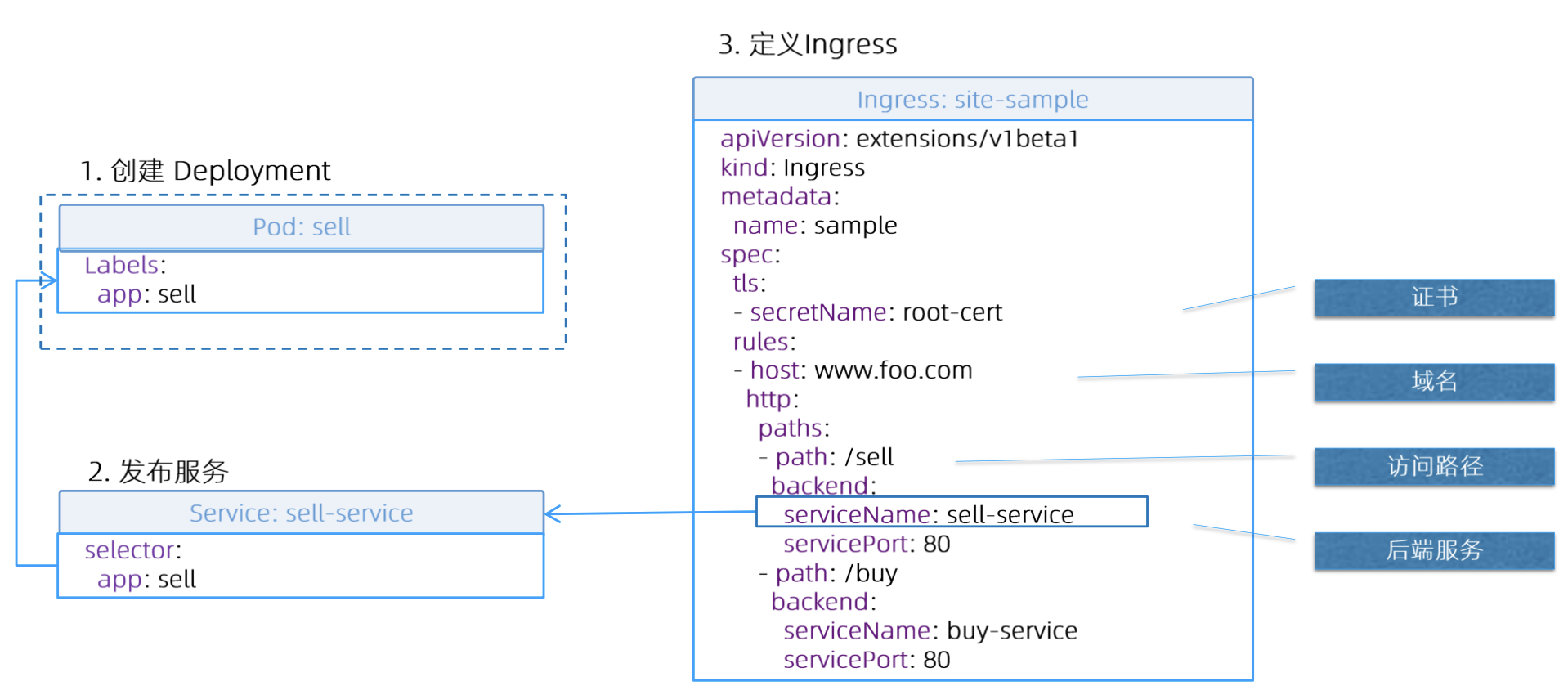
  1. Ingress
    • Ingress 是一层反向代理
    • 根据 hostnamepath 将流量转发到不同的服务,使得同一个负载均衡器用于多个后端应用
    • Ingress Spec转发规则的集合
  2. Ingress Controller
    • 负载均衡配置
    • 边缘路由配置
    • DNS 配置

逻辑结构

image-20230924105453073

TLS

CN = Common Name,如果为 *,表示不做域名校验

1
2
3
4
5
6
7
8
9
$ openssl req -x509 -nodes -days 365 -newkey rsa:2048 -keyout tls.key -out tls.crt -subj "/CN=z.com/O=z" -addext "subjectAltName = DNS:z.com"
Generating a RSA private key
..................................+++++
...........+++++
writing new private key to 'tls.key'
-----

$ kubectl create secret tls z-tls --cert=./tls.crt --key=./tls.key
secret/z-tls created

Ingress

kubernetes.io/ingress.class 指定 IngressClass,再通过 IngressClass 关联 Ingress Controller

Ingress Controller 应遵循统一规范,只解析需要解析的 Ingress

1
2
3
4
5
6
7
8
9
10
11
12
13
14
15
16
17
18
19
20
21
22
apiVersion: networking.k8s.io/v1
kind: Ingress
metadata:
name: gateway
annotations:
kubernetes.io/ingress.class: "nginx"
spec:
tls:
- hosts:
- z.com
secretName: z-tls
rules:
- host: z.com
http:
paths:
- path: "/"
pathType: Prefix
backend:
service:
name: nginx-basic
port:
number: 80
1
2
3
$ k get ingressclasses.networking.k8s.io -A
NAME CONTROLLER PARAMETERS AGE
nginx k8s.io/ingress-nginx <none> 73s
1
2
3
4
5
6
7
8
9
10
11
12
13
14
15
16
17
18
19
20
apiVersion: networking.k8s.io/v1
kind: IngressClass
metadata:
annotations:
kubectl.kubernetes.io/last-applied-configuration: |
{"apiVersion":"networking.k8s.io/v1","kind":"IngressClass","metadata":{"annotations":{},"labels":{"app.kubernetes.io/component":"controller","app.kubernetes.io/instance":"ingress-nginx","app.kubernetes.io/managed-by":"Helm","app.kubernetes.io/name":"ingress-nginx","app.kubernetes.io/version":"1.0.0","helm.sh/chart":"ingress-nginx-4.0.1"},"name":"nginx"},"spec":{"controller":"k8s.io/ingress-nginx"}}
creationTimestamp: "2022-09-24T03:01:44Z"
generation: 1
labels:
app.kubernetes.io/component: controller
app.kubernetes.io/instance: ingress-nginx
app.kubernetes.io/managed-by: Helm
app.kubernetes.io/name: ingress-nginx
app.kubernetes.io/version: 1.0.0
helm.sh/chart: ingress-nginx-4.0.1
name: nginx
resourceVersion: "81101"
uid: f2d56aa2-a59f-49c9-a8dc-d4c862761604
spec:
controller: k8s.io/ingress-nginx
1
2
3
4
5
6
7
8
9
10
11
12
13
14
15
16
17
18
19
20
21
22
23
24
25
26
27
28
29
30
31
32
33
34
35
$ k apply -f z-ingress.yaml
ingress.networking.k8s.io/gateway created

$ k get ingress gateway -owide
NAME CLASS HOSTS ADDRESS PORTS AGE
gateway <none> z.com 192.168.191.153 80, 443 13m

$ k describe ingress gateway
Name: gateway
Labels: <none>
Namespace: default
Address: 192.168.191.153
Default backend: default-http-backend:80 (<error: endpoints "default-http-backend" not found>)
TLS:
z-tls terminates z.com
Rules:
Host Path Backends
---- ---- --------
z.com
/ nginx-basic:80 (192.168.185.13:80,192.168.185.14:80,192.168.185.15:80)
Annotations: kubernetes.io/ingress.class: nginx
Events:
Type Reason Age From Message
---- ------ ---- ---- -------
Normal Sync 8m21s (x3 over 11m) nginx-ingress-controller Scheduled for sync

$ k get endpoints nginx-basic
NAME ENDPOINTS AGE
nginx-basic 192.168.185.13:80,192.168.185.14:80,192.168.185.15:80 18h

$ k get po -n ingress-nginx -owide
NAME READY STATUS RESTARTS AGE IP NODE NOMINATED NODE READINESS GATES
ingress-nginx-admission-create-pp5hp 0/1 Completed 0 19m 192.168.185.20 mac-k8s <none> <none>
ingress-nginx-admission-patch-252nh 0/1 Completed 1 19m 192.168.185.19 mac-k8s <none> <none>
ingress-nginx-controller-75f58fbf6b-ghqjg 1/1 Running 0 19m 192.168.185.21 mac-k8s <none> <none>
1
2
3
4
5
6
7
8
9
10
11
12
13
14
15
16
17
18
19
20
21
22
23
24
25
26
27
28
29
30
31
32
33
apiVersion: networking.k8s.io/v1
kind: Ingress
metadata:
annotations:
kubectl.kubernetes.io/last-applied-configuration: |
{"apiVersion":"networking.k8s.io/v1","kind":"Ingress","metadata":{"annotations":{"kubernetes.io/ingress.class":"nginx"},"name":"gateway","namespace":"default"},"spec":{"rules":[{"host":"z.com","http":{"paths":[{"backend":{"service":{"name":"nginx-basic","port":{"number":80}}},"path":"/","pathType":"Prefix"}]}}],"tls":[{"hosts":["z.com"],"secretName":"z-tls"}]}}
kubernetes.io/ingress.class: nginx
creationTimestamp: "2022-09-24T03:19:58Z"
generation: 2
name: gateway
namespace: default
resourceVersion: "83537"
uid: 876ef437-85df-40dd-a74c-938fd10bbdda
spec:
rules:
- host: z.com
http:
paths:
- backend:
service:
name: nginx-basic
port:
number: 80
path: /
pathType: Prefix
tls:
- hosts:
- z.com
secretName: z-tls
status:
loadBalancer:
ingress:
- ip: 192.168.191.153

直接访问 Ingress Controller 的 Pod IP(会被 ipvs 拦截)

1
2
3
4
5
6
7
8
9
10
11
12
13
14
15
16
17
18
19
20
21
22
23
24
25
26
27
28
29
30
31
32
33
34
35
36
37
38
39
40
41
42
43
44
45
46
47
48
49
50
51
52
53
54
55
56
57
58
59
60
61
62
63
64
65
66
67
68
69
70
71
72
73
74
75
76
77
78
79
80
81
82
83
84
85
86
87
$ curl -H "Host: z.com" https://192.168.185.21 -v -k
* Trying 192.168.185.21:443...
* Connected to 192.168.185.21 (192.168.185.21) port 443 (#0)
* ALPN, offering h2
* ALPN, offering http/1.1
* TLSv1.0 (OUT), TLS header, Certificate Status (22):
* TLSv1.3 (OUT), TLS handshake, Client hello (1):
* TLSv1.2 (IN), TLS header, Certificate Status (22):
* TLSv1.3 (IN), TLS handshake, Server hello (2):
* TLSv1.2 (IN), TLS header, Finished (20):
* TLSv1.2 (IN), TLS header, Supplemental data (23):
* TLSv1.3 (IN), TLS handshake, Encrypted Extensions (8):
* TLSv1.2 (IN), TLS header, Supplemental data (23):
* TLSv1.3 (IN), TLS handshake, Certificate (11):
* TLSv1.2 (IN), TLS header, Supplemental data (23):
* TLSv1.3 (IN), TLS handshake, CERT verify (15):
* TLSv1.2 (IN), TLS header, Supplemental data (23):
* TLSv1.3 (IN), TLS handshake, Finished (20):
* TLSv1.2 (OUT), TLS header, Finished (20):
* TLSv1.3 (OUT), TLS change cipher, Change cipher spec (1):
* TLSv1.2 (OUT), TLS header, Supplemental data (23):
* TLSv1.3 (OUT), TLS handshake, Finished (20):
* SSL connection using TLSv1.3 / TLS_AES_256_GCM_SHA384
* ALPN, server accepted to use h2
* Server certificate:
* subject: O=Acme Co; CN=Kubernetes Ingress Controller Fake Certificate
* start date: Sep 24 03:01:46 2022 GMT
* expire date: Sep 23 03:01:46 2024 GMT
* issuer: O=Acme Co; CN=Kubernetes Ingress Controller Fake Certificate
* SSL certificate verify result: self-signed certificate (18), continuing anyway.
* Using HTTP2, server supports multiplexing
* Connection state changed (HTTP/2 confirmed)
* Copying HTTP/2 data in stream buffer to connection buffer after upgrade: len=0
* TLSv1.2 (OUT), TLS header, Supplemental data (23):
* Using Stream ID: 1 (easy handle 0xaaaad5a01620)
* TLSv1.2 (OUT), TLS header, Supplemental data (23):
> GET / HTTP/2
> Host: z.com
> user-agent: curl/7.81.0
> accept: */*
>
* TLSv1.2 (IN), TLS header, Supplemental data (23):
* TLSv1.3 (IN), TLS handshake, Newsession Ticket (4):
* TLSv1.2 (IN), TLS header, Supplemental data (23):
* TLSv1.3 (IN), TLS handshake, Newsession Ticket (4):
* old SSL session ID is stale, removing
* TLSv1.2 (IN), TLS header, Supplemental data (23):
* Connection state changed (MAX_CONCURRENT_STREAMS == 128)!
* TLSv1.2 (OUT), TLS header, Supplemental data (23):
* TLSv1.2 (IN), TLS header, Supplemental data (23):
< HTTP/2 200
< date: Sun, 24 Sep 2022 03:25:06 GMT
< content-type: text/html
< content-length: 615
< last-modified: Tue, 15 Aug 2022 17:03:04 GMT
< etag: "64dbafc8-267"
< accept-ranges: bytes
< strict-transport-security: max-age=15724800; includeSubDomains
<
<!DOCTYPE html>
<html>
<head>
<title>Welcome to nginx!</title>
<style>
html { color-scheme: light dark; }
body { width: 35em; margin: 0 auto;
font-family: Tahoma, Verdana, Arial, sans-serif; }
</style>
</head>
<body>
<h1>Welcome to nginx!</h1>
<p>If you see this page, the nginx web server is successfully installed and
working. Further configuration is required.</p>

<p>For online documentation and support please refer to
<a href="http://nginx.org/">nginx.org</a>.<br/>
Commercial support is available at
<a href="http://nginx.com/">nginx.com</a>.</p>

<p><em>Thank you for using nginx.</em></p>
</body>
</html>
* TLSv1.2 (IN), TLS header, Supplemental data (23):
* Connection #0 to host 192.168.185.21 left intact

通过 Ingress Service 来访问 - https 的 NodePort 端口为 31590

1
2
3
4
5
6
7
8
9
10
11
12
13
14
15
16
17
18
19
20
21
22
23
24
$ k get service -n ingress-nginx -owide
NAME TYPE CLUSTER-IP EXTERNAL-IP PORT(S) AGE SELECTOR
ingress-nginx-controller NodePort 10.97.88.8 <none> 80:30687/TCP,443:31590/TCP 38m app.kubernetes.io/component=controller,app.kubernetes.io/instance=ingress-nginx,app.kubernetes.io/name=ingress-nginx
ingress-nginx-controller-admission ClusterIP 10.100.139.239 <none> 443/TCP 38m app.kubernetes.io/component=controller,app.kubernetes.io/instance=ingress-nginx,app.kubernetes.io/name=ingress-nginx

$ curl -H 'Host: z.com' https://10.97.88.8 -ksI
HTTP/2 200
date: Sun, 24 Sep 2022 03:45:22 GMT
content-type: text/html
content-length: 615
last-modified: Tue, 15 Aug 2022 17:03:04 GMT
etag: "64dbafc8-267"
accept-ranges: bytes
strict-transport-security: max-age=15724800; includeSubDomains

$ curl -H 'Host: z.com' https://192.168.191.153:31590 -ksI
HTTP/2 200
date: Sun, 24 Sep 2022 03:43:55 GMT
content-type: text/html
content-length: 615
last-modified: Tue, 15 Aug 2022 17:03:04 GMT
etag: "64dbafc8-267"
accept-ranges: bytes
strict-transport-security: max-age=15724800; includeSubDomains

缺陷

Ingress 已毕业,但很难满足所有业务场景
导致很多 Ingress Controller 采用非标准化的方式来实现一些高级功能,主要是借助 Annotation

七层的流量治理是一个很大的范畴,很难通过一个 Ingress Spec 去完整定义 - Service API / (Envoy + Istio)

  1. TLS 配置受限(如无法配置 cypher, dhkey, TLSVersion)
  2. 无法实现基于 Header 来配置规则
  3. 无法实现 Rewriting
    • Header rewriting
    • URI rewriting

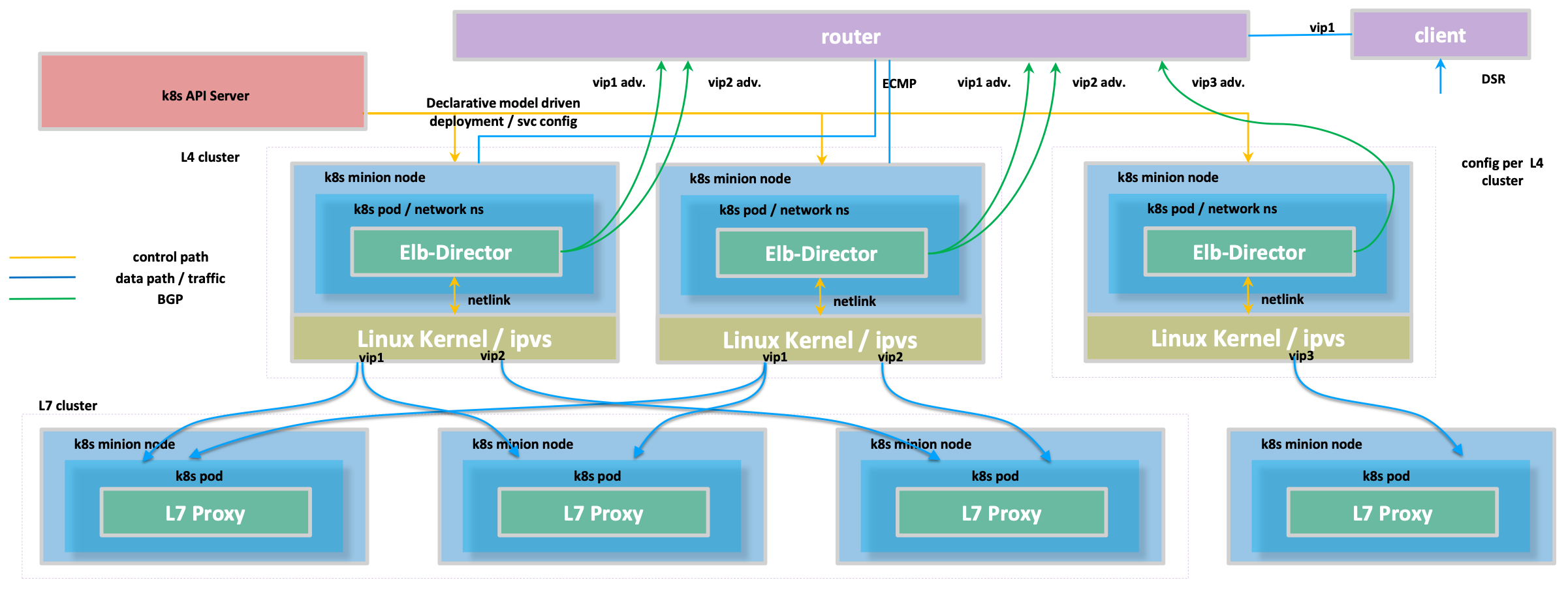
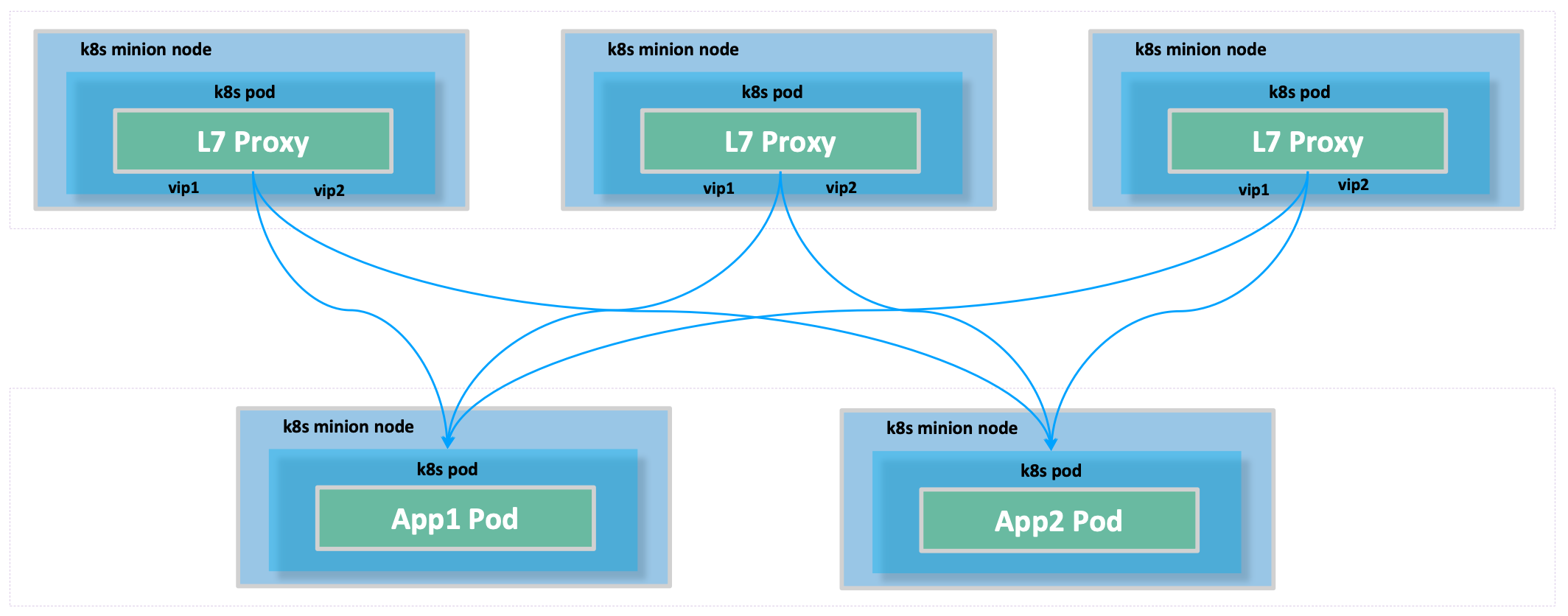
实战案例

image-20230924164001922

L4

image-20230924164038458

L7 - IP in IP Tunneling

image-20230924164100548

数据流

image-20230924164216219