RAG - Qdrant
Features
Getting Started
Introduction
- Vector databases are a relatively new way for interacting with abstract data representations derived from opaque machine learning models such as deep learning architectures.
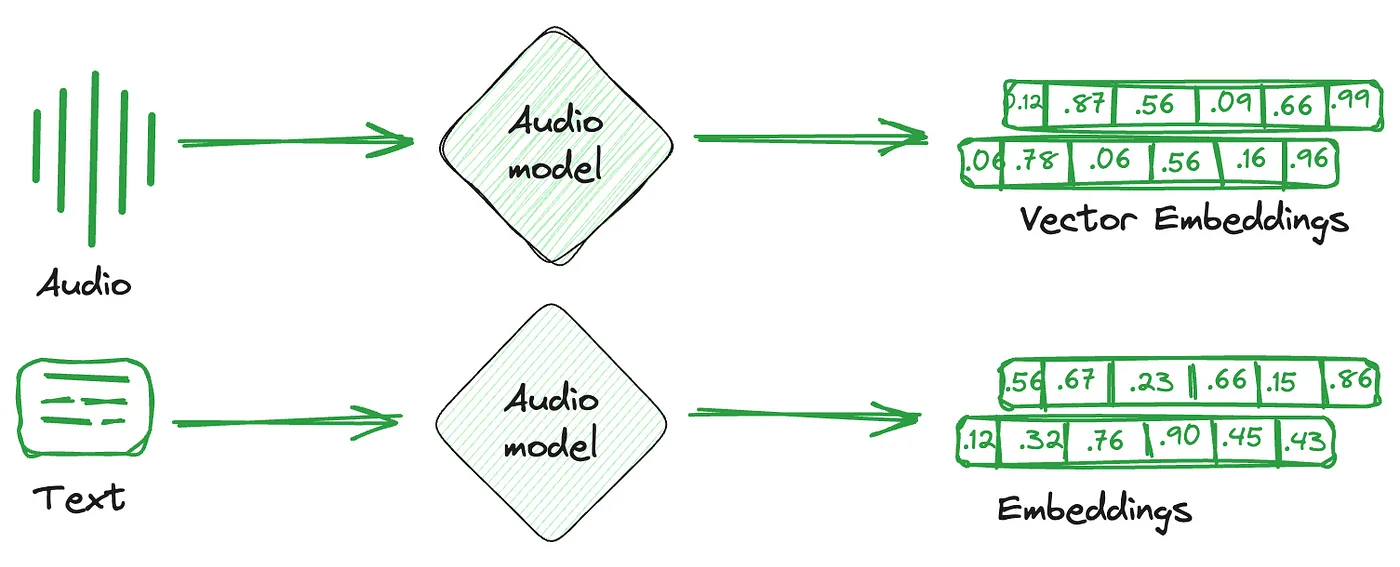
- These representations are often called vectors or embeddings and they are a compressed version of the data used to train a machine learning model to accomplish a task like sentiment analysis, speech recognition, object detection, and many others.
What is Qdrant?
- Qdrant “is a vector similarity search engine that provides a production-ready service with a convenient API to store, search, and manage points (i.e. vectors) with an additional payload.”
- You can think of the payloads as additional pieces of information that can help you hone in on your search and also receive useful information that you can give to your users.
- You can get started using Qdrant with the Python qdrant-client, by pulling the latest docker image of qdrant and connecting to it locally.
What Are Vector Databases?
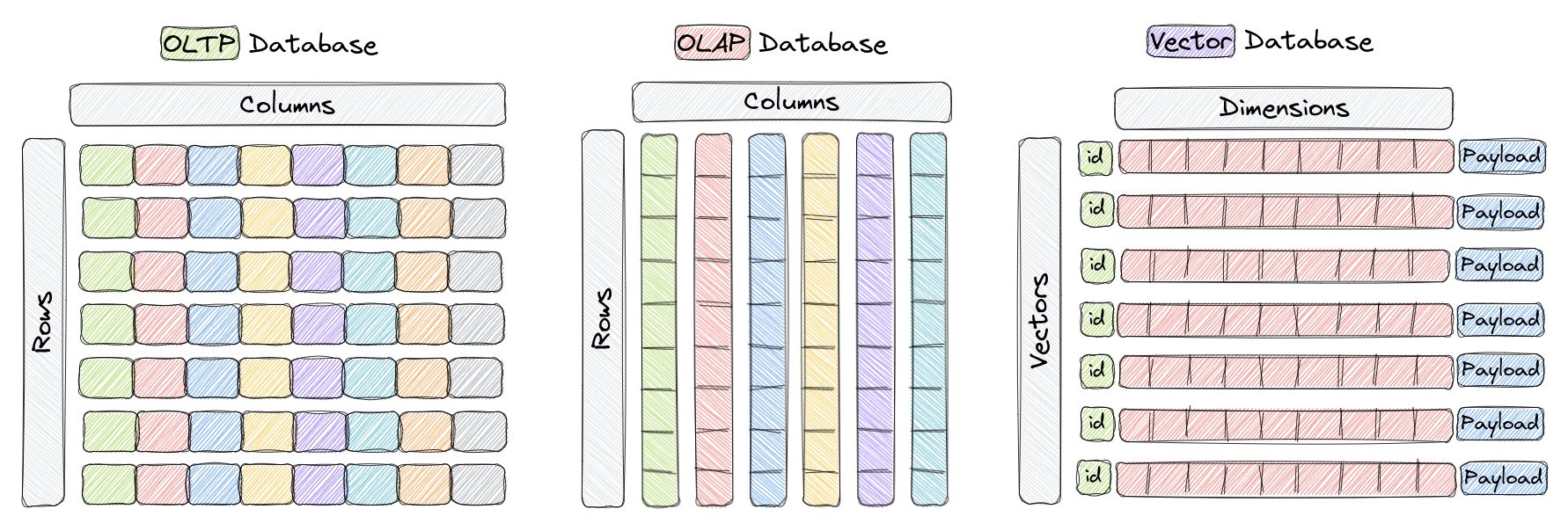
- Vector databases are a type of database designed to store and query high-dimensional vectors efficiently.
- In traditional OLTP and OLAP databases, data is organized in rows and columns (and these are called Tables), and queries are performed based on the values in those columns.
- However, in certain applications including image recognition, natural language processing, and recommendation systems, data is often represented as vectors in a high-dimensional space, and these vectors, plus an id and a payload, are the elements we store in something called a Collection within a vector database like Qdrant.
- A vector in this context is a mathematical representation of an object or data point, where elements of the vector implicitly or explicitly correspond to specific features or attributes of the object.
- Vector databases are optimized for storing and querying these high-dimensional vectors efficiently, and they often using specialized data structures and indexing techniques such as Hierarchical Navigable Small World (HNSW) – which is used to implement Approximate Nearest Neighbors – and Product Quantization, among others.
- These databases enable fast similarity and semantic search while allowing users to find vectors that are the closest to a given query vector based on some distance metric.
- The most commonly used distance metrics are Euclidean Distance, Cosine Similarity, and Dot Product, and these three are fully supported Qdrant.
Cosine similarity
direction
- Cosine similarity is a way to measure how similar two vectors are.
- To simplify, it reflects whether the vectors have the same direction (similar) or are poles apart.
- Cosine similarity is often used with text representations to compare how similar two documents or sentences are to each other.
- The output of cosine similarity ranges from -1 to 1, where -1 means the two vectors are completely dissimilar, and 1 indicates maximum similarity.
$$
S_c(A,B) = \frac{A \cdot B}{|A| |B|}
$$
Dot Product
length + direction
- Unlike cosine similarity, it also considers the length of the vectors.
- This might be important when, for example, vector representations of your documents are built based on the term (word) frequencies.
- The dot product similarity is calculated by multiplying the respective values in the two vectors and then summing those products.
- The higher the sum, the more similar the two vectors are.
- If you normalize the vectors (so the numbers in them sum up to 1), the dot product similarity will become the cosine similarity.
$$
A \cdot B = \sum_{i=1}^{n}A_iB_i
$$
Euclidean Distance
- Euclidean distance is a way to measure the distance between two points in space, similar to how we measure the distance between two places on a map.
- It’s calculated by finding the square root of the sum of the squared differences between the two points’ coordinates.
- This distance metric is also commonly used in machine learning to measure how similar or dissimilar two vectors are.
$$
d(P,Q) = \sqrt{\sum_{i=1}^{n}(P_i-Q_i)^2}
$$
Why do we need Vector Databases?
- Vector databases play a crucial role in various applications that require similarity search.
- By taking advantage of their efficient indexing and searching techniques, vector databases enable faster and more accurate retrieval of unstructured data already represented as vectors, which can help put in front of users the most relevant results to their queries.
- In addition, other benefits of using vector databases include:
- Efficient storage and indexing of high-dimensional data.
- Ability to handle large-scale datasets with billions of data points.
- Support for real-time analytics and queries.
- Ability to handle vectors derived from complex data types such as images, videos, and natural language text.
- Improved performance and reduced latency in machine learning and AI applications.
- Reduced development and deployment time and cost compared to building a custom solution.
High-Level Overview of Qdrant’s Architecture
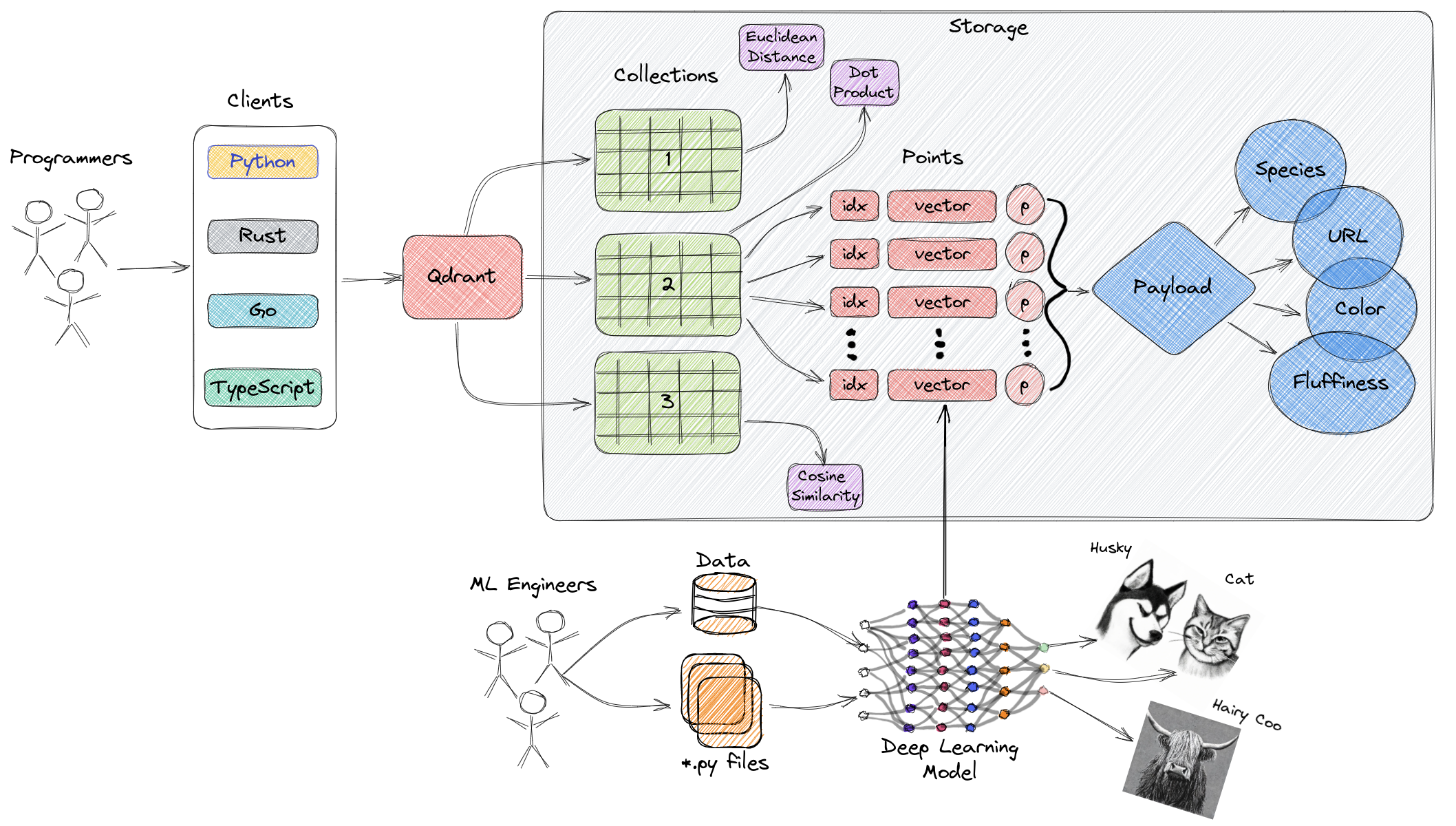
Collections
- A collection is a named set of points (vectors with a payload) among which you can search.
- The vector of each point within the same collection must have the same dimensionality and be compared by a single metric.
- Named vectors can be used to have multiple vectors in a single point, each of which can have their own dimensionality and metric requirements.
Distance Metrics
- These are used to measure similarities among vectors and they must be selected at the same time you are creating a collection.
- The choice of metric depends on the way the vectors were obtained and, in particular, on the neural network that will be used to encode new queries.
Points
The points are the central entity that Qdrant operates with and they consist of a vector and an optional id and payload.
| Component | Desc |
|---|---|
| ID | a unique identifier for your vectors |
| Vector | a high-dimensional representation of data |
| Payload | A payload is a JSON object with additional data you can add to a vector. |
Storage
- Qdrant can use one of two options for storage
- In-memory storage (Stores all vectors in RAM, has the highest speed since disk access is required only for persistence)
- or Memmap storage, (creates a virtual address space associated with the file on disk).
Clients
- the programming languages you can use to connect to Qdrant.
How Does Vector Search Work in Qdrant?
A Brief History of Search
Inverted index
- In the simplest form, it’s an appendix to a book, typically put at its end, with a list of the essential terms-and links to pages they occur at.
- If you are looking for a specific topic in a particular book, you can try to find a related phrase and quickly get to the correct page.
- Of course, assuming you know the proper term.
- If you don’t, you must try and fail several times or find somebody else to help you form the correct query.

Tokenization
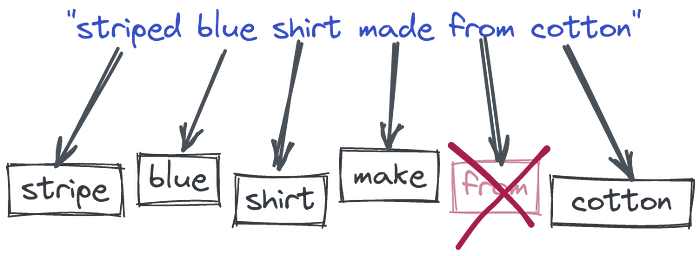
- we allowed our users to provide many words and started splitting them into pieces.
- That allowed finding some documents which do not necessarily contain all the query words, but possibly part of them.
- We also started converting words into their root forms to cover more cases, removing stopwords, etc.
- Still, the idea behind the whole process is derived from the most straightforward keyword-based search known since the Middle Ages, with some tweaks.
Vectorization
Token-based Vector - Sparse - Token
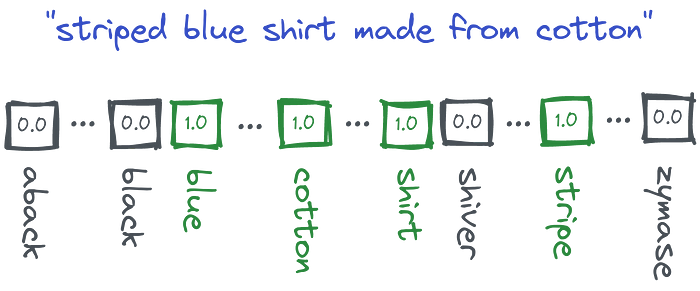
- Technically speaking, we encode the documents and queries into so-called sparse vectors where each position has a corresponding word from the whole dictionary.
- If the input text contains a specific word, it gets a non-zero value at that position.
- But in reality, none of the texts will contain more than hundreds of different words.
- So the majority of vectors will have thousands of zeros and a few non-zero values. - sparse
- And they might be already used to calculate some word-based similarity by finding the documents which have the biggest overlap.
- Sparse vectors have relatively high dimensionality - equal to the size of the dictionary
- And the dictionary is obtained automatically from the input data.
- So if we have a vector, we are able to partially reconstruct the words used in the text that created that vector.
The Tower of Babel
- Once we realized that people might describe the same concept with different words, we started building lists of synonyms to convert the query to a normalized form.
- But that won’t work for the cases we didn’t foresee.
- Still, we need to craft and maintain our dictionaries manually, so they can support the language that changes over time.
- Another difficult issue comes to light with multilingual scenarios.
- Old methods require setting up separate pipelines and keeping humans in the loop to maintain the quality.
The Representation Revolution
Embedding - Dense - Meaning
- The latest research in Machine Learning for NLP is heavily focused on training Deep Language Models.
- The neural network takes a large corpus of text as input and creates a mathematical representation of the words in the form of vectors.
- These vectors are created in such a way that words with similar meanings and occurring in similar contexts are grouped together and represented by similar vectors.
- And we can also take, for example, an average of all the word vectors to create the vector for a whole text (e.g query, sentence, or paragraph).
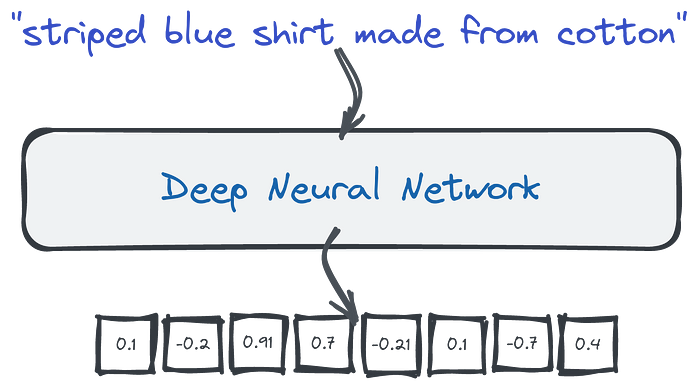
- We can take those dense vectors produced by the network and use them as a different data representation.
- They are dense because neural networks will rarely produce zeros at any position.
- In contrary to sparse ones, they have a relatively low dimensionality — hundreds or a few thousand only. - 768
- Unfortunately, if we want to have a look and understand the content of the document by looking at the vector it’s no longer possible.
- Dimensions are no longer representing the presence of specific words.
- Dense vectors can capture the meaning, not the words used in a text.
- That being said, LLM can automatically handle synonyms.
- Moreso, since those neural networks might have been trained with multilingual corpora, they translate the same sentence, written in different languages, to similar vector representations, also called embeddings.
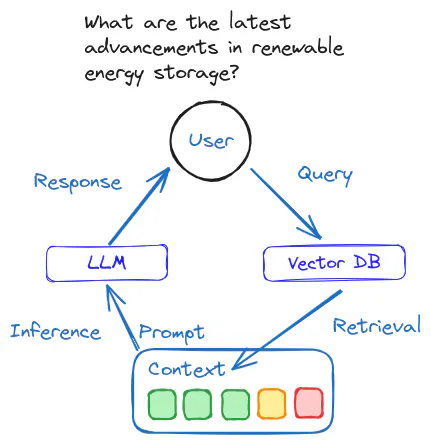
- And we can compare them to find similar pieces of text by calculating the distance to other vectors in our database.
- Input queries contain different words, but they are still converted into similar vector representations, because the neural encoder can capture the meaning of the sentences. That feature can capture synonyms but also different languages.
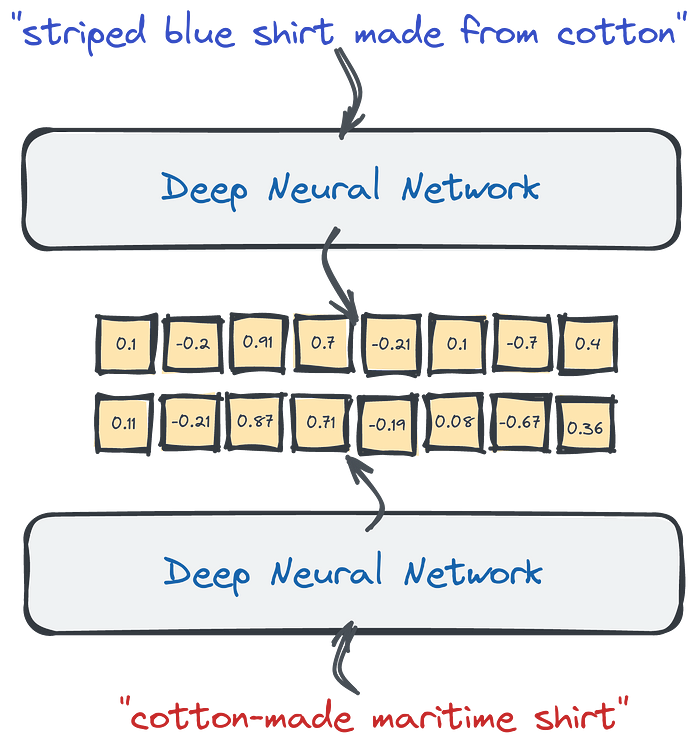
- Vector search is a process of finding similar objects based on their embeddings similarity.
- The good thing is, you don’t have to design and train your neural network on your own.
- Many pre-trained models are available, either on HuggingFace or by using libraries like SentenceTransformers.
- If you, however, prefer not to get your hands dirty with neural models, you can also create the embeddings with SaaS tools, like co.embed API.
Why Qdrant?
- The challenge with vector search arises when we need to find similar documents in a big set of objects.
- If we want to find the closest examples, the naive approach would require calculating the distance to every document.
- That might work with dozens or even hundreds of examples but may become a bottleneck if we have more than that.
- When we work with relational data, we set up database indexes to speed things up and avoid full table scans. And the same is true for vector search.
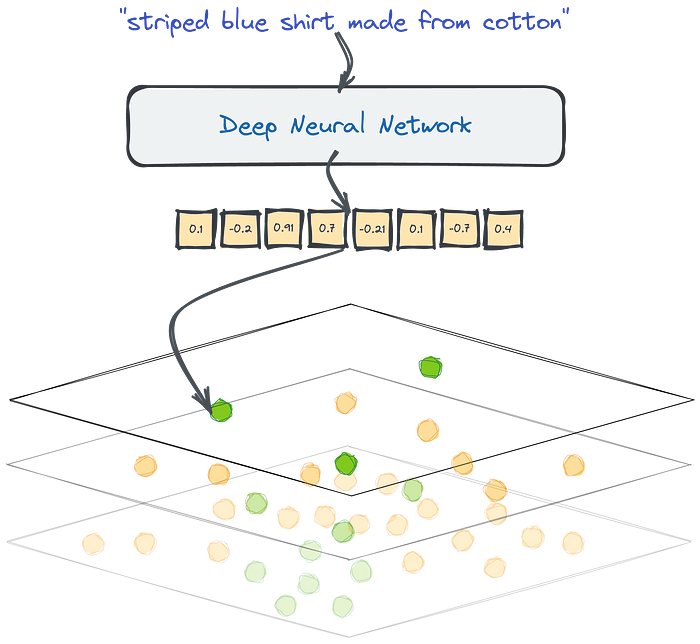
- Qdrant is a fully-fledged vector database that speeds up the search process by using a graph-like structure to find the closest objects in sublinear time.
- So you don’t calculate the distance to every object from the database, but some candidates only.
- Vector search with Qdrant.
- Thanks to HNSW graph we are able to compare the distance to some of the objects from the database, not to all of them.
- While doing a semantic search at scale, because this is what we sometimes call the vector search done on texts, we need a specialized tool to do it effectively — a tool like Qdrant.
- Vector search is an exciting alternative to sparse methods.
- It solves the issues we had with the keyword-based search without needing to maintain lots of heuristics manually.
- It requires an additional component, a neural encoder, to convert text into vectors.
- You can search for any kind of data as long as there is a neural network that would vectorize your data type.
- Do you think about a reverse image search? That’s also possible with vector embeddings.
- Qdrant is designed to find the approximate nearest data points in your dataset.
Filtering Clauses
- Qdrant lets you to filter collections by combining conditions and clauses.
- Clauses are different logical operations, such as OR, AND, and NOT.
- You can nest them inside each other to create any boolean expression.
Must
When using must, the clause becomes true only if every condition listed inside must is satisfied.
In this sense, must is equivalent to the operator AND.
1 | POST /collections/demo/points/scroll |
Should
When using should, the clause becomes true if at least one condition listed inside should is satisfied.
In this sense, should is equivalent to the operator OR.
1 | POST /collections/demo/points/scroll |
Must Not
When using must_not, the clause becomes true if none if the conditions listed inside should is satisfied.
In this sense, must_not is equivalent to the expression (NOT A) AND (NOT B) AND (NOT C).
1 | POST /collections/demo/points/scroll |
Combination
You can also use join different clauses
In this case, the conditions are combined by AND.
1 | POST /collections/demo/points/scroll |
Also, the conditions could be recursively nested.
1 | POST /collections/demo/points/scroll |
Nested Filters
Add Vectors with Payloads
1 | PUT collections/dinosaurs/points |
Basic Filtering with match
1 | POST /collections/dinosaurs/points/scroll |
- Both points match these conditions, as:
- The “t-rex” eats meat and likes it.
- The “diplodocus” eats meat but doesn’t like it.
- However, if you want to retrieve only the points where both conditions are true for the same element within the array (e.g., the “t-rex” with ID 1), you’ll need to use a nested filter.
Advanced Filtering with Nested Object Filters
- To apply the filter at the array element level, you use the nested filter condition.
- This ensures that the food and likes values are evaluated together within each array element.
- Nested filters treat each array element as a separate object, applying the filter independently to each element.
- The parent document (in this case, the dinosaur point) matches the filter if any one array element meets all conditions.
1 | POST /collections/dinosaurs/points/scroll |
Combining has_id with Nested Filters
- Note that has_id cannot be used inside a nested filter.
- If you need to filter by ID as well, include the has_id condition as a separate clause
1 | POST /collections/dinosaurs/points/scroll |
Full Text Filtering
Try filtering with exact phrase (substring match)
- Qdrant supports text filtering by default using exact matches, but note that this will not tokenize the text.
- Substring matching in unindexed text isn’t flexible enough for variations.
1 | POST /collections/star_charts/points/scroll |
Index the description field
- To make filtering more powerful and flexible, we’ll index the description field.
- This will tokenize the text, allowing for more complex queries such as filtering for phrases like “cave colonies.”
- We use a word tokenizer, and only tokens that are between 5 and 20 characters will be indexed.
- You should always index a field before filtering.
- If you use filtering before you create an index, Qdrant will search through the entire dataset in an unstructured way.
- Your search performance will be very slow
1 | PUT /collections/star_charts/index |
Try the filter again
- Now you will filter for all tokens “cave” AND “colonies” from the descriptions.
1 | POST /collections/star_charts/points/scroll |
- Phrase search requires tokens to come in and exact sequence, and by indexing all words we are ignoring the sequence completely and filtering for relevant keywords.
Search with ColBERT Multivectors
- In Qdrant, multivectors allow you to store and search multiple vectors for each point in your collection.
- Additionally, you can store payloads, which are key-value pairs containing metadata about each point.
- This tutorial will show you how to create a collection, insert points with multivectors and payloads, and perform a search.
Create a collection with multivectors
- To use multivectors, you need to configure your collection to store multiple vectors per point.
- The collection’s configuration specifies the vector size, distance metric, and multivector settings, such as the comparator function.
1 | PUT collections/multivector_collection |
Insert points with multivectors and payloads
- You can insert points where each point contains multiple vectors and a payload.
1 | PUT collections/multivector_collection/points |
Query the collection
- To perform a search with multivectors, you can pass multiple query vectors.
- Qdrant will compare the query vectors against the multivectors and return the most similar results based on the comparator defined for the collection (max_sim).
- You can also request the payloads to be returned along with the search results.
1 | POST collections/multivector_collection/points/query |
Sparse Vector Search
- In this tutorial, you’ll learn how to create a collection with sparse vectors in Qdrant, insert points with sparse vectors, and query them based on specific indices and values.
- Sparse vectors allow you to efficiently store and search data with only certain dimensions being non-zero, which is particularly useful in applications like text embeddings or handling sparse data.
Create a collection with sparse vectors
- The first step is to create a collection that can handle sparse vectors.
- Unlike dense vectors that represent full feature spaces, sparse vectors only store non-zero values in select positions, making them more efficient.
- We’ll create a collection called sparse_charts where each point will have sparse vectors to represent keywords or other features.
- sparse_vectors
- Defines that the collection supports sparse vectors
- in this case, indexed by “keywords.” This can represent keyword-based features where only certain indices (positions) have non-zero values.
1 | PUT /collections/sparse_charts |
Insert data points with sparse vectors
- Each point will include:
- indices: The positions of non-zero values in the vector space.
- values: The corresponding values at those positions, representing the importance or weight of each keyword or feature.
- Each point is represented by its sparse vector, defined with specific keyword indices and values.
- These could represent the relative importance of keywords associated with those positions
1 | PUT /collections/sparse_charts/points |
Run a query with specific indices and values
- This query searches for points that have non-zero values at the positions
[1, 42]and specific values[0.22, 0.8]. - This is a targeted query and expects a close match to these indices and values.
- Point 1 would be the best match since its sparse vector includes these indices that maximize the measure of similarity.
- In this case, this is the dot product calculation.
1 | POST /collections/sparse_charts/points/query |
Breaking down the scoring mechanism
- This query searches for points with non-zero values at positions
[0, 2, 4]and values[0.4, 0.9, 0.8]. - It’s a broader search that might return multiple matches with overlapping indices and similar values.
1 | POST /collections/sparse_charts/points/query |
1 | { |
How we got this result
- Let’s assume the sparse vectors of Point 4 and Point 5 are as follows
- Point 4: [0.4, 0, 0, 0.3, 0] (Matches query at index 0 with value 0.4)
- Point 5: [0, 0, 0.9, 0, 0.8] (Matches query at indices 2 and 4 with values 0.9 and 0.8)
- The dot product would look something like:
- Dot product for Point 4:
- Query: [0.4, 0, 0.9, 0, 0.8]
- Point 4: [0.4, 0, 0, 0.3, 0]
- Dot product: ( 0.4 * 0.4 = 0.16 )
- Dot product for Point 5:
- Query: [0.4, 0, 0.9, 0, 0.8]
- Point 5: [0, 0, 0.9, 0, 0.8]
- Dot product: ( 0.9 * 0.9 + 0.8 * 0.8 = 0.81 + 0.64 = 1.45 )
- Dot product for Point 4:
- Since Point 5 has a higher dot product score, it would be considered a better match than Point 4.
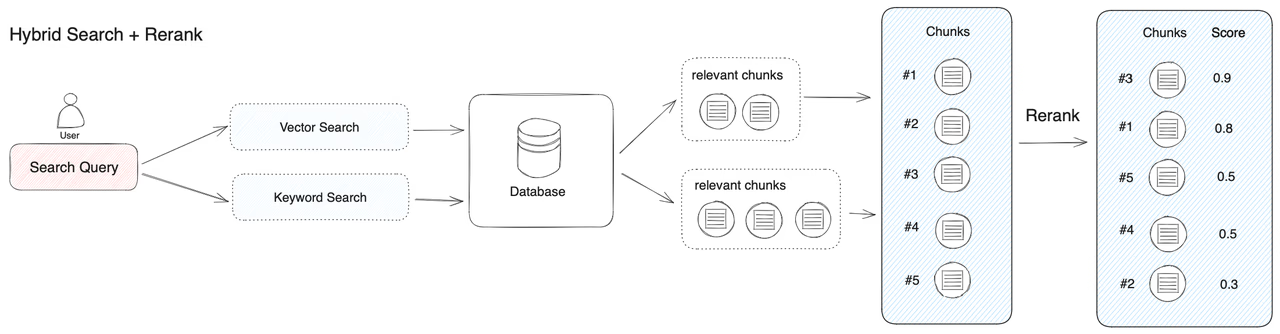
Hybrid Search with Sparse and Dense Vectors
- In this tutorial, we will continue to explore hybrid search in Qdrant, focusing on both sparse and dense vectors.
Create a collection with sparse vectors
- This collection will support both dense vectors for semantic similarity and sparse vectors for keyword-based search.
- vectors
- Configures the dense vector space with 4 dimensions, using cosine similarity for distance measurement.
- sparse_vectors
- Configures the collection to support sparse vectors for keyword-based indexing.
1 | PUT /collections/terraforming_plans |
Insert data points with descriptions
- Each point will have both a dense and sparse vector, along with a description in the payload.
- Dense vector
- Represents the semantic features of the data point in a numerical form.
- Sparse vector (keywords):
- Represents the keyword features, with indices mapped to specific keywords and values representing their relevance.
- payload
- Provides a short description of the data point’s content, making it easier to understand what each vector represents.
1 | PUT /collections/terraforming_plans/points |
Perform a hybrid search
- Next, perform a hybrid search on the terraforming_plans collection
- combining both keyword-based (sparse) and semantic (dense) search using Reciprocal Rank Fusion (RRF).
1 | POST /collections/terraforming_plans/points/query |
- prefetch: Contains two subqueries:
- Keyword-based query: Uses the sparse vector (keywords) to search by keyword relevance.
- Dense vector query: Uses the dense vector for semantic similarity search.
- fusion: rrf
- Combines the results from both queries using Reciprocal Rank Fusion (RRF), giving priority to points ranked highly in both searches.
- limit:
- Limits the number of results to the top 10.
Summary
- Performed a hybrid search combining keyword relevance and dense vector similarity using Reciprocal Rank Fusion.
- This approach allows for effective hybrid search, combining textual and semantic search capabilities.
Separate User Data in Multitenant Setups
- In this tutorial, we will cover how to implement multitenancy in Qdrant.
- Multitenancy allows you to host multiple tenants or clients within a single instance of Qdrant, ensuring data isolation and access control between tenants.
- This feature is essential for use cases where you need to serve different clients while maintaining separation of their data.
Create a collection
- Imagine you are running a recommendation service where different departments (tenants) store their data in Qdrant.
- By using payload-based multitenancy, you can keep all tenants’ data in a single collection but filter the data based on a unique tenant identifier.
Build a tenant index
- Qdrant supports efficient indexing based on the tenant’s identifier to optimize multitenant searches.
- By enabling tenant indexing, you can structure data on disk for faster tenant-specific searches, improving performance and reducing disk reads.
1 | PUT /collections/central_library/index |
Load vectors for tenants
- Next, you will load data into the shared collection.
- Each data point is tagged with a tenant-specific identifier in the payload.
- This identifier (group_id) ensures that tenants’ data remains isolated even when stored in the same collection.
1 | PUT /collections/central_library/points |
Perform a filtered query
- When querying the shared collection, use the group_id payload field to ensure tenants can only access their own data.
- The filter in this query ensures that only points belonging to the specified group_id are returned.
1 | POST /collections/central_library/points/query |
Group query results
- You can group query results by specific fields, such as station, to get an overview of each tenant’s data.
- This query groups results by station and limits the number of groups and the number of points per group.
1 | POST /collections/central_library/points/query/groups |
1 | { |
API && SDKs
| API Reference | URL |
|---|---|
| REST API | https://api.qdrant.tech/api-reference |
| gRPC API | https://github.com/qdrant/qdrant/blob/master/docs/grpc/docs.md |
- For each REST endpoint, there is a corresponding gRPC method.
- The choice between gRPC and the REST API is a trade-off between convenience and speed.
- gRPC is a binary protocol and can be more challenging to debug.
- We recommend using gRPC if you are already familiar with Qdrant and are trying to optimize the performance of your application.
FastEmbed
Embedding - fast / efficient / accurate
- FastEmbed is a lightweight Python library built for embedding generation.
- It supports popular embedding models and offers a user-friendly experience for embedding data into vector space.
- By using FastEmbed, you can ensure that your embedding generation process is not only fast and efficient but also highly accurate, meeting the needs of various machine learning and natural language processing applications.
- FastEmbed easily integrates with Qdrant for a variety of multimodal search purposes.
Why is FastEmbed useful?
Light
- Unlike other inference frameworks, such as PyTorch, FastEmbed requires very little external dependencies.
- Because it uses the ONNX runtime, it is perfect for serverless environments like AWS Lambda.
Fast
- By using ONNX, FastEmbed ensures high-performance inference across various hardware platforms.
Accurate
- FastEmbed aims for better accuracy and recall than models like OpenAI’s Ada-002.
- It always uses model which demonstrate strong results on the MTEB leaderboard.
Support
- FastEmbed supports a wide range of models, including multilingual ones, to meet diverse use case needs.
How to Generate Sparse Vectors with SPLADE
- SPLADE is a novel method for learning sparse text representation vectors, outperforming BM25 in tasks like information retrieval and document classification.
- Its main advantage is generating efficient and interpretable sparse vectors, making it effective for large-scale text data.
1 | from fastembed import SparseTextEmbedding, SparseEmbedding |
Observations
- The relative order of importance is quite useful. The most important tokens in the sentence have the highest weights.
- Term Expansion
- The model can expand the terms in the document.
- This means that the model can generate weights for tokens that are not present in the document but are related to the tokens in the document.
- This is a powerful feature that allows the model to capture the context of the document.
Design choices
- The weights are not normalized.
- This means that the sum of the weights is not 1 or 100.
- This is a common practice in sparse embeddings, as it allows the model to capture the importance of each token in the document.
- Tokens are included in the sparse vector only if they are present in the model’s vocabulary.
- This means that the model will not generate a weight for tokens that it has not seen during training.
- Tokens do not map to words directly
- allowing you to gracefully handle typo errors and out-of-vocabulary tokens.
How to Generate ColBERT Multivectors with FastEmbed
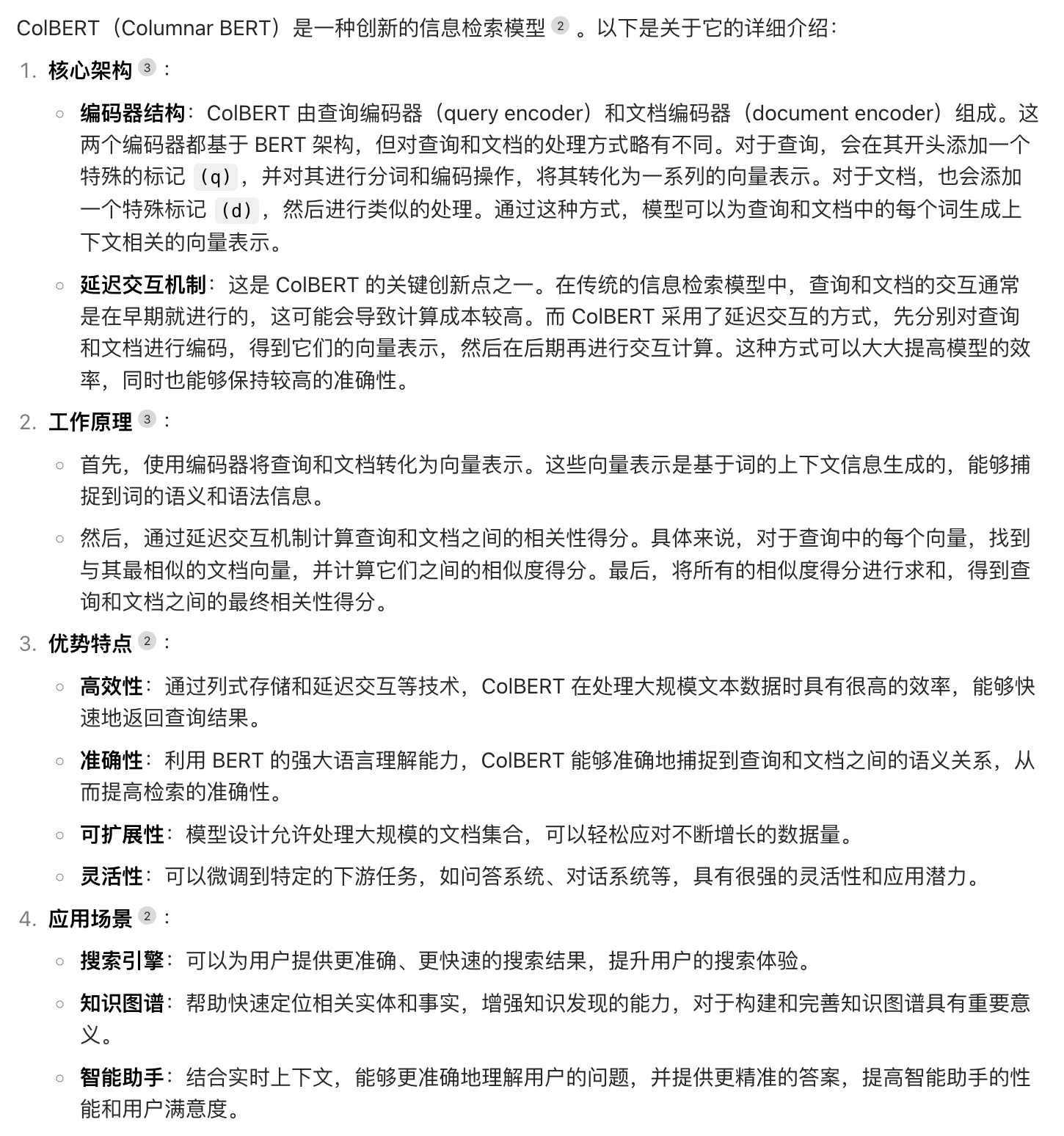
- With FastEmbed, you can use ColBERT to generate multivector embeddings.
- ColBERT is a powerful retrieval model that combines the strength of BERT embeddings with efficient late interaction techniques.
- FastEmbed will provide you with an optimized pipeline to utilize these embeddings in your search tasks.
- Please note that ColBERT requires more resources than other no-interaction models.
- We recommend you use ColBERT as a re-ranker instead of a first-stage retriever.
- The first-stage retriever can retrieve 100-500 examples. This task would be done by a simpler model.
- Then, you can rank the leftover results with ColBERT.
- ColBERT computes document and query embeddings differently. Make sure to use the corresponding methods.
- Don’t worry about query embeddings having the bigger shape in this case.
- ColBERT authors recommend to pad queries with [MASK] tokens to 32 tokens.
- They also recommend truncating queries to 32 tokens
- however, we don’t do that in FastEmbed so that you can put some straight into the queries.
1 | from fastembed import LateInteractionTextEmbedding |
Concepts
| Concept | Desc |
|---|---|
| Collections | Collections define a named set of points that you can use for your search. |
| Payload | A Payload describes information that you can store with vectors. |
| Points | Points are a record which consists of a vector and an optional payload. |
| Search | Search describes similarity search, which set up related objects close to each other in vector space. |
| Explore | Explore includes several APIs for exploring data in your collections. |
| Hybrid Queries | Hybrid Queries combines multiple queries or performs them in more than one stage. |
| Filtering | Filtering defines various database-style clauses, conditions, and more. |
| Optimizer | Optimizer describes options to rebuild database structures for faster search. They include a vacuum, a merge, and an indexing optimizer. |
| Storage | Storage describes the configuration of storage in segments, which include indexes and an ID mapper. |
| Indexing | Indexing lists and describes available indexes. They include payload, vector, sparse vector, and a filterable index. |
| Snapshots | Snapshots describe the backup/restore process (and more) for each node at specific times. |
Collections
- A collection is a named set of points (vectors with a payload) among which you can search.
- The vector of each point within the same collection must have the same dimensionality and be compared by a single metric.
- Named vectors can be used to have multiple vectors in a single point, each of which can have their own dimensionality and metric requirements.
- Distance metrics are used to measure similarities among vectors.
- The choice of metric depends on the way vectors obtaining and, in particular, on the method of neural network encoder training.
Qdrant supports these most popular types of metrics
- Dot product
- Cosine similarity
- For search efficiency, Cosine similarity is implemented as dot-product over normalized vectors.
- Vectors are automatically normalized during upload
- Euclidean distance
- Manhattan distance
Collection parameters
- In addition to metrics and vector size, each collection uses its own set of parameters that controls collection optimization, index construction, and vacuum.
- These settings can be changed at any time by a corresponding request.
Setting up multitenancy
- How many collections should you create? In most cases, you should only use a single collection with payload-based partitioning.
- This approach is called multitenancy. It is efficient for most of users, but it requires additional configuration.
- When should you create multiple collections? When you have a limited number of users and you need isolation.
- This approach is flexible, but it may be more costly, since creating numerous collections may result in resource overhead.
- Also, you need to ensure that they do not affect each other in any way, including performance-wise.
https://github.com/qdrant/qdrant/blob/master/config/config.yaml
| Option | desc |
|---|---|
| hnsw_config | Indexing |
| wal_config | Write-Ahead-Log related configuration |
| optimizers_config | Optimizer |
| shard_number | which defines how many shards the collection should have. |
| on_disk_payload | defines where to store payload data. If true - payload will be stored on disk only. Might be useful for limiting the RAM usage in case of large payload. |
| quantization_config | Quantization |
- Vectors all live in RAM for very quick access.
- The on_disk parameter can be set in the vector configuration.
- If true, all vectors will live on disk. This will enable the use of memmaps, which is suitable for ingesting a large amount of data.
Collection with multiple vectors
- It is possible to have multiple vectors per record. This feature allows for multiple vector storages per collection.
- To distinguish vectors in one record, they should have a unique name defined when creating the collection.
- Each named vector in this mode has its distance and size
- For rare use cases, it is possible to create a collection without any vector storage.
- For each named vector you can optionally specify hnsw_config or quantization_config to deviate from the collection configuration.
- This can be useful to fine-tune search performance on a vector level.
- Vectors all live in RAM for very quick access.
- On a per-vector basis you can set on_disk to true to store all vectors on disk at all times.
- This will enable the use of memmaps, which is suitable for ingesting a large amount of data.
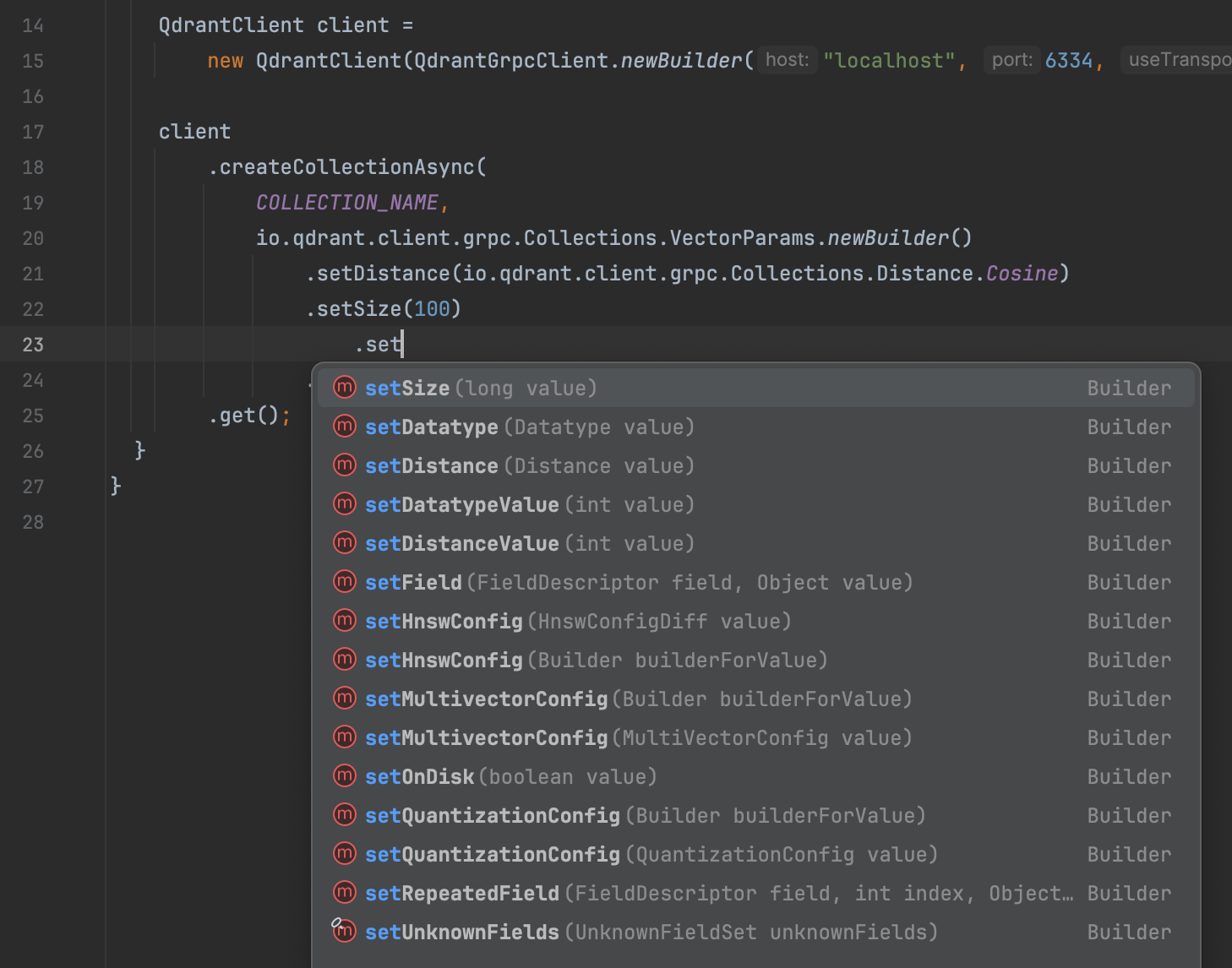
1 | client |
Vector datatypes
- Some embedding providers may provide embeddings in a pre-quantized format.
- One of the most notable examples is the Cohere int8 & binary embeddings.
- Qdrant has direct support for uint8 embeddings, which you can also use in combination with binary quantization.
1 | client |
- Vectors with uint8 datatype are stored in a more compact format, which can save memory and improve search speed at the cost of some precision.
- If you choose to use the uint8 datatype, elements of the vector will be stored as unsigned 8-bit integers, which can take values from 0 to 255.
Collection with sparse vectors
- Qdrant supports sparse vectors as a first-class citizen.
- Sparse vectors are useful for text search, where each word is represented as a separate dimension.
- Collections can contain sparse vectors as additional named vectors along side regular dense vectors in a single point.
- Unlike dense vectors, sparse vectors must be named.
- And additionally, sparse vectors and dense vectors must have different names within a collection.
1 | client |

- Outside of a unique name, there are no required configuration parameters for sparse vectors.
- The distance function for sparse vectors is always Dot and does not need to be specified.
- However, there are optional parameters to tune the underlying sparse vector index.
Update collection parameters
- Dynamic parameter updates may be helpful, for example, for more efficient initial loading of vectors.
- For example, you can disable indexing during the upload process, and enable it immediately after the upload is finished.
- As a result, you will not waste extra computation resources on rebuilding the index.
- The following command enables indexing for segments that have more than 10000 kB of vectors stored:
- The following parameters can be updated:
- optimizers_config
- hnsw_config
- quantization_config
- vectors - vector-specific configuration, including individual hnsw_config, quantization_config and on_disk settings.
- Calls to this endpoint may be blocking as it waits for existing optimizers to finish.
- We recommended against using this in a production database as it may introduce huge overhead due to the rebuilding of the index.
1 | client.updateCollectionAsync( |
Update vector parameters
- To update vector parameters using the collection update API, you must always specify a vector name.
- If your collection does not have named vectors, use an empty (“”) name.
- Qdrant 1.4 adds support for updating more collection parameters at runtime.
- HNSW index, quantization and disk configurations can now be changed without recreating a collection.
- Segments (with index and quantized data) will automatically be rebuilt in the background to match updated parameters.
To put vector data on disk for a collection that does not have named vectors, use “” as name:
1 | PATCH /collections/{collection_name} |
To put vector data on disk for a collection that does have named vectors:
1 | PATCH /collections/{collection_name} |
In the following example the HNSW index and quantization parameters are updated, both for the whole collection, and for my_vector specifically
1 | PATCH /collections/{collection_name} |
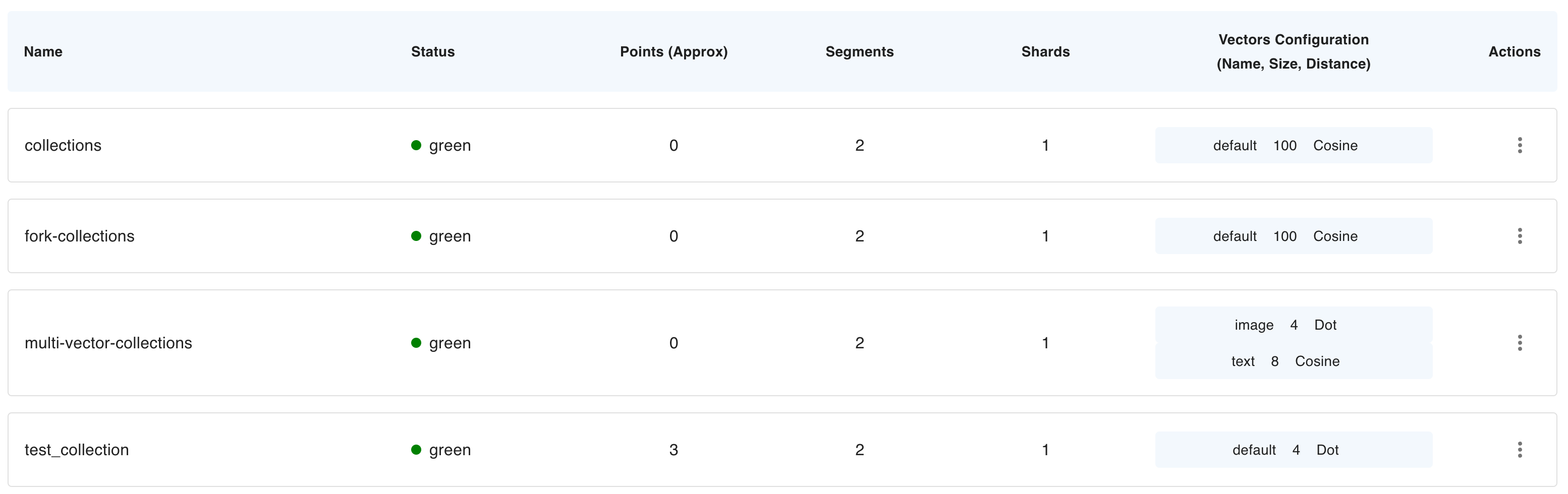
Collection info
- Qdrant allows determining the configuration parameters of an existing collection to better understand how the points are distributed and indexed.
- If you insert the vectors into the collection, the status field may become yellow whilst it is optimizing.
- It will become green once all the points are successfully processed.
- The following color statuses are possible
- green - collection is ready
- yellow - collection is optimizing
- grey - collection is pending optimization
- red - an error occurred which the engine could not recover from
1 | status: Green |
Grey collection status
- A collection may have the grey status or show “optimizations pending, awaiting update operation” as optimization status.
- This state is normally caused by restarting a Qdrant instance while optimizations were ongoing.
- It means the collection has optimizations pending, but they are paused.
- You must send any update operation to trigger and start the optimizations again.
Approximate point and vector counts
| Count attribute | Desc |
|---|---|
| points_count | total number of objects (vectors and their payloads) stored in the collection |
| vectors_count | total number of vectors in a collection, useful if you have multiple vectors per point |
| indexed_vectors_count | total number of vectors stored in the HNSW or sparse index. Qdrant does not store all the vectors in the index, but only if an index segment might be created for a given configuration. |
- The above counts are not exact, but should be considered approximate.
- Depending on how you use Qdrant these may give very different numbers than what you may expect.
- It’s therefore important not to rely on them.
- More specifically, these numbers represent the count of points and vectors in Qdrant’s internal storage.
- Internally, Qdrant may temporarily duplicate points as part of automatic optimizations.
- It may keep changed or deleted points for a bit. And it may delay indexing of new points.
- All of that is for optimization reasons.
- Updates you do are therefore not directly reflected in these numbers.
- If you see a wildly different count of points, it will likely resolve itself once a new round of automatic optimizations has completed.
- To clarify: these numbers don’t represent the exact amount of points or vectors you have inserted, nor does it represent the exact number of distinguishable points or vectors you can query. If you want to know exact counts, refer to the count API.
- Note: these numbers may be removed in a future version of Qdrant.
Indexing vectors in HNSW
- In some cases, you might be surprised the value of indexed_vectors_count is lower than vectors_count.
- This is an intended behaviour and depends on the optimizer configuration.
- A new index segment is built if the size of non-indexed vectors is higher than the value of indexing_threshold(in kB).
- If your collection is very small or the dimensionality of the vectors is low
- there might be no HNSW segment created and indexed_vectors_count might be equal to 0.
- It is possible to reduce the indexing_threshold for an existing collection by updating collection parameters.
Collection aliases
- In a production environment, it is sometimes necessary to switch different versions of vectors seamlessly.
- For example, when upgrading to a new version of the neural network.
- There is no way to stop the service and rebuild the collection with new vectors in these situations.
- Aliases are additional names for existing collections.
- All queries to the collection can also be done identically, using an alias instead of the collection name.
- Thus, it is possible to build a second collection in the background and then switch alias from the old to the new collection.
- Since all changes of aliases happen atomically, no concurrent requests will be affected during the switch.
Points
- The points are the central entity that Qdrant operates with.
- A point is a record consisting of a vector and an optional payload.
- You can search among the points grouped in one collection based on vector similarity.
1 | // This is a simple point |
- Any point modification operation is asynchronous and takes place in 2 steps.
- At the first stage, the operation is written to the Write-ahead-log.
- After this moment, the service will not lose the data, even if the machine loses power supply.
Point IDs
- Qdrant supports using both 64-bit unsigned integers and UUID as identifiers for points.
- UUID
- simple - 936DA01F9ABD4d9d80C702AF85C822A8
- hyphenated - 550e8400-e29b-41d4-a716-446655440000
- urn - urn:uuid:F9168C5E-CEB2-4faa-B6BF-329BF39FA1E4
- That means that in every request UUID string could be used instead of numerical id.
1 | client |
1 | client |
Vectors
- Each point in qdrant may have one or more vectors.
- Vectors are the central component of the Qdrant architecture, qdrant relies on different types of vectors to provide different types of data exploration and search.
- It is possible to attach more than one type of vector to a single point. In Qdrant we call it Named Vectors.
| Vector type | Desc |
|---|---|
| Dense Vectors | A regular vectors, generated by majority of the embedding models. |
| Sparse Vectors | Vectors with no fixed length, but only a few non-zero elements. Useful for exact token match and collaborative filtering recommendations. |
| MultiVectors | Matrices of numbers with fixed length but variable height. Usually obtained from late interraction models like ColBERT. |
Upload points
- To optimize performance, Qdrant supports batch loading of points. I.e., you can load several points into the service in one API call.
- Batching allows you to minimize the overhead of creating a network connection.
- The Qdrant API supports two ways of creating batches - record-oriented and column-oriented.
- Internally, these options do not differ and are made only for the convenience of interaction.
Create points with batch
1 | PUT /collections/{collection_name}/points |
record-oriented
1 | client |
The Python client has additional features for loading points, which include: Parallelization + A retry mechanism + Lazy batching support
- For example, you can read your data directly from hard drives, to avoid storing all data in RAM.
- You can use these features with the upload_collection and upload_points methods.
- Similar to the basic upsert API, these methods support both record-oriented and column-oriented formats.
- If ids are not provided, Qdrant Client will generate them automatically as random UUIDs.
Column-oriented format
1 | client.upload_collection( |
Record-oriented format:
1 | client.upload_points( |
- All APIs in Qdrant, including point loading, are idempotent.
- It means that executing the same method several times in a row is equivalent to a single execution.
- In this case, it means that points with the same id will be overwritten when re-uploaded.
- Idempotence property is useful if you use, for example, a message queue that doesn’t provide an exactly-ones guarantee.
- Even with such a system, Qdrant ensures data consistency.
If the collection was created with multiple vectors, each vector data can be provided using the vector’s name:
1 | client |
1 | client |
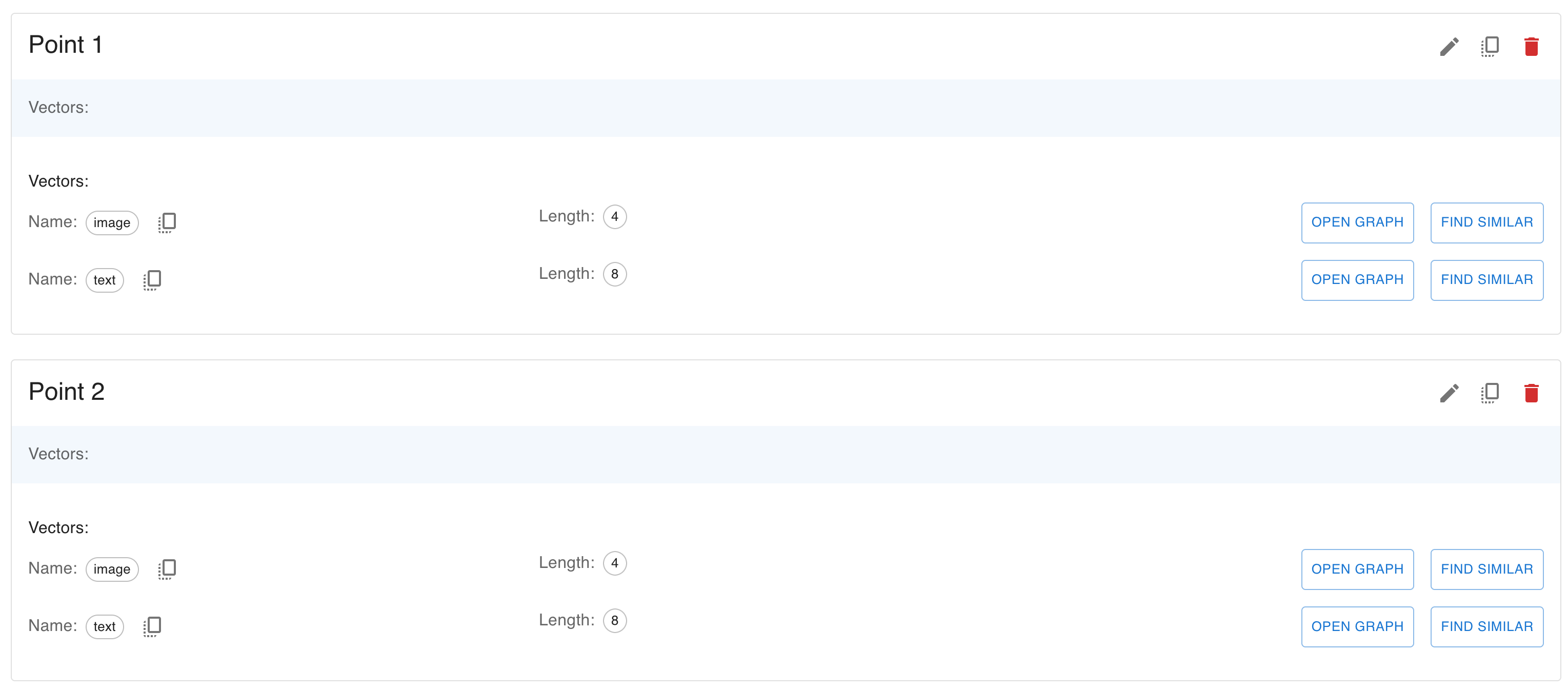
- Named vectors are optional. When uploading points, some vectors may be omitted.
- For example, you can upload one point with only the image vector and a second one with only the text vector.
- When uploading a point with an existing ID, the existing point is deleted first, then it is inserted with just the specified vectors.
- In other words, the entire point is replaced, and any unspecified vectors are set to null.
- To keep existing vectors unchanged and only update specified vectors, see update vectors.
Points can contain dense and sparse vectors.
- A sparse vector is an array in which most of the elements have a value of zero.
- It is possible to take advantage of this property to have an optimized representation, for this reason they have a different shape than dense vectors.
- They are represented as a list of (index, value) pairs, where index is an integer and value is a floating point number.
- The index is the position of the non-zero value in the vector.
- The values is the value of the non-zero element.
2
3
[(6, 1.0), (7, 2.0)]
1 | { |
- The indices and values arrays must have the same length. And the indices must be unique.
- If the indices are not sorted, Qdrant will sort them internally so you may not rely on the order of the elements.
Sparse vectors must be named and can be uploaded in the same way as dense vectors.
1 | PUT /collections/{collection_name}/points |
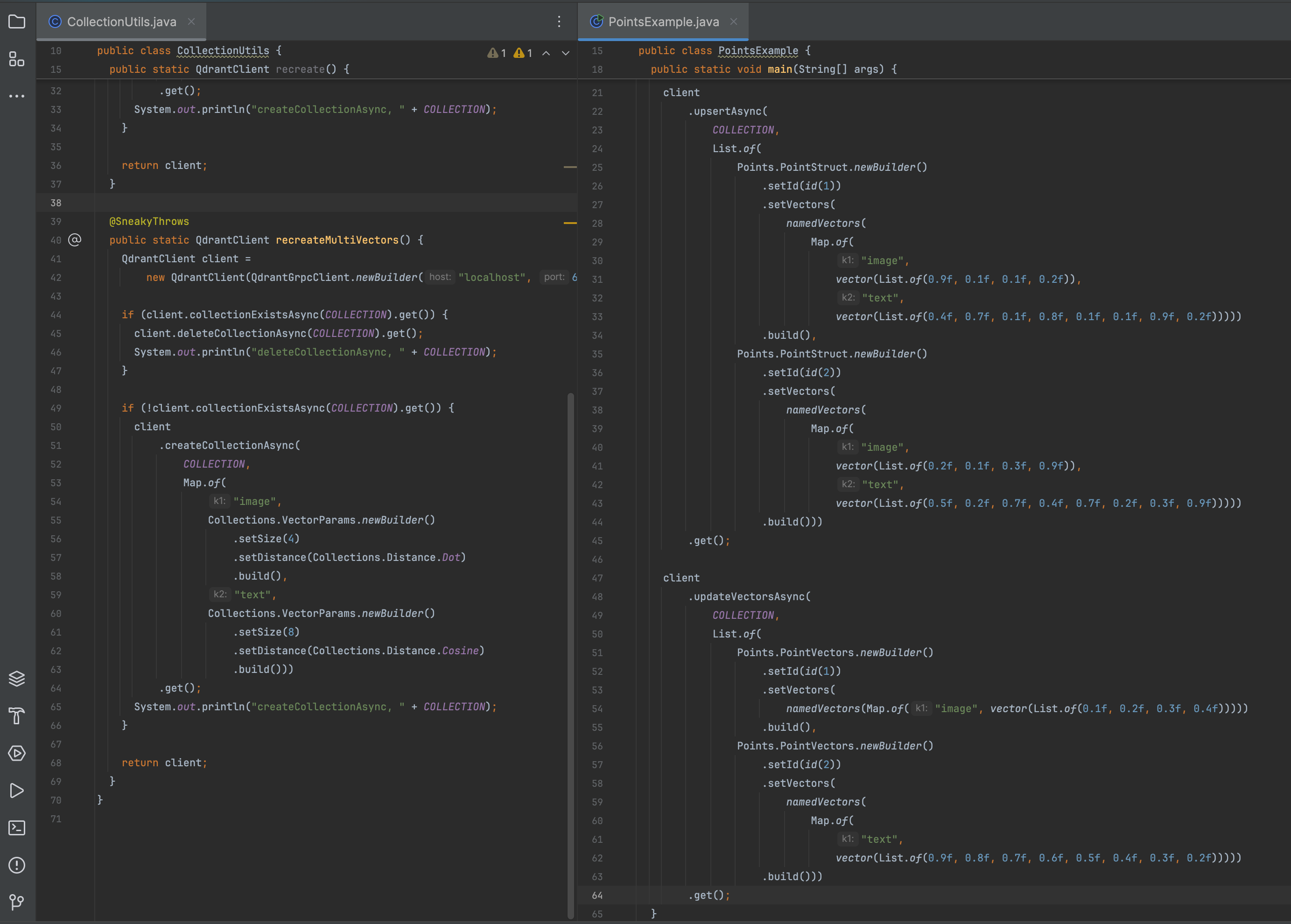
Update vectors
- This method updates the specified vectors on the given points. Unspecified vectors are kept unchanged. All given points must exist.
- To update points and replace all of its vectors, see uploading points.
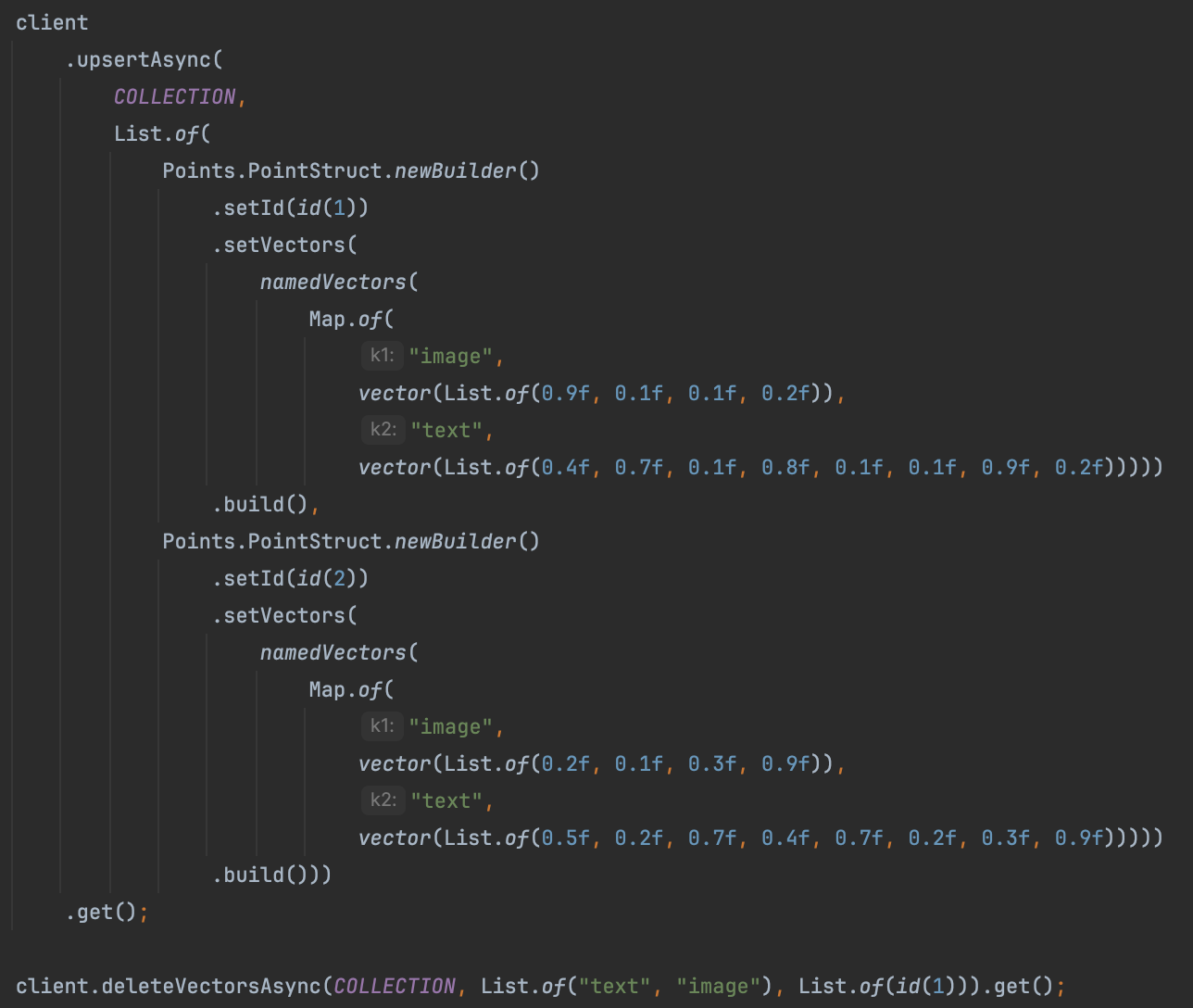
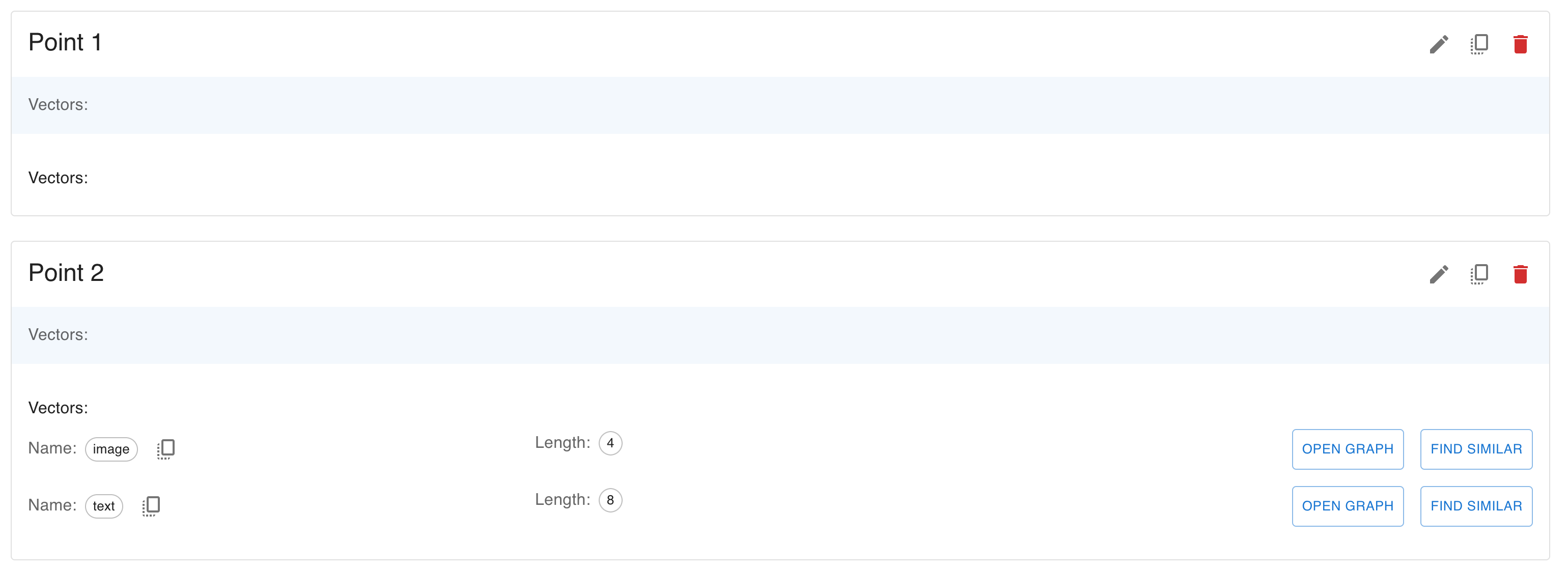
Delete vectors
- This method deletes just the specified vectors from the given points. Other vectors are kept unchanged. Points are never deleted.
- To delete entire points, see deleting points.
Delete points
1 | client.deleteAsync(COLLECTION, List.of(id(1), id(2))); |
Alternative way to specify which points to remove is to use filter.
1 | client |
There is a method for retrieving points by their ids.
1 | List<Points.RetrievedPoint> points = |
- This method has additional parameters with_vectors and with_payload.
- Using these parameters, you can select parts of the point you want as a result.
- Excluding helps you not to waste traffic transmitting useless data.
Scroll points
Sometimes it might be necessary to get all stored points without knowing ids, or iterate over points that correspond to a filter.
1 | Points.ScrollResponse response = |
1 | next_page_offset { |
- The Scroll API will return all points that match the filter in a page-by-page manner.
- All resulting points are sorted by ID.
- To query the next page it is necessary to specify the largest seen ID in the offset field.
- For convenience, this ID is also returned in the field next_page_offset.
- If the value of the next_page_offset field is null - the last page is reached.
- To query the next page it is necessary to specify the largest seen ID in the offset field.
Order points by payload key
- When using the scroll API, you can sort the results by payload key.
- For example, you can retrieve points in chronological order if your payloads have a “timestamp” field, as is shown from the example below:
- Without an appropriate index, payload-based ordering would create too much load on the system for each request.
- Qdrant therefore requires a payload index which supports Range filtering conditions on the field used for order_by
- You need to use the order_by key parameter to specify the payload key.
- Then you can add other fields to control the ordering, such as direction and start_from
- When you use the order_by parameter, pagination is disabled.
- When sorting is based on a non-unique value, it is not possible to rely on an ID offset.
- Thus, next_page_offset is not returned within the response.
- However, you can still do pagination by combining “order_by”: { “start_from”: … } with a { “must_not”: [{ “has_id”: […] }] } filter.
1 | client |
Counting points
- Sometimes it can be useful to know how many points fit the filter conditions without doing a real search.
- Among others, for example, we can highlight the following scenarios:
- Evaluation of results size for faceted search
- Determining the number of pages for pagination
- Debugging the query execution speed
1 | client |
Batch update
- You can batch multiple point update operations. This includes inserting, updating and deleting points, vectors and payload.
- A batch update request consists of a list of operations. These are executed in order.
- To batch many points with a single operation type, please use batching functionality in that operation directly.
| Operation | Desc |
|---|---|
| Upsert points | upsert / UpsertOperation |
| Delete points | delete_points / DeleteOperation |
| Update vectors | update_vectors / UpdateVectorsOperation |
| Delete vectors | delete_vectors / DeleteVectorsOperation |
| Set payload | set_payload / SetPayloadOperation |
| Overwrite payload | overwrite_payload / OverwritePayload |
| Delete payload | delete_payload / DeletePayloadOperation |
| Clear payload | clear_payload / ClearPayloadOperation |
The following example snippet makes use of all operations.
1 | client |
Awaiting result
- If the API is called with the &wait=false parameter, or if it is not explicitly specified, the client will receive an acknowledgment of receiving data:
- This response does not mean that the data is available for retrieval yet. - This uses a form of eventual consistency.
- It may take a short amount of time before it is actually processed as updating the collection happens in the background.
- In fact, it is possible that such request eventually fails.
- If inserting a lot of vectors, we also recommend using asynchronous requests to take advantage of pipelining.
- If the logic of your application requires a guarantee that the vector will be available for searching immediately after the API responds, then use the flag ?wait=true.
- In this case, the API will return the result only after the operation is finished:
1 | { |
1 | { |
Vectors
- Vectors (or embeddings) are the core concept of the Qdrant Vector Search engine.
- Vectors define the similarity between objects in the vector space.
- If a pair of vectors are similar in vector space, it means that the objects they represent are similar in some way.
- For example, if you have a collection of images, you can represent each image as a vector.
- If two images are similar, their vectors will be close to each other in the vector space.
- In order to obtain a vector representation of an object, you need to apply a vectorization algorithm to the object.
- Usually, this algorithm is a neural network that converts the object into a fixed-size vector.
- The neural network is usually trained on a pairs or triplets of similar and dissimilar objects, so it learns to recognize a specific type of similarity.
- By using this property of vectors, you can explore your data in a number of ways; e.g. by searching for similar objects, clustering objects, and more.
Vector Types
- Modern neural networks can output vectors in different shapes and sizes, and Qdrant supports most of them.
Dense Vectors
- This is the most common type of vector.
- It is a simple list of numbers, it has a fixed length and each element of the list is a floating-point number.
- The majority of neural networks create dense vectors, so you can use them with Qdrant without any additional processing.
- Although compatible with most embedding models out there, Qdrant has been tested with the following verified embedding providers.
1 |
|
Sparse Vectors
- Sparse vectors are a special type of vectors.
- Mathematically, they are the same as dense vectors, but they contain many zeros so they are stored in a special format.
- Sparse vectors in Qdrant don’t have a fixed length, as it is dynamically allocated during vector insertion.
- In order to define a sparse vector, you need to provide a list of non-zero elements and their indexes.
1 | // A sparse vector with 4 non-zero elements |
- Sparse vectors in Qdrant are kept in special storage and indexed in a separate index, so their configuration is different from dense vectors.
- To create a collection with sparse vectors:
1 | client |
- Insert a point with a sparse vector into the created collection:
1 | client |
- Now you can run a search with sparse vectors:
1 | List<Points.ScoredPoint> points = |
Multivectors
- Qdrant supports the storing of a variable amount of same-shaped dense vectors in a single point.
- This means that instead of a single dense vector, you can upload a matrix of dense vectors.
- The length of the matrix is fixed, but the number of vectors in the matrix can be different for each point.
1 | // A multivector of size 4 |
There are two scenarios where multivectors are useful:
- Multiple representation of the same object
- For example, you can store multiple embeddings for pictures of the same object, taken from different angles.
- This approach assumes that the payload is same for all vectors.
- Late interaction embeddings
- Some text embedding models can output multiple vectors for a single text.
- For example, a family of models such as ColBERT output a relatively small vector for each token in the text.
In order to use multivectors, we need to specify a function that will be used to compare between matrices of vectors
- Currently, Qdrant supports max_sim function, which is defined as a sum of maximum similarities between each pair of vectors in the matrices.

To use multivectors, create a collection with the following configuration:
1 | client |
To insert a point with multivector:
1 | client |
To search with multivector (available in query API):
1 | List<Points.ScoredPoint> points = |
Named Vectors
- In Qdrant, you can store multiple vectors of different sizes in the same data point.
- This is useful when you need to define your data with multiple embeddings to represent different features or modalities (e.g., image, text or video).
- To store different vectors for each point, you need to create separate named vector spaces in the collection.
- You can define these vector spaces during collection creation and manage them independently.
- Each vector should have a unique name.
- Vectors can represent different modalities and you can use different embedding models to generate them.
To create a collection with named vectors, you need to specify a configuration for each vector
1 | client |
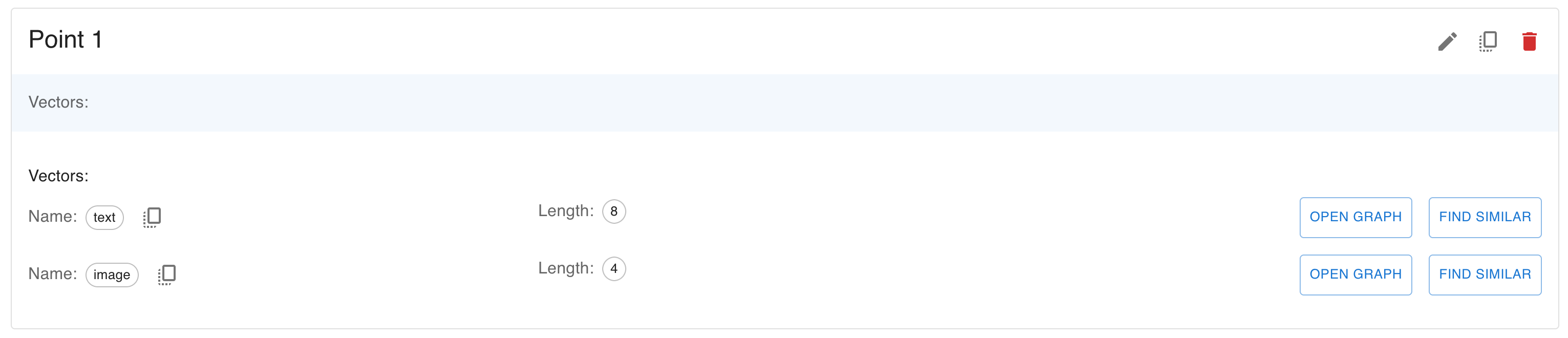
To insert a point with named vectors:
1 | client |
To search with named vectors (available in query API):
1 | List<Points.ScoredPoint> points = |
Datatypes
- Newest versions of embeddings models generate vectors with very large dimentionalities.
- With OpenAI’s text-embedding-3-large embedding model, the dimensionality can go up to 3072.
- The amount of memory required to store such vectors grows linearly with the dimensionality, so it is important to choose the right datatype for the vectors.
- The choice between datatypes is a trade-off between memory consumption and precision of vectors.
- Qdrant supports a number of datatypes for both dense and sparse vectors:
Float32
- This is the default datatype for vectors in Qdrant. It is a 32-bit (4 bytes) floating-point number.
- The standard OpenAI embedding of 1536 dimensionality will require 6KB of memory to store in Float32.
- 1536 × 4 bytes = 6,144 bytes ≈ 6KB
- You don’t need to specify the datatype for vectors in Qdrant, as it is set to Float32 by default.
Float16
- This is a 16-bit (2 bytes) floating-point number. It is also known as half-precision float. Intuitively, it looks like this:
- The main advantage of Float16 is that it requires half the memory of Float32, while having virtually no impact on the quality of vector search.
1 | float32 -> float16 delta (float32 - float16).abs |
- To use Float16, you need to specify the datatype for vectors in the collection configuration:
1 | client |
Uint8
- Another step towards memory optimization is to use the Uint8 datatype for vectors.
- Unlike Float16, Uint8 is not a floating-point number, but an integer number in the range from 0 to 255.
- Not all embeddings models generate vectors in the range from 0 to 255, so you need to be careful when using Uint8 datatype.
- In order to convert a number from float range to Uint8 range, you need to apply a process called quantization.
- Some embedding providers may provide embeddings in a pre-quantized format.
- One of the most notable examples is the Cohere int8 & binary embeddings.
- For other embeddings, you will need to apply quantization yourself.
- There is a difference in how Uint8 vectors are handled for dense and sparse vectors.
- Dense vectors are required to be in the range from 0 to 255, while sparse vectors can be quantized in-flight.
1 | client |
Quantization
- Apart from changing the datatype of the original vectors, Qdrant can create quantized representations of vectors alongside the original ones.
- This quantized representation can be used to quickly select candidates for rescoring with the original vectors or even used directly for search.
- Quantization is applied in the background, during the optimization process.
Vector Storage
- Depending on the requirements of the application, Qdrant can use one of the data storage options.
- Keep in mind that you will have to tradeoff between search speed and the size of RAM used.
Payload
- One of the significant features of Qdrant is the ability to store additional information along with vectors.
- This information is called payload in Qdrant terminology.
- Qdrant allows you to store any information that can be represented using JSON.
Payload types
- In addition to storing payloads, Qdrant also allows you search based on certain kinds of values.
- This feature is implemented as additional filters during the search and will enable you to incorporate custom logic on top of semantic similarity.
- During the filtering, Qdrant will check the conditions over those values that match the type of the filtering condition.
- If the stored value type does not fit the filtering condition - it will be considered not satisfied.
- For example, you will get an empty output if you apply the range condition on the string data.
- However, arrays (multiple values of the same type) are treated a little bit different.
- When we apply a filter to an array, it will succeed if at least one of the values inside the array meets the condition.
Integer
- integer - 64-bit integer in the range from -9223372036854775808 to 9223372036854775807.
Float
- float - 64-bit floating point number.
Bool
- Bool - binary value. Equals to true or false.
Keyword
- keyword - string value.
Geo
- geo is used to represent geographical coordinates.
- Coordinate should be described as an object containing two fields: lon - for longitude, and lat - for latitude.
Datetime
- datetime - date and time in RFC 3339 format.
| Format | Desc |
|---|---|
| 2023-02-08T10:49:00Z | RFC 3339, UTC |
| 2023-02-08T11:49:00+01:00 | RFC 3339, with timezone |
| 2023-02-08T10:49:00 | without timezone, UTC is assumed |
| 2023-02-08T10:49 | without timezone and seconds |
| 2023-02-08 | only date, midnight is assumed |
- T can be replaced with a space.
- The T and Z symbols are case-insensitive.
- UTC is always assumed when the timezone is not specified.
- Timezone can have the following formats: ±HH:MM, ±HHMM, ±HH, or Z.
- Seconds can have up to 6 decimals, so the finest granularity for datetime is microseconds.
UUID
- In addition to the basic keyword type, Qdrant supports uuid type for storing UUID values.
- Functionally, it works the same as keyword, internally stores parsed UUID values.
- String representation of UUID (e.g. 550e8400-e29b-41d4-a716-446655440000) occupies 36 bytes.
- But when numeric representation is used, it is only 128 bits (16 bytes).
- Usage of uuid index type is recommended in payload-heavy collections to save RAM and improve search performance.
Create point with payload
1 | client |
Set only the given payload values on a point.
1 | client |
You don’t need to know the ids of the points you want to modify. The alternative is to use filters.
1 | client |
It is possible to modify only a specific key of the payload by using the key parameter.
1 | { |
1 | POST /collections/{collection_name}/points/payload |
1 | { |
Overwrite payload - Fully replace any existing payload with the given one.
Like set payload, you don’t need to know the ids of the points you want to modify. The alternative is to use filters.
1 | client |
Clear payload - This method removes all payload keys from specified points
You can also use models.FilterSelector to remove the points matching given filter criteria, instead of providing the ids.
1 | client |
Delete payload keys - Delete specific payload keys from points.
Alternatively, you can use filters to delete payload keys from the points.
1 | client |
Payload indexing
- To search more efficiently with filters, Qdrant allows you to create indexes for payload fields by specifying the name and type of field it is intended to be.
- The indexed fields also affect the vector index. See Indexing for details.
- In practice, we recommend creating an index on those fields that could potentially constrain the results the most.
- For example, using an index for the object ID will be much more efficient, being unique for each record, than an index by its color, which has only a few possible values.
- In compound queries involving multiple fields, Qdrant will attempt to use the most restrictive index first.
To create index for the field, you can use the following:
1 | client |
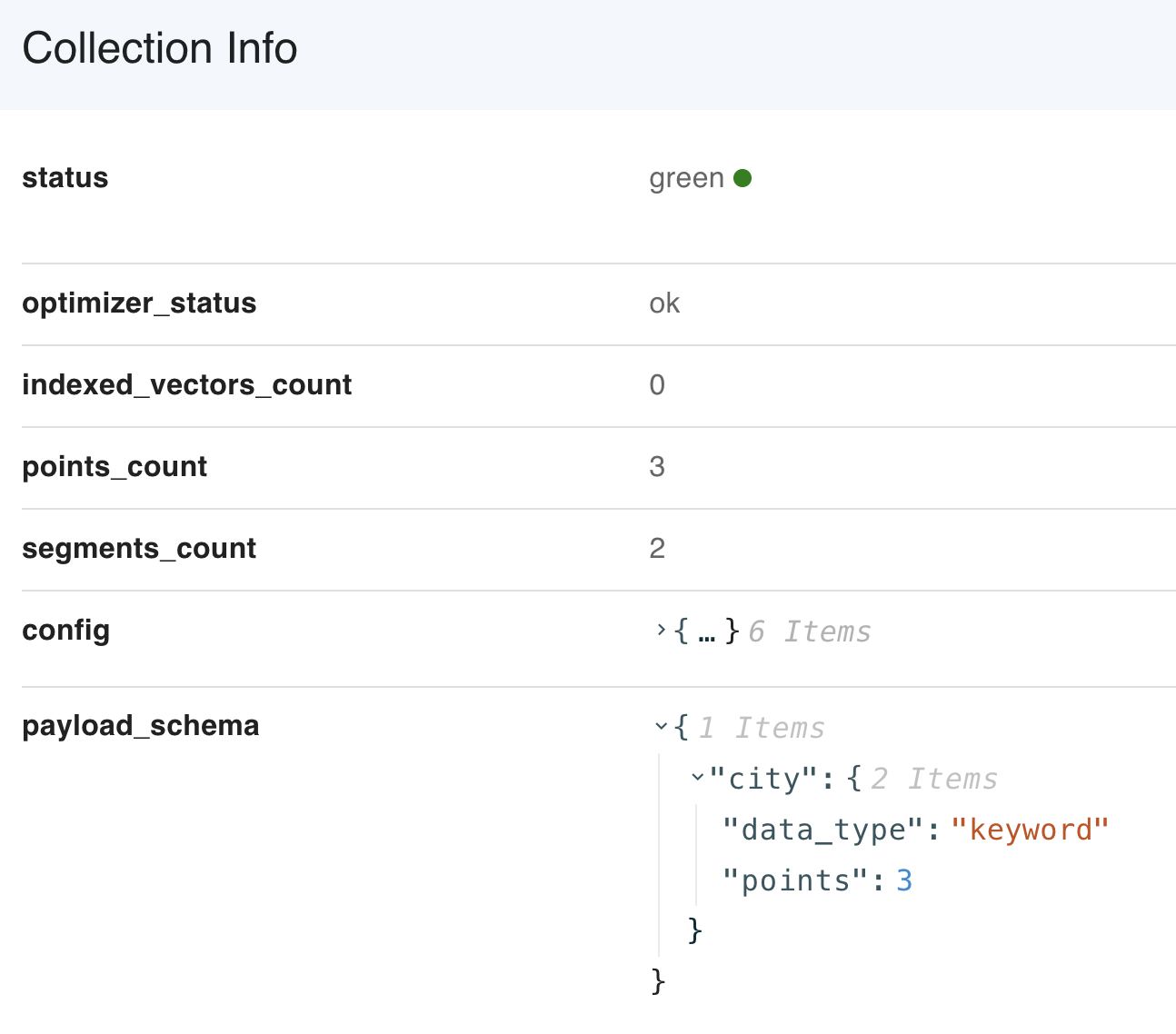
The index usage flag is displayed in the payload schema with the collection info API.
Facet counts
- Faceting is a special counting technique that can be used for various purposes:
- Know which unique values exist for a payload key.
- Know the number of points that contain each unique value.
- Know how restrictive a filter would become by matching a specific value.
- Specifically, it is a counting aggregation for the values in a field, akin to a GROUP BY with COUNT(*) commands in SQL.
- These results for a specific field is called a “facet”.
- For example, when you look at an e-commerce search results page, you might see a list of brands on the sidebar, showing the number of products for each brand. This would be a facet for a “brand” field.
- In Qdrant you can facet on a field only if you have created a field index that supports MatchValue conditions for it, like a keyword index.
1 | client |
1 | { |
- The results are sorted by the count in descending order, then by the value in ascending order.
- Only values with non-zero counts will be returned.
- By default, the way Qdrant the counts for each value is approximate to achieve fast results.
- This should accurate enough for most cases, but if you need to debug your storage, you can use the exact parameter to get exact counts.
1 | client |
Similarity search
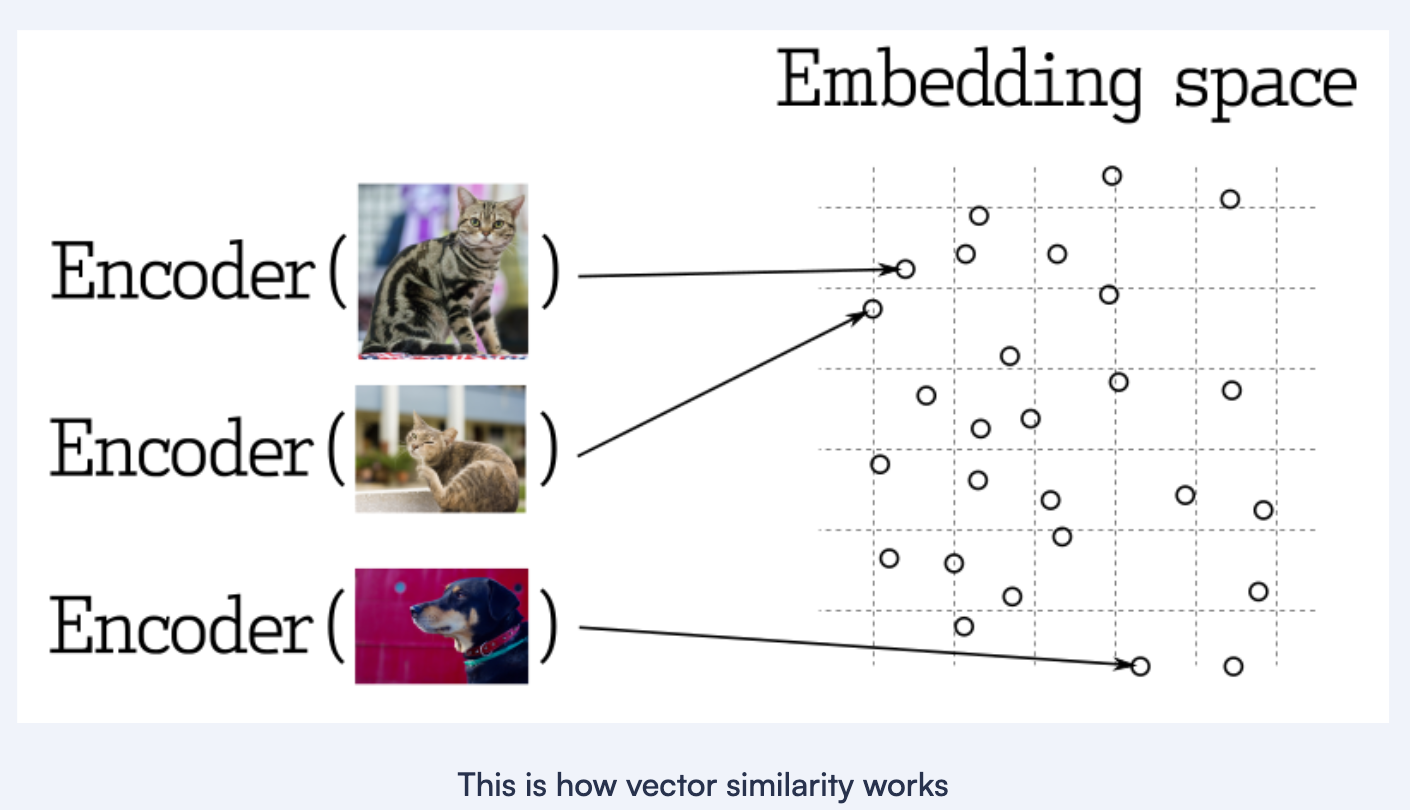
- Searching for the nearest vectors is at the core of many representational learning applications.
- Modern neural networks are trained to transform objects into vectors so that objects close in the real world appear close in vector space.
- It could be, for example, texts with similar meanings, visually similar pictures, or songs of the same genre.
Query API
- Qdrant provides a single interface for all kinds of search and exploration requests - the Query API.
- Here is a reference list of what kind of queries you can perform with the Query API in Qdrant:
Depending on the query parameter, Qdrant might prefer different strategies for the search.
| Query parameter | Search strategy |
|---|---|
| Nearest Neighbors Search | Vector Similarity Search, also known as k-NN |
| Search By Id | Search by an already stored vector - skip embedding model inference |
| Recommendations | Provide positive and negative examples |
| Discovery Search | Guide the search using context as a one-shot training set |
| Scroll | Get all points with optional filtering |
| Grouping | Group results by a certain field |
| Order By | Order points by payload key |
| Hybrid Search | Combine multiple queries to get better results |
| Multi-Stage Search | Optimize performance for large embeddings |
| Random Sampling | Get random points from the collection |
Nearest Neighbors Search
1 | client.queryAsync(QueryPoints.newBuilder() |
Search By Id
1 | client.queryAsync(QueryPoints.newBuilder() |
Metrics
- There are many ways to estimate the similarity of vectors with each other. In Qdrant terms, these ways are called metrics.
- The choice of metric depends on the vectors obtained and, in particular, on the neural network encoder training method.
- Qdrant supports these most popular types of metrics:
- Dot product / Cosine similarity / Euclidean distance / Manhattan distance
- The most typical metric used in similarity learning models is the cosine metric
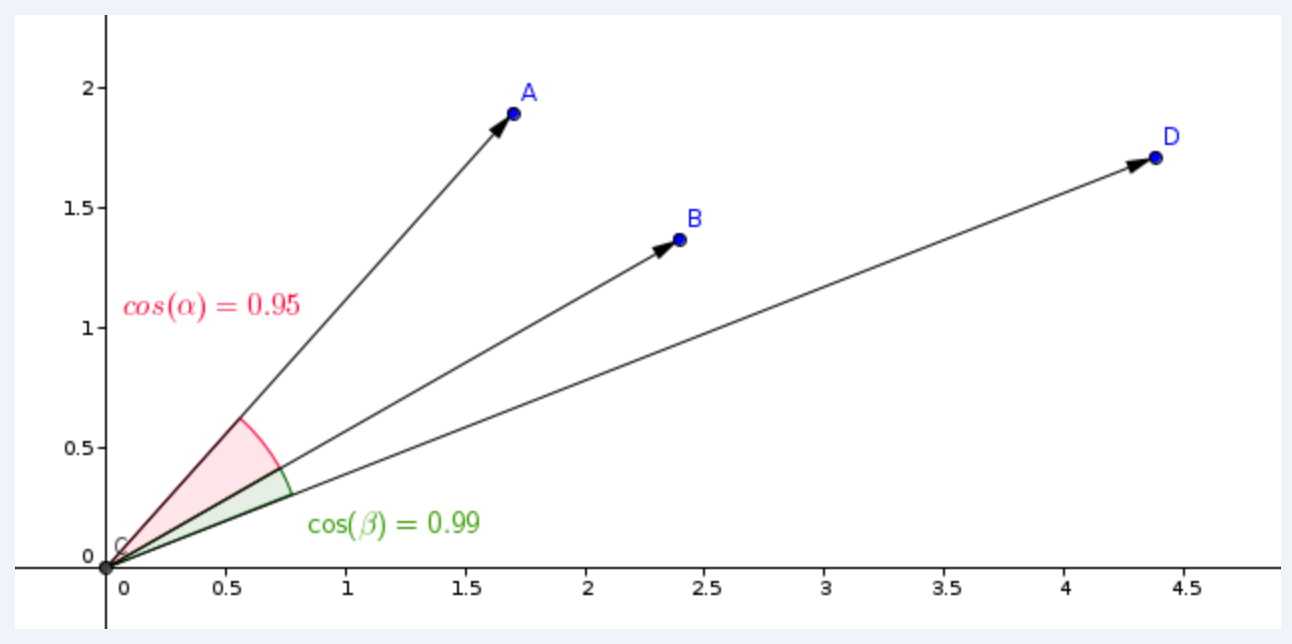
- Qdrant counts this metric in 2 steps, due to which a higher search speed is achieved.
- The first step is to normalize the vector when adding it to the collection. It happens only once for each vector.
- The second step is the comparison of vectors. In this case, it becomes equivalent to dot production - a very fast operation due to SIMD.
- SIMD - Single Instruction / Multiple Data
- Depending on the query configuration, Qdrant might prefer different strategies for the search. Read more about it in the query planning section.
Search API
1 | client.queryAsync(QueryPoints.newBuilder() |
- In this example, we are looking for vectors similar to vector [0.2, 0.1, 0.9, 0.7].
- Parameter limit (or its alias - top) specifies the amount of most similar results we would like to retrieve.
- Values under the key params specify custom parameters for the search.
| Parameters | Desc |
|---|---|
| hnsw_ef | value that specifies ef parameter of the HNSW algorithm. |
| exact | option to not use the approximate search (ANN). If set to true, the search may run for a long as it performs a full scan to retrieve exact results. |
| indexed_only | With this option you can disable the search in those segments where vector index is not built yet. This may be useful if you want to minimize the impact to the search performance whilst the collection is also being updated. Using this option may lead to a partial result if the collection is not fully indexed yet, consider using it only if eventual consistency is acceptable for your use case. |
- Since the filter parameter is specified, the search is performed only among those points that satisfy the filter condition.
1 | { |
- The result contains ordered by score list of found point ids.
- Note that payload and vector data is missing in these results by default.
If the collection was created with multiple vectors, the name of the vector to use for searching should be provided
Search is processing only among vectors with the same name.
1 | client.queryAsync(QueryPoints.newBuilder() |
If the collection was created with sparse vectors, the name of the sparse vector to use for searching should be provided:
You can still use payload filtering and other features of the search API with sparse vectors.
There are however important differences between dense and sparse vector search:
| Index | Sparse Query | Dense Query |
|---|---|---|
| Scoring Metric | Default is Dot product, no need to specify it | Distance has supported metrics e.g. Dot, Cosine |
| Search Type | Always exact in Qdrant | HNSW is an approximate NN |
| Return Behaviour | Returns only vectors with non-zero values in the same indices as the query vector | Returns limit vectors |
In general, the speed of the search is proportional to the number of non-zero values in the query vector.
1 | client.queryAsync( |
Filtering results by score
- In addition to payload filtering, it might be useful to filter out results with a low similarity score.
- For example, if you know the minimal acceptance score for your model and do not want any results which are less similar than the threshold.
- In this case, you can use score_threshold parameter of the search query. It will exclude all results with a score worse than the given.
- This parameter may exclude lower or higher scores depending on the used metric.
- For example, higher scores of Euclidean metric are considered more distant and, therefore, will be excluded.
Payload and vector in the result
- By default, retrieval methods do not return any stored information such as payload and vectors.
- Additional parameters with_vectors and with_payload alter this behavior.
1 | client.queryAsync( |
- You can use with_payload to scope to or filter a specific payload subset.
- You can even specify an array of items to include, such as city, village, and town:
1 | client.queryAsync( |
- It is possible to target nested fields using a dot notation:
- payload.nested_field - for a nested field
- payload.nested_array[].sub_field - for projecting nested fields within an array
- Accessing array elements by index is currently not supported
Batch search API
- The batch search API enables to perform multiple search requests via a single request.
- Its semantic is straightforward, n batched search requests are equivalent to n singular search requests.
- This approach has several advantages.
- Logically, fewer network connections are required which can be very beneficial on its own.
- More importantly, batched requests will be efficiently processed via the query planner which can detect and optimize requests if they have the same filter.
- This can have a great effect on latency for non trivial filters as the intermediary results can be shared among the request.
- In order to use it, simply pack together your search requests. All the regular attributes of a search request are of course available.
1 | Filter filter = Filter.newBuilder().addMust(matchKeyword("city", "London")).build(); |
1 | { |
Pagination
- Search and recommendation APIs allow to skip first results of the search and return only the result starting from some specified offset
- Is equivalent to retrieving the 11th page with 10 records per page.
1 | client.queryAsync( |
Large offset values may cause performance issues
- Vector-based retrieval in general and HNSW index in particular, are not designed to be paginated.
- It is impossible to retrieve Nth closest vector without retrieving the first N vectors first.
- However, using the offset parameter saves the resources by reducing network traffic and the number of times the storage is accessed.
- Using an offset parameter, will require to internally retrieve offset + limit points, but only access payload and vector from the storage those points which are going to be actually returned.
Grouping API
- It is possible to group results by a certain field.
- This is useful when you have multiple points for the same item, and you want to avoid redundancy of the same item in the results.
- For example, if you have a large document split into multiple chunks, and you want to search or recommend on a per-document basis, you can group the results by the document ID.
- With the groups API, you will be able to get the best N points for each document, assuming that the payload of the points contains the document ID.
- Of course there will be times where the best N points cannot be fulfilled due to lack of points or a big distance with respect to the query.
- In every case, the group_size is a best-effort parameter, akin to the limit parameter.
1 | [ |
Search groups
1 | client.queryGroupsAsync( |
1 | { |
- The groups are ordered by the score of the top point in the group. Inside each group the points are sorted too.
- If the group_by field of a point is an array (e.g. “document_id”: [“a”, “b”]), the point can be included in multiple groups (e.g. “document_id”: “a” and document_id: “b”).
- This feature relies heavily on the
group_bykey provided. To improve performance, make sure to create a dedicated index for it. - Limitations
- Only keyword and integer payload values are supported for the group_by parameter. Payload values with other types will be ignored.
- At the moment, pagination is not enabled when using groups, so the offset parameter is not allowed.
Lookup in groups
- Having multiple points for parts of the same item often introduces redundancy in the stored data.
- Which may be fine if the information shared by the points is small, but it can become a problem if the payload is large
- because it multiplies the storage space needed to store the points by a factor of the amount of points we have per group.
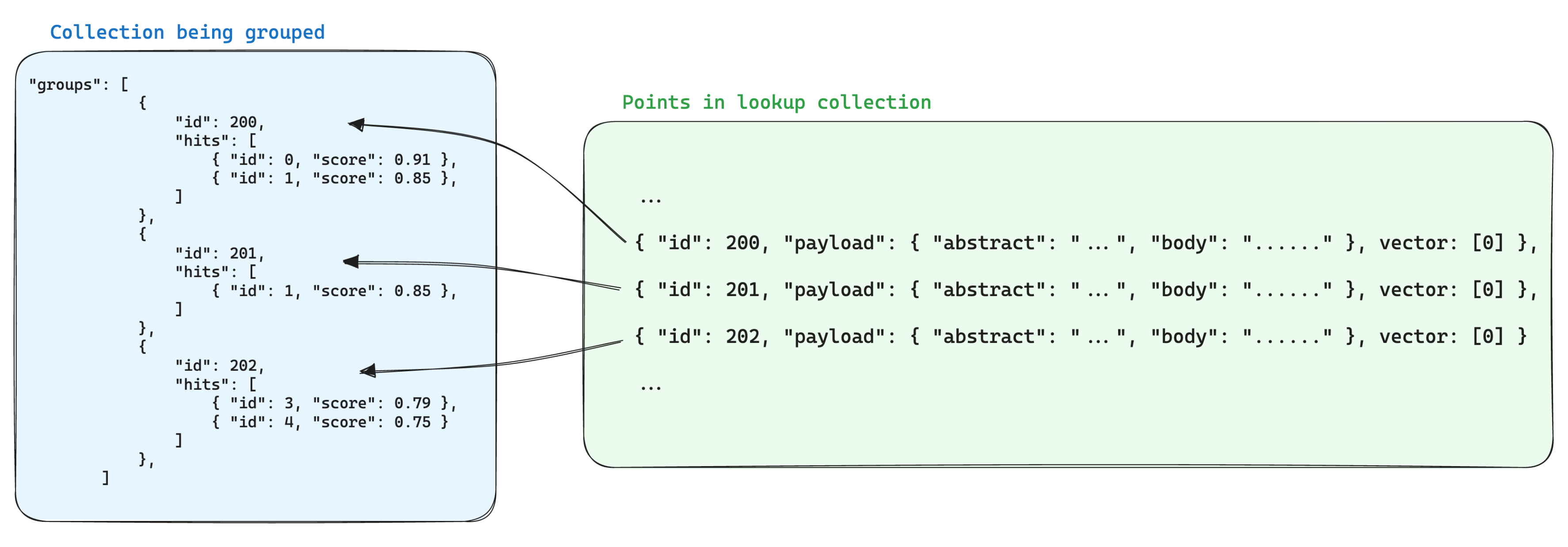
- One way of optimizing storage when using groups is to store the information shared by the points with the same group id in a single point in another collection.
- Then, when using the groups API, add the with_lookup parameter to bring the information from those points into each group. – MongoDB
- This has the extra benefit of having a single point to update when the information shared by the points in a group changes.
- For example, if you have a collection of documents, you may want to chunk them and store the points for the chunks in a separate collection, making sure that you store the point id from the document it belongs in the payload of the chunk point.
- In this case, to bring the information from the documents into the chunks grouped by the document id, you can use the with_lookup parameter:
- For the with_lookup parameter, you can also use the shorthand with_lookup=”documents” to bring the whole payload and vector(s) without explicitly specifying it.
- Since the lookup is done by matching directly with the point id, any group id that is not an existing (and valid) point id in the lookup collection will be ignored, and the lookup field will be empty.
1 | client.queryGroupsAsync( |
1 | { |
Random Sampling
- In some cases it might be useful to retrieve a random sample of points from the collection.
- This can be useful for debugging, testing, or for providing entry points for exploration.
1 | client |
Query planning
- Depending on the filter used in the search - there are several possible scenarios for query execution.
- Qdrant chooses one of the query execution options depending on the available indexes, the complexity of the conditions and the cardinality of the filtering result. This process is called query planning.
- The strategy selection process relies heavily on heuristics and can vary from release to release. However, the general principles are:
- planning is performed for each segment independently (see storage for more information about segments)
- prefer a full scan if the amount of points is below a threshold
- estimate the cardinality of a filtered result before selecting a strategy
- retrieve points using payload index (see indexing) if cardinality is below threshold
- use filterable vector index if the cardinality is above a threshold
- You can adjust the threshold using a configuration file, as well as independently for each collection.
Explore the data
- After mastering the concepts in search, you can start exploring your data in other ways.
- Qdrant provides a stack of APIs that allow you to find similar vectors in a different fashion, as well as to find the most dissimilar ones.
- These are useful tools for recommendation systems, data exploration, and data cleaning.
Recommendation API
- In addition to the regular search, Qdrant also allows you to search based on multiple positive and negative examples.
- The API is called recommend, and the examples can be point IDs, so that you can leverage the already encoded objects;
- and, as of v1.6, you can also use raw vectors as input, so that you can create your vectors on the fly without uploading them as points.
- The algorithm used to get the recommendations is selected from the available strategy options.
- Each of them has its own strengths and weaknesses, so experiment and choose the one that works best for your case.
1 | client |
1 | { |
Average vector strategy
- The default and first strategy added to Qdrant is called average_vector.
- It preprocesses the input examples to create a single vector that is used for the search.
- Since the preprocessing step happens very fast, the performance of this strategy is on-par with regular search.
- The intuition behind this kind of recommendation is that each vector component represents an independent feature of the data, so, by averaging the examples, we should get a good recommendation.
- The way to produce the searching vector is by first averaging all the positive and negative examples separately, and then combining them into a single vector using the following formula:
1 | avg_positive + avg_positive - avg_negative |
- In the case of not having any negative examples, the search vector will simply be equal to avg_positive.
- This is the default strategy that’s going to be set implicitly, but you can explicitly define it by setting “strategy”: “average_vector” in the recommendation request.
Best score strategy
- A new strategy introduced in v1.6, is called best_score.
- It is based on the idea that the best way to find similar vectors is to find the ones that are closer to a positive example, while avoiding the ones that are closer to a negative one.
- The way it works is that each candidate is measured against every example, then we select the best positive and best negative scores.
- The final score is chosen with this step formula:
1 | let score = if best_positive_score > best_negative_score { |
- The performance of best_score strategy will be linearly impacted by the amount of examples.
- Since we are computing similarities to every example at each step of the search, the performance of this strategy will be linearly impacted by the amount of examples.
- This means that the more examples you provide, the slower the search will be.
- However, this strategy can be very powerful and should be more embedding-agnostic.
- Accuracy may be impacted with this strategy.
- To improve it, increasing the ef search parameter to something above 32 will already be much better than the default 16, e.g: “params”: { “ef”: 64 }
- To use this algorithm, you need to set “strategy”: “best_score” in the recommendation request.
Using only negative examples
- A beneficial side-effect of best_score strategy is that you can use it with only negative examples.
- This will allow you to find the most dissimilar vectors to the ones you provide.
- This can be useful for finding outliers in your data, or for finding the most dissimilar vectors to a given one.
- Combining negative-only examples with filtering can be a powerful tool for data exploration and cleaning.
Multiple vectors
- If the collection was created with multiple vectors, the name of the vector should be specified in the recommendation request:
- Parameter using specifies which stored vectors to use for the recommendation.
1 | client.queryAsync(QueryPoints.newBuilder() |
Lookup vectors from another collection
- If you have collections with vectors of the same dimensionality, and you want to look for recommendations in one collection based on the vectors of another collection, you can use the lookup_from parameter.
- It might be useful, e.g. in the item-to-user recommendations scenario.
- Where user and item embeddings, although having the same vector parameters (distance type and dimensionality), are usually stored in different collections.
- Vectors are retrieved from the external collection by ids provided in the positive and negative lists.
- These vectors then used to perform the recommendation in the current collection, comparing against the “using” or default vector.
1 | client.queryAsync(QueryPoints.newBuilder() |
Batch recommendation API
- Similar to the batch search API in terms of usage and advantages, it enables the batching of recommendation requests.
1 | Points.Filter filter = |
1 | { |
Discovery API
- In this API, Qdrant introduces the concept of context, which is used for splitting the space.
- Context is a set of positive-negative pairs, and each pair divides the space into positive and negative zones.
- In that mode, the search operation prefers points based on how many positive zones they belong to (or how much they avoid negative zones).
- The interface for providing context is similar to the recommendation API (ids or raw vectors).
- Still, in this case, they need to be provided in the form of positive-negative pairs.
Discovery API lets you do two new types of search:
- Discovery search
- Uses the context (the pairs of positive-negative vectors) and a target to return the points more similar to the target, but constrained by the context.
- Context search
- Using only the context pairs, get the points that live in the best zone, where loss is minimized
- The way positive and negative examples should be arranged in the context pairs is completely up to you.
- So you can have the flexibility of trying out different permutation techniques based on your model and data.
- The speed of search is linearly related to the amount of examples you provide in the query.
Discovery search
- This type of search works specially well for combining multimodal, vector-constrained searches.
- Qdrant already has extensive support for filters, which constrain the search based on its payload, but using discovery search, you can also constrain the vector space in which the search is performed.
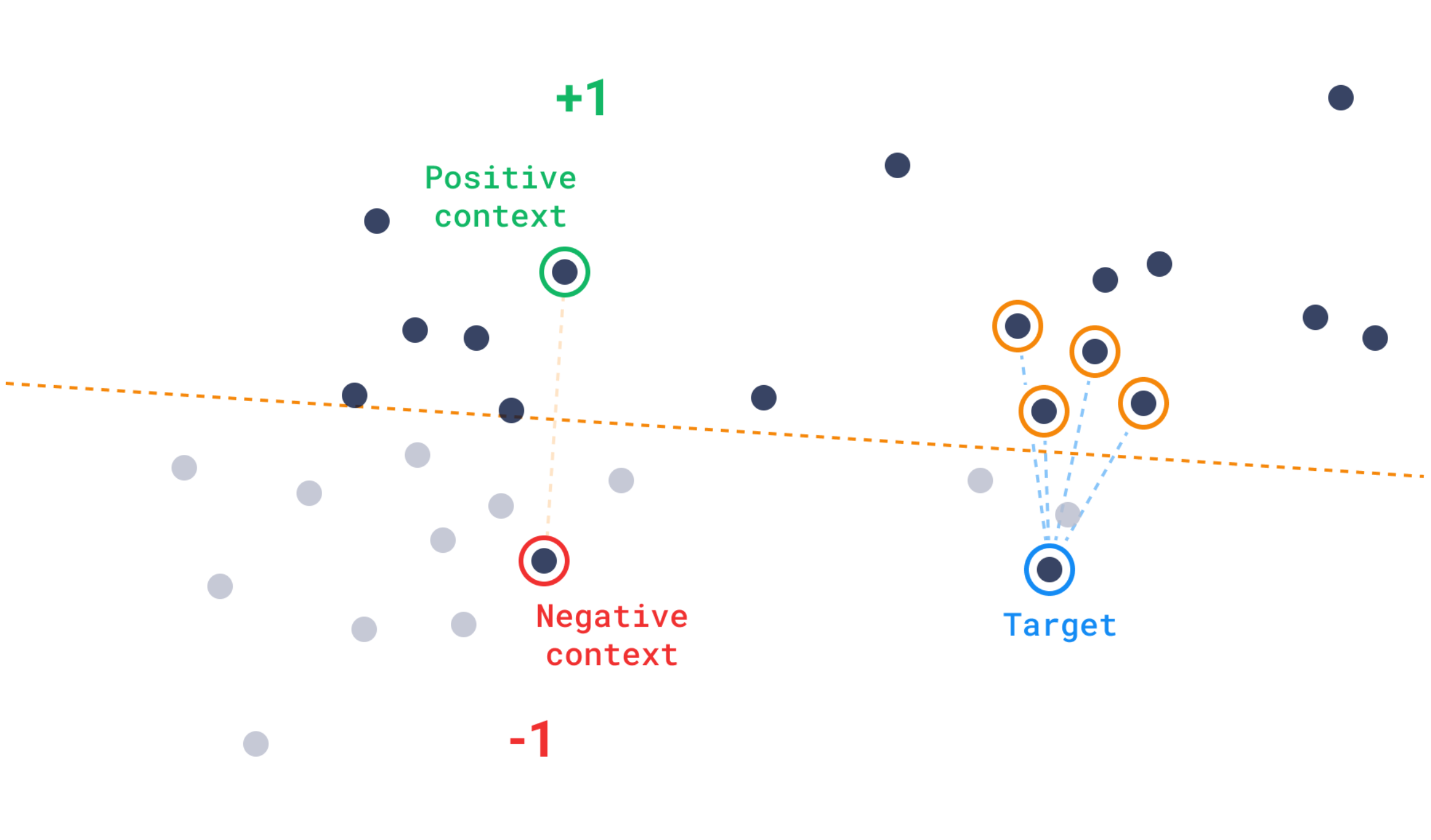
Context search
- Conversely, in the absence of a target, a rigid integer-by-integer function doesn’t provide much guidance for the search when utilizing a proximity graph like HNSW.
- Instead, context search employs a function derived from the triplet-loss concept, which is usually applied during model training.
- For context search, this function is adapted to steer the search towards areas with fewer negative examples.
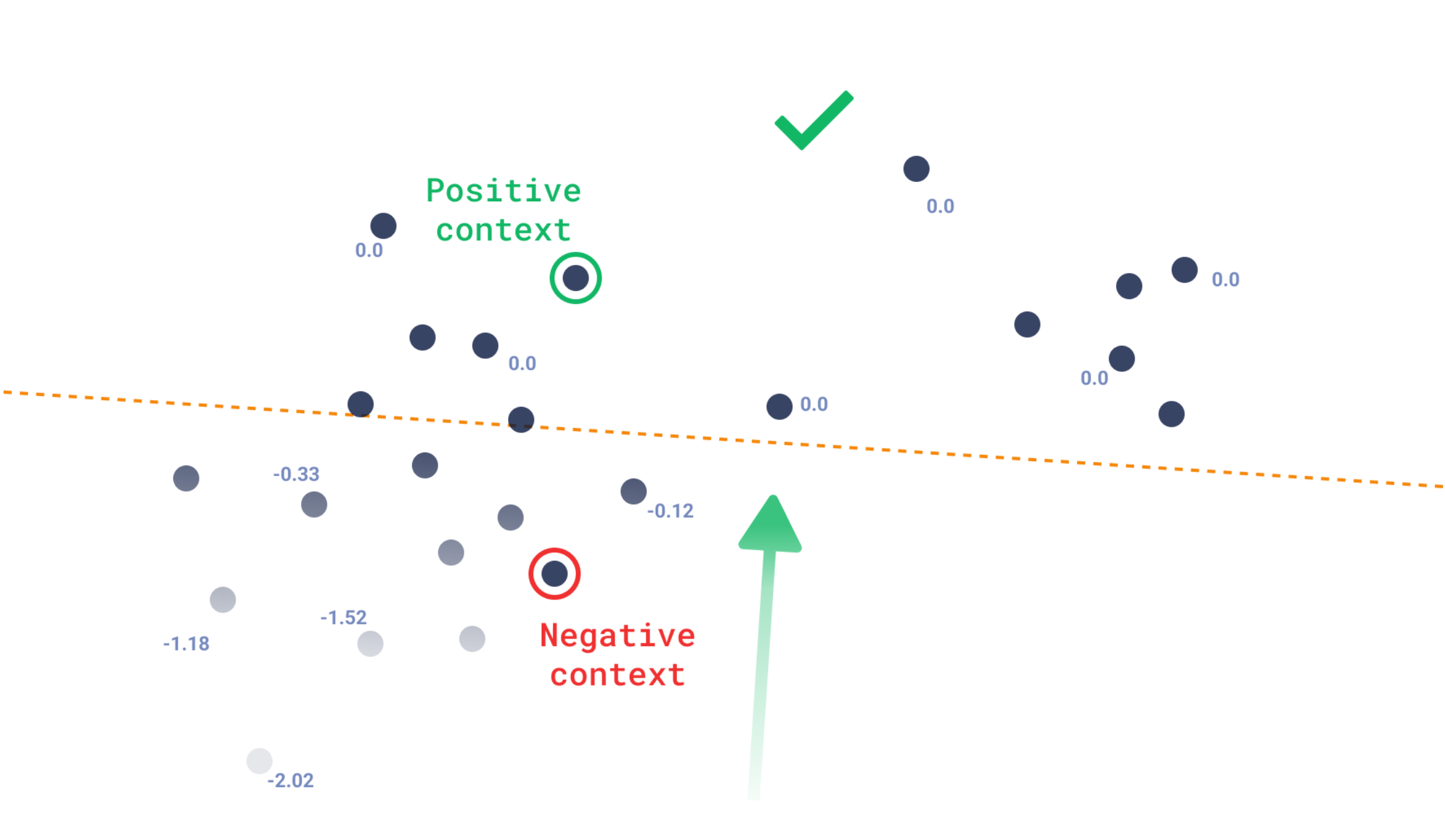
Distance Matrix
- The distance matrix API allows to calculate the distance between sampled pairs of vectors and to return the result as a sparse matrix.
- Such API enables new data exploration use cases such as clustering similar vectors, visualization of connections or dimension reduction.
Hybrid and Multi-Stage Queries
- With the introduction of many named vectors per point
- there are use-cases when the best search is obtained by combining multiple queries, or by performing the search in more than one stage.
- Qdrant has a flexible and universal interface to make this possible, called Query API (API reference).
- The main component for making the combinations of queries possible is the prefetch parameter, which enables making sub-requests.
- Specifically, whenever a query has at least one prefetch, Qdrant will:
- Perform the prefetch query (or queries)
- Apply the main query over the results of its prefetch(es).
- Additionally, prefetches can have prefetches themselves, so you can have nested prefetches.
Hybrid Search
- One of the most common problems when you have different representations of the same data is to combine the queried points for each representation into a single result.
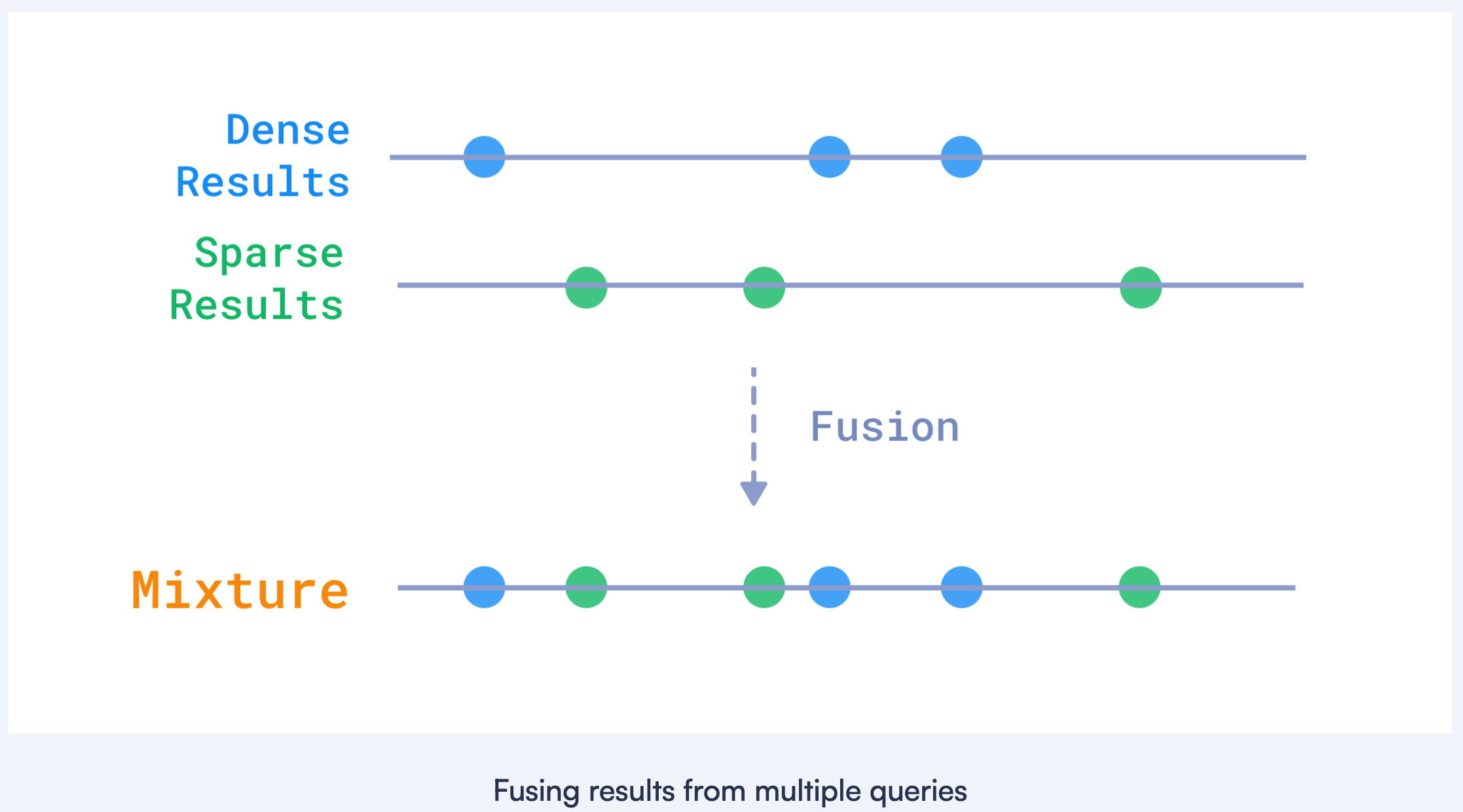
- For example, in text search, it is often useful to combine dense and sparse vectors get the best of semantics, plus the best of matching specific words.
- dense - semantics
- sparse - words
- Qdrant currently has two ways of combining the results from different queries
- rrf - Reciprocal Rank Fusion
- dbsf - Distribution-Based Score Fusion
1 | POST /collections/{collection_name}/points/query |
Multi-stage queries
- In many cases, the usage of a larger vector representation gives more accurate search results, but it is also more expensive to compute.
- Splitting the search into two stages is a known technique:
- First, use a smaller and cheaper representation to get a large list of candidates.
- Then, re-score the candidates using the larger and more accurate representation.
- There are a few ways to build search architectures around this idea:
- The quantized vectors as a first stage, and the full-precision vectors as a second stage.
- Leverage Matryoshka Representation Learning (MRL) to generate candidate vectors with a shorter vector, and then refine them with a longer one.
- Use regular dense vectors to pre-fetch the candidates, and then re-score them with a multi-vector model like ColBERT.
- To get the best of all worlds, Qdrant has a convenient interface to perform the queries in stages, such that the coarse results are fetched first, and then they are refined later with larger vectors.
Fetch 1000 results using a shorter MRL byte vector, then re-score them using the full vector and get the top 10.
1 | POST /collections/{collection_name}/points/query |
Fetch 100 results using the default vector, then re-score them using a multi-vector to get the top 10.
1 | POST /collections/{collection_name}/points/query |
It is possible to combine all the above techniques in a single query:
1 | POST /collections/{collection_name}/points/query |
Flexible interface
- Other than the introduction of prefetch, the Query API has been designed to make querying simpler. Let’s look at a few bonus features:
Whenever you need to use a vector as an input, you can always use a point ID instead.
1 | POST /collections/{collection_name}/points/query |
- The above example will fetch the default vector from the point with this id, and use it as the query vector.
- If the using parameter is also specified, Qdrant will use the vector with that name.
It is also possible to reference an ID from a different collection, by setting the lookup_from parameter.
1 | POST /collections/{collection_name}/points/query |
- In the case above, Qdrant will fetch the “image-512” vector from the specified point id in the collection another_collection.
- The fetched vector(s) must match the characteristics of the using vector, otherwise, an error will be returned.
Re-ranking with payload values
- The Query API can retrieve points not only by vector similarity but also by the content of the payload.
- There are two ways to make use of the payload in the query:
- Apply filters to the payload fields, to only get the points that match the filter.
- Order the results by the payload field.
1 | POST /collections/{collection_name}/points/query |
- In this example, we first fetch 10 points with the color “red” and then 10 points with the color “green”. Then, we order the results by the price field.
Grouping
- It is possible to group results by a certain field.
- This is useful when you have multiple points for the same item, and you want to avoid redundancy of the same item in the results.
1 | POST /collections/{collection_name}/points/query/groups |
Filtering
- With Qdrant, you can set conditions when searching or retrieving points.
- For example, you can impose conditions on both the payload and the id of the point.
- Setting additional conditions is important when it is impossible to express all the features of the object in the embedding.
- Examples include a variety of business requirements: stock availability, user location, or desired price range.
Filtering clauses
- Qdrant allows you to combine conditions in clauses.
- Clauses are different logical operations, such as OR, AND, and NOT.
- Clauses can be recursively nested into each other so that you can reproduce an arbitrary boolean expression.
- Suppose we have a set of points with the following payload:
1 | [ |
Must
When using must, the clause becomes true only if every condition listed inside must is satisfied.
In this sense, must is equivalent to the operator AND.
1 | POST /collections/{collection_name}/points/scroll |
1 | [{ "id": 2, "city": "London", "color": "red" }] |
Should
When using should, the clause becomes true if at least one condition listed inside should is satisfied.
In this sense, should is equivalent to the operator OR.
1 | POST /collections/{collection_name}/points/scroll |
1 | [ |
Must Not
When using must_not, the clause becomes true if none of the conditions listed inside should is satisfied.
In this sense, must_not is equivalent to the expression (NOT A) AND (NOT B) AND (NOT C).
1 | POST /collections/{collection_name}/points/scroll |
1 | [ |
Clauses combination
In this case, the conditions are combined by AND.
1 | POST /collections/{collection_name}/points/scroll |
1 | [ |
Also, the conditions could be recursively nested.
1 | POST /collections/{collection_name}/points/scroll |
1 | [ |
Filtering conditions
- Different types of values in payload correspond to different kinds of queries that we can apply to them.
- Let’s look at the existing condition variants and what types of data they apply to.
Match
1 | { |
- For the other types, the match condition will look exactly the same, except for the type used
1 | { |
- The simplest kind of condition is one that checks if the stored value equals the given one.
- If several values are stored, at least one of them should match the condition.
- You can apply it to keyword, integer and bool payloads.
Match Any
- In case you want to check if the stored value is one of multiple values, you can use the Match Any condition.
- Match Any works as a logical OR for the given values. It can also be described as a IN operator.
- You can apply it to keyword and integer payloads.
1 | { |
- In this example, the condition will be satisfied if the stored value is either black or yellow.
- If the stored value is an array, it should have at least one value matching any of the given values.
- E.g. if the stored value is [“black”, “green”], the condition will be satisfied, because “black” is in [“black”, “yellow”].
Match Except
- In case you want to check if the stored value is not one of multiple values, you can use the Match Except condition.
- Match Except works as a logical NOR for the given values. It can also be described as a NOT IN operator.
- You can apply it to keyword and integer payloads.
1 | { |
- In this example, the condition will be satisfied if the stored value is neither black nor yellow.
- If the stored value is an array, it should have at least one value not matching any of the given values.
- E.g. if the stored value is [“black”, “green”], the condition will be satisfied, because “green” does not match “black” nor “yellow”.
Nested key
- Payloads being arbitrary JSON object, it is likely that you will need to filter on a nested field.
- For convenience, we use a syntax similar to what can be found in the Jq project.
- Suppose we have a set of points with the following payload
1 | [ |
You can search on a nested field using a dot notation.
1 | POST /collections/{collection_name}/points/scroll |
You can also search through arrays by projecting inner values using the [] syntax.
1 | POST /collections/{collection_name}/points/scroll |
And the leaf nested field can also be an array.
This query would only output the point with id 2 as only Japan has a city with the “Osaka castke” as part of the sightseeing.
1 | POST /collections/{collection_name}/points/scroll |
Nested object filter
- By default, the conditions are taking into account the entire payload of a point.
- For instance, given two points with the following payload:
1 | [ |
The following query would match both points:
1 | POST /collections/{collection_name}/points/scroll |
This happens because both points are matching the two conditions:
- the “t-rex” matches food=meat on
diet[1].foodand likes=true ondiet[1].likes - the “diplodocus” matches food=meat on diet[1].food and likes=true on diet[0].likes
TBD
- To retrieve only the points which are matching the conditions on an array element basis, that is the point with id 1 in this example, you would need to use a nested object filter.
- Nested object filters allow arrays of objects to be queried independently of each other.
- It is achieved by using the nested condition type formed by a payload key to focus on and a filter to apply.
- The key should point to an array of objects and can be used with or without the bracket notation (“data” or “**data[]**”).
1 | POST /collections/{collection_name}/points/scroll |
- The matching logic is modified to be applied at the level of an array element within the payload.
- Nested filters work in the same way as if the nested filter was applied to a single element of the array at a time.
- Parent document is considered to match the condition if at least one element of the array matches the nested filter.
Limitations
The has_id condition is not supported within the nested object filter. If you need it, place it in an adjacent must clause.
1 | POST /collections/{collection_name}/points/scroll |
Full Text Match
- A special case of the match condition is the text match condition.
- It allows you to search for a specific substring, token or phrase within the text field.
- Exact texts that will match the condition depend on full-text index configuration.
- Configuration is defined during the index creation and describe at full-text index.
- If there is no full-text index for the field, the condition will work as exact substring match.
1 | { |
If the query has several words, then the condition will be satisfied only if all of them are present in the text.
Range
1 | { |
- The range condition sets the range of possible values for stored payload values.
- If several values are stored, at least one of them should match the condition.
- Comparisons that can be used:
- gt - greater than
- gte - greater than or equal
- lt - less than
- lte - less than or equal
- Can be applied to float and integer payloads.
Datetime Range
- The datetime range is a unique range condition, used for datetime payloads, which supports RFC 3339 formats.
- You do not need to convert dates to UNIX timestaps. During comparison, timestamps are parsed and converted to UTC.
1 | { |
UUID Match
- Matching of UUID values works similarly to the regular match condition for strings.
- Functionally, it will work with keyword and uuid indexes exactly the same, but uuid index is more memory efficient.
1 | { |
Values count
- In addition to the direct value comparison, it is also possible to filter by the amount of values.
- If stored value is not an array - it is assumed that the amount of values is equals to 1.
1 | [ |
We can perform the search only among the items with more than two comments:
1 | { |
1 | [{ "id": 2, "name": "product B", "comments": ["meh", "expected more", "ok"] }] |
Is Empty
- Sometimes it is also useful to filter out records that are missing some value.
- This condition will match all records where the field
reportseither does not exist, or hasnullor[]value.
1 | { |
Is Null
- It is not possible to test for NULL values with the match condition. We have to use IsNull condition instead:
- This condition will match all records where the field reports exists and has NULL value.
1 | { |
Has id
- This type of query is not related to payload, but can be very useful in some situations.
- For example, the user could mark some specific search results as irrelevant, or we want to search only among the specified points.
1 | POST /collections/{collection_name}/points/scroll |
1 | [ |
Optimizer
- It is much more efficient to apply changes in batches than perform each change individually, as many other databases do. Qdrant here is no exception.
- Since Qdrant operates with data structures that are not always easy to change, it is sometimes necessary to rebuild those structures completely.
- Storage optimization in Qdrant occurs at the segment level (see storage).
- In this case, the segment to be optimized remains readable for the time of the rebuild.
- The availability is achieved by wrapping the segment into a proxy that transparently handles data changes.
- Changed data is placed in the copy-on-write segment, which has priority for retrieval and subsequent updates.
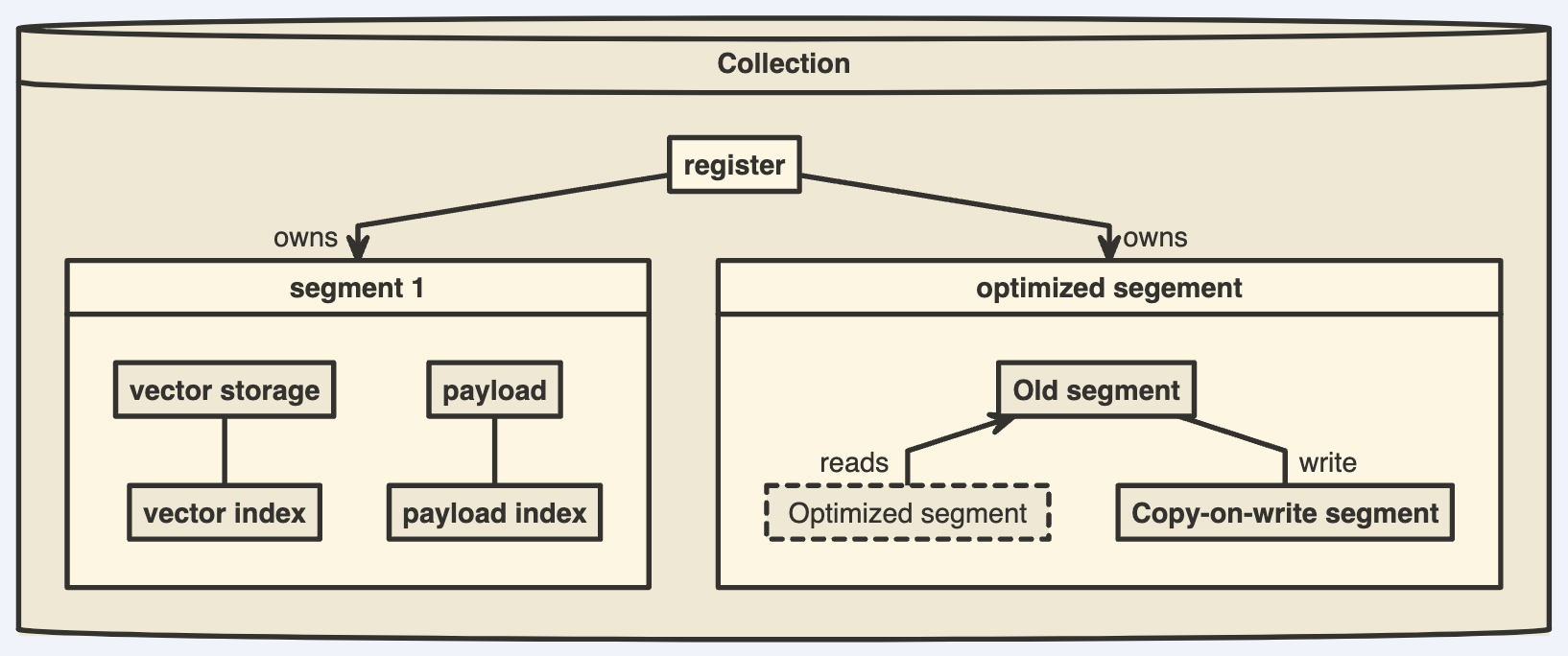
Vacuum Optimizer
- The simplest example of a case where you need to rebuild a segment repository is to remove points.
- Like many other databases, Qdrant does not delete entries immediately after a query.
- Instead, it marks records as deleted and ignores them for future queries.
- This strategy allows us to minimize disk access - one of the slowest operations.
- However, a side effect of this strategy is that, over time, deleted records accumulate, occupy memory and slow down the system.
- To avoid these adverse effects, Vacuum Optimizer is used. It is used if the segment has accumulated too many deleted records.
- The criteria for starting the optimizer are defined in the configuration file.
1 | storage: |
Merge Optimizer
- The service may require the creation of temporary segments.
- Such segments, for example, are created as copy-on-write segments during optimization itself.
- It is also essential to have at least one small segment that Qdrant will use to store frequently updated data.
- On the other hand, too many small segments lead to suboptimal search performance.
- There is the Merge Optimizer, which combines the smallest segments into one large segment. It is used if too many segments are created.
- The criteria for starting the optimizer are defined in the configuration file.
1 | storage: |
Indexing Optimizer
- Qdrant allows you to choose the type of indexes and data storage methods used depending on the number of records.
- So, for example, if the number of points is less than 10000, using any index would be less efficient than a brute force scan.
- The Indexing Optimizer is used to implement the enabling of indexes and memmap storage when the minimal amount of records is reached.
- The criteria for starting the optimizer are defined in the configuration file.
1 | storage: |
- In addition to the configuration file, you can also set optimizer parameters separately for each collection.
- Dynamic parameter updates may be useful, for example, for more efficient initial loading of points.
- You can disable indexing during the upload process with these settings and enable it immediately after it is finished.
- As a result, you will not waste extra computation resources on rebuilding the index.
Storage
- All data within one collection is divided into segments.
- Each segment has its independent vector and payload storage as well as indexes.
- Data stored in segments usually do not overlap.
- However, storing the same point in different segments will not cause problems since the search contains a deduplication mechanism.
- The segments consist of vector and payload storages, vector and payload indexes, and id mapper, which stores the relationship between internal and external ids.
- A segment can be appendable or non-appendable depending on the type of storage and index used.
- You can freely add, delete and query data in the appendable segment.
- With non-appendable segment can only read and delete data.
- The configuration of the segments in the collection can be different and independent of one another, but at least one `appendable’ segment must be present in a collection.
Vector storage
- Depending on the requirements of the application, Qdrant can use one of the data storage options.
- The choice has to be made between the search speed and the size of the RAM used.
- In-memory storage
- Stores all vectors in RAM, has the highest speed since disk access is required only for persistence.
- Memmap storage
- Creates a virtual address space associated with the file on disk.
- Mmapped files are not directly loaded into RAM.
- Instead, they use page cache to access the contents of the file.
- This scheme allows flexible use of available memory. With sufficient RAM, it is almost as fast as in-memory storage.
Configuring Memmap storage
- There are two ways to configure the usage of memmap(also known as on-disk) storage:
- Set up on_disk option for the vectors in the collection create API
1 | PUT /collections/{collection_name} |
- This will create a collection with all vectors immediately stored in memmap storage.
- This is the recommended way, in case your Qdrant instance operates with fast disks and you are working with large collections.
Set up memmap_threshold option. This option will set the threshold after which the segment will be converted to memmap storage.
- You can set the threshold globally in the configuration file. The parameter is called memmap_threshold (previously memmap_threshold_kb).
- You can set the threshold for each collection separately during creation or update.
1 | PUT /collections/{collection_name} |
The rule of thumb to set the memmap threshold parameter is simple:
- if you have a balanced use scenario
- set memmap threshold the same as indexing_threshold (default is 20000).
- In this case the optimizer will not make any extra runs and will optimize all thresholds at once.
- if you have a high write load and low RAM
- set memmap threshold lower than indexing_threshold to e.g. 10000.
- In this case the optimizer will convert the segments to memmap storage first and will only apply indexing after that.
- In addition, you can use memmap storage not only for vectors, but also for HNSW index.
- To enable this, you need to set the hnsw_config.on_disk parameter to true during collection creation or updating.
1 | PUT /collections/{collection_name} |
Payload storage
- Qdrant supports two types of payload storages: InMemory and OnDisk.
- InMemory payload storage is organized in the same way as in-memory vectors.
- The payload data is loaded into RAM at service startup while disk and RocksDB are used for persistence only.
- This type of storage works quite fast, but it may require a lot of space to keep all the data in RAM
- especially if the payload has large values attached - abstracts of text or even images.
- In the case of large payload values, it might be better to use OnDisk payload storage.
- This type of storage will read and write payload directly to RocksDB, so it won’t require any significant amount of RAM to store.
- The downside, however, is the access latency.
- If you need to query vectors with some payload-based conditions - checking values stored on disk might take too much time.
- In this scenario, we recommend creating a payload index for each field used in filtering conditions to avoid disk access.
- Once you create the field index, Qdrant will preserve all values of the indexed field in RAM regardless of the payload storage type.
- You can specify the desired type of payload storage with configuration file or with collection parameter on_disk_payload during creation of the collection.
Versioning
- To ensure data integrity, Qdrant performs all data changes in 2 stages.
- In the first step, the data is written to the Write-ahead-log(WAL), which orders all operations and assigns them a sequential number.
- Once a change has been added to the WAL, it will not be lost even if a power loss occurs.
- Then the changes go into the segments.
- Each segment stores the last version of the change applied to it as well as the version of each individual point.
- If the new change has a sequential number less than the current version of the point, the updater will ignore the change.
- This mechanism allows Qdrant to safely and efficiently restore the storage from the WAL in case of an abnormal shutdown.
Indexing
- A key feature of Qdrant is the effective combination of vector and traditional indexes.
- It is essential to have this because for vector search to work effectively with filters, having vector index only is not enough.
- In simpler terms, a vector index speeds up vector search, and payload indexes speed up filtering.
- The indexes in the segments exist independently, but the parameters of the indexes themselves are configured for the whole collection.
- Not all segments automatically have indexes.
- Their necessity is determined by the optimizer settings and depends, as a rule, on the number of stored points.
Payload Index
- Payload index in Qdrant is similar to the index in conventional document-oriented databases. - MongoDB
- This index is built for a specific field and type, and is used for quick point requests by the corresponding filtering condition.
- The index is also used to accurately estimate the filter cardinality, which helps the query planning choose a search strategy.
- Creating an index requires additional computational resources and memory, so choosing fields to be indexed is essential.
- Qdrant does not make this choice but grants it to the user.
To mark a field as indexable, you can use the following:
You can use dot notation to specify a nested field for indexing. Similar to specifying nested filters.
1 | PUT /collections/{collection_name}/index |
| Available field type | Desc |
|---|---|
| keyword | for keyword payload, affects Match filtering conditions. |
| integer | for integer payload, affects Match and Range filtering conditions. |
| float | for float payload, affects Range filtering conditions. |
| bool | for bool payload, affects Match filtering conditions |
| geo | for geo payload, affects Geo Bounding Box and Geo Radius filtering conditions. |
| datetime | for datetime payload, affects Range filtering conditions |
| text | a special kind of index, available for keyword / string payloads, affects Full Text search filtering conditions. |
| uuid | a special type of index, similar to keyword, but optimized for UUID values. Affects Match filtering conditions. |
- Payload index may occupy some additional memory, so it is recommended to only use index for those fields that are used in filtering conditions.
- If you need to filter by many fields and the memory limits does not allow to index all of them, it is recommended to choose the field that limits the search result the most.
- As a rule, the more different values a payload value has, the more efficiently the index will be used.
Full-text index
- Qdrant supports full-text search for string payload.
- Full-text index allows you to filter points by the presence of a word or a phrase in the payload field.
- Full-text index configuration is a bit more complex than other indexes, as you can specify the tokenization parameters.
- Tokenization is the process of splitting a string into tokens, which are then indexed in the inverted index.
1 | PUT /collections/{collection_name}/index |
| Available tokenizer | Desc |
|---|---|
| word | splits the string into words, separated by spaces, punctuation marks, and special characters. |
| whitespace | splits the string into words, separated by spaces. |
| prefix | splits the string into words, separated by spaces, punctuation marks, and special characters, and then creates a prefix index for each word. For example: hello will be indexed as h, he, hel, hell, hello. |
| multilingual | special type of tokenizer based on charabia package. It allows proper tokenization and lemmatization for multiple languages, including those with non-latin alphabets and non-space delimiters. See charabia documentation for full list of supported languages supported normalization options. In the default build configuration, qdrant does not include support for all languages, due to the increasing size of the resulting binary. Chinese, Japanese and Korean languages are not enabled by default, but can be enabled by building qdrant from source with –features multiling-chinese,multiling-japanese,multiling-korean flags. |
Parameterized index
- We’ve added a parameterized variant to the integer index, which allows you to fine-tune indexing and search performance.
- Both the regular and parameterized integer indexes use the following flags:
- lookup - enables support for direct lookup using Match filters.
- range - enables support for Range filters.
- The regular integer index assumes both lookup and range are true.
- In contrast, to configure a parameterized index, you would set only one of these filters to true
| lookup | range | Result |
|---|---|---|
| true | true | Regular integer index |
| true | false | Parameterized integer index |
| false | true | Parameterized integer index |
| false | false | No integer index |
- The parameterized index can enhance performance in collections with millions of points.
- We encourage you to try it out. If it does not enhance performance in your use case, you can always restore the regular integer index.
- Note: If you set “lookup”: true with a range filter, that may lead to significant performance issues.
- For example, the following code sets up a parameterized integer index which supports only range filters
1 | PUT /collections/{collection_name}/index |
On-disk payload index
- By default all payload-related structures are stored in memory.
- In this way, the vector index can quickly access payload values during search.
- As latency in this case is critical, it is recommended to keep hot payload indexes in memory.
- There are, however, cases when payload indexes are too large or rarely used.
- In those cases, it is possible to store payload indexes on disk.
- On-disk payload index might affect cold requests latency, as it requires additional disk I/O operations.
- To configure on-disk payload index, you can use the following index parameters:
1 | PUT /collections/{collection_name}/index |
Tenant Index
- Many vector search use-cases require multitenancy.
- In a multi-tenant scenario the collection is expected to contain multiple subsets of data, where each subset belongs to a different tenant.
- Qdrant supports efficient multi-tenant search by enabling special configuration vector index, which disables global search and only builds sub-indexes for each tenant.
- In Qdrant, tenants are not necessarily non-overlapping. It is possible to have subsets of data that belong to multiple tenants.
- However, knowing that the collection contains multiple tenants unlocks more opportunities for optimization.
- To optimize storage in Qdrant further, you can enable tenant indexing for payload fields.
- This option will tell Qdrant which fields are used for tenant identification and will allow Qdrant to structure storage for faster search of tenant-specific data.
- One example of such optimization is localizing tenant-specific data closer on disk, which will reduce the number of disk reads during search.
- Tenant optimization is supported for the following datatypes: keyword / uuid
- To enable tenant index for a field, you can use the following index parameters:
1 | PUT /collections/{collection_name}/index |
Principal Index
- Similar to the tenant index, the principal index is used to optimize storage for faster search
- assuming that the search request is primarily filtered by the principal field.
- A good example of a use case for the principal index is time-related data, where each point is associated with a timestamp.
- In this case, the principal index can be used to optimize storage for faster search with time-based filters.
- Principal optimization is supported for following types: integer / float / datetime
1 | PUT /collections/{collection_name}/index |
Vector Index
- A vector index is a data structure built on vectors through a specific mathematical model.
- Through the vector index, we can efficiently query several vectors similar to the target vector.
- Qdrant currently only uses HNSW as a dense vector index.
- HNSW (Hierarchical Navigable Small World Graph) is a graph-based indexing algorithm.
- It builds a multi-layer navigation structure for an image according to certain rules.
- In this structure, the upper layers are more sparse and the distances between nodes are farther.
- The lower layers are denser and the distances between nodes are closer.
- The search starts from the uppermost layer, finds the node closest to the target in this layer, and then enters the next layer to begin another search.
- After multiple iterations, it can quickly approach the target position.
- In order to improve performance, HNSW limits the maximum degree of nodes on each layer of the graph to m.
- In addition, you can use ef_construct (when building index) or ef (when searching targets) to specify a search range.
- The corresponding parameters could be configured in the configuration file:
1 | storage: |
- And so in the process of creating a collection. The ef parameter is configured during the search and by default is equal to ef_construct.
- HNSW is chosen for several reasons.
- First, HNSW is well-compatible with the modification that allows Qdrant to use filters during a search.
- Second, it is one of the most accurate and fastest algorithms, according to public benchmarks.
- The HNSW parameters can also be configured on a collection and named vector level by setting hnsw_config to fine-tune search performance.
Sparse Vector Index
- Sparse vectors in Qdrant are indexed with a special data structure, which is optimized for vectors that have a high proportion of zeroes.
- In some ways, this indexing method is similar to the inverted index, which is used in text search engines.
- A sparse vector index in Qdrant is exact, meaning it does not use any approximation algorithms.
- All sparse vectors added to the collection are immediately indexed in the mutable version of a sparse index.
- With Qdrant, you can benefit from a more compact and efficient immutable sparse index, which is constructed during the same optimization process as the dense vector index.
- This approach is particularly useful for collections storing both dense and sparse vectors.
- To configure a sparse vector index, create a collection with the following parameters:
1 | PUT /collections/{collection_name} |
The following parameters may affect performance:
- on_disk: true
- The index is stored on disk, which lets you save memory. This may slow down search performance.
- on_disk: false
- The index is still persisted on disk, but it is also loaded into memory for faster search.
Unlike a dense vector index, a sparse vector index does not require a pre-defined vector size. It automatically adjusts to the size of the vectors added to the collection.
Note: A sparse vector index only supports dot-product similarity searches. It does not support other distance metrics.
IDF Modifier
- For many search algorithms, it is important to consider how often an item occurs in a collection.
- Intuitively speaking, the less frequently an item appears in a collection, the more important it is in a search.
- This is also known as the Inverse Document Frequency (IDF).
- It is used in text search engines to rank search results based on the rarity of a word in a collection.
- IDF depends on the currently stored documents and therefore can’t be pre-computed in the sparse vectors in streaming inference mode.
- In order to support IDF in the sparse vector index, Qdrant provides an option to modify the sparse vector query with the IDF statistics automatically.
- The only requirement is to enable the IDF modifier in the collection configuration:
1 | PUT /collections/{collection_name} |
Filtrable Index
- Separately, a payload index and a vector index cannot solve the problem of search using the filter completely.
- In the case of weak filters, you can use the HNSW index as it is.
- In the case of stringent filters, you can use the payload index and complete rescore.
- However, for cases in the middle, this approach does not work well.
- On the one hand, we cannot apply a full scan on too many vectors.
- On the other hand, the HNSW graph starts to fall apart when using too strict filters.
- Qdrant solves this problem by extending the HNSW graph with additional edges based on the stored payload values.
- Extra edges allow you to efficiently search for nearby vectors using the HNSW index and apply filters as you search in the graph.
- This approach minimizes the overhead on condition checks since you only need to calculate the conditions for a small fraction of the points involved in the search.
Quantization
- Quantization is an optional feature in Qdrant that enables efficient storage and search of high-dimensional vectors.
- By transforming original vectors into a new representations, quantization compresses data while preserving close to original relative distances between vectors.
- Different quantization methods have different mechanics and tradeoffs.
- Quantization is primarily used to reduce the memory footprint and accelerate the search process in high-dimensional vector spaces.
- In the context of the Qdrant, quantization allows you to optimize the search engine for specific use cases, striking a balance between accuracy, storage efficiency, and search speed.
- There are tradeoffs associated with quantization.
- On the one hand, quantization allows for significant reductions in storage requirements and faster search times.
- This can be particularly beneficial in large-scale applications where minimizing the use of resources is a top priority.
- On the other hand, quantization introduces an approximation error, which can lead to a slight decrease in search quality.
- The level of this tradeoff depends on the quantization method and its parameters, as well as the characteristics of the data.
- On the one hand, quantization allows for significant reductions in storage requirements and faster search times.
Scalar Quantization
float32 -> uint8 / SIMD fast / loss of accuracy
- Scalar quantization, in the context of vector search engines, is a compression technique that compresses vectors by reducing the number of bits used to represent each vector component.
- For instance, Qdrant uses 32-bit floating numbers to represent the original vector components.
- Scalar quantization allows you to reduce the number of bits used to 8.
- In other words, Qdrant performs float32 -> uint8 conversion for each vector component.
- Effectively, this means that the amount of memory required to store a vector is reduced by a factor of 4.
- In addition to reducing the memory footprint, scalar quantization also speeds up the search process.
- Qdrant uses a special SIMD CPU instruction to perform fast vector comparison.
- This instruction works with 8-bit integers, so the conversion to uint8 allows Qdrant to perform the comparison faster.
- The main drawback of scalar quantization is the loss of accuracy.
- The float32 -> uint8 conversion introduces an error that can lead to a slight decrease in search quality.
- However, this error is usually negligible, and tends to be less significant for high-dimensional vectors.
- In our experiments, we found that the error introduced by scalar quantization is usually less than 1%.
Binary Quantization
only with rescoring enabled / high-dimensional vectors / centered distribution
- Binary quantization is an extreme case of scalar quantization.
- This feature lets you represent each vector component as a single bit, effectively reducing the memory footprint by a factor of 32.
- This is the fastest quantization method, since it lets you perform a vector comparison with a few CPU instructions.
- Binary quantization can achieve up to a 40x speedup compared to the original vectors.
- However, binary quantization is only efficient for high-dimensional vectors and require a centered distribution of vector components.
- Models with a lower dimensionality or a different distribution of vector components may require additional experiments to find the optimal quantization parameters.
- We recommend using binary quantization only with rescoring enabled, as it can significantly improve the search quality with just a minor performance impact.
- Additionally, oversampling can be used to tune the tradeoff between search speed and search quality in the query time.
- The additional benefit of this method is that you can efficiently emulate Hamming distance with dot product.
Product Quantization
chunk / k-means / not SIMD-friendly / slower than scalar quantization / only for high-dimensional vectors
- Product quantization is a method of compressing vectors to minimize their memory usage by dividing them into chunks and quantizing each segment individually.
- Each chunk is approximated by a centroid index that represents the original vector component.
- The positions of the centroids are determined through the utilization of a clustering algorithm such as k-means.
- For now, Qdrant uses only 256 centroids, so each centroid index can be represented by a single byte.
- Product quantization can compress by a more prominent factor than a scalar one. But there are some tradeoffs.
- Product quantization distance calculations are not SIMD-friendly, so it is slower than scalar quantization.
- Also, product quantization has a loss of accuracy, so it is recommended to use it only for high-dimensional vectors.
Choose
Scalar Quantization
| Quantization method | Accuracy | Speed | Compression |
|---|---|---|---|
| Scalar | 0.99 | up to x2 | 4 |
| 0.95* | up to x40 | 32 | |
| 0.7 | 0.5 | up to 64 |
- Binary Quantization
- is the fastest method and the most memory-efficient, but it requires a centered distribution of vector components.
- It is recommended to use with tested models only. - OpenAI text-embedding-ada-002 / Cohere AI embed-english-v2.0
- Product Quantization
- may provide a better compression ratio, but it has a significant loss of accuracy and is slower than scalar quantization.
- It is recommended if the memory footprint is the top priority and the search speed is not critical.
- Scalar Quantization
- is the most universal method, as it provides a good balance between accuracy, speed, and compression.
- It is recommended as default quantization if binary quantization is not applicable.
Setting up
- You can configure quantization for a collection by specifying the quantization parameters in the quantization_config section of the collection configuration.
- Quantization will be automatically applied to all vectors during the indexation process.
- Quantized vectors are stored alongside the original vectors in the collection, so you will still have access to the original vectors if you need them.
- The quantization_config can also be set on a per vector basis by specifying it in a named vector.
Setting up Scalar Quantization
1 | PUT /collections/{collection_name} |
- type
- the type of the quantized vector components. Currently, Qdrant supports only int8.
- quantile
- the quantile of the quantized vector components.
- The quantile is used to calculate the quantization bounds.
- For instance, if you specify 0.99 as the quantile, 1% of extreme values will be excluded from the quantization bounds.
- Using quantiles lower than 1.0 might be useful if there are outliers in your vector components.
- This parameter only affects the resulting precision and not the memory footprint.
- It might be worth tuning this parameter if you experience a significant decrease in search quality.
- always_ram
- whether to keep quantized vectors always cached in RAM or not.
- By default, quantized vectors are loaded in the same way as the original vectors.
- However, in some setups you might want to keep quantized vectors in RAM to speed up the search process.
Searching
- Once you have configured quantization for a collection, you don’t need to do anything extra to search with quantization. Qdrant will automatically use quantized vectors if they are available.
- However, there are a few options that you can use to control the search process:
1 | POST /collections/{collection_name}/points/query |
- ignore
- Toggle whether to ignore quantized vectors during the search process.
- By default, Qdrant will use quantized vectors if they are available.
- rescore
- Having the original vectors available, Qdrant can re-evaluate top-k search results using the original vectors.
- This can improve the search quality, but may slightly decrease the search speed, compared to the search without rescore.
- It is recommended to disable rescore only if the original vectors are stored on a slow storage (e.g. HDD or network storage).
- By default, rescore is enabled.
- oversampling
- Defines how many extra vectors should be pre-selected using quantized index, and then re-scored using original vectors.
- For example, if oversampling is 2.4 and limit is 100, then 240 vectors will be pre-selected using quantized index, and then top-100 will be returned after re-scoring.
- Oversampling is useful if you want to tune the tradeoff between search speed and search quality in the query time.
Tips
Accuracy tuning
- In this section, we will discuss how to tune the search precision.
- The fastest way to understand the impact of quantization on the search quality is to compare the search results with and without quantization.
- In order to disable quantization, you can set ignore to true in the search request:
1 | POST /collections/{collection_name}/points/query |
- Adjust the quantile parameter
- The quantile parameter in scalar quantization determines the quantization bounds.
- By setting it to a value lower than 1.0, you can exclude extreme values (outliers) from the quantization bounds.
- For example, if you set the quantile to 0.99, 1% of the extreme values will be excluded.
- By adjusting the quantile, you find an optimal value that will provide the best search quality for your collection.
- Enable rescore
- Having the original vectors available, Qdrant can re-evaluate top-k search results using the original vectors.
- On large collections, this can improve the search quality, with just minor performance impact.
Memory and speed tuning
- In this section, we will discuss how to tune the memory and speed of the search process with quantization.
- There are 3 possible modes to place storage of vectors within the qdrant collection:
- All in RAM
- all vector, original and quantized, are loaded and kept in RAM.
- This is the fastest mode, but requires a lot of RAM. Enabled by default.
- Original on Disk, quantized in RAM
- this is a hybrid mode, allows to obtain a good balance between speed and memory usage.
- Recommended scenario if you are aiming to shrink the memory footprint while keeping the search speed.
- All on Disk
- all vectors, original and quantized, are stored on disk.
- This mode allows to achieve the smallest memory footprint, but at the cost of the search speed.
- It is recommended to use this mode if you have a large collection and fast storage (e.g. SSD or NVMe).
- All in RAM
Original on Disk, quantized in RAM - This mode is enabled by setting always_ram to true in the quantization config while using memmap storage:
1 | PUT /collections/{collection_name} |
- In this scenario, the number of disk reads may play a significant role in the search speed.
- In a system with high disk latency, the re-scoring step may become a bottleneck.
- Consider disabling rescore to improve the search speed:
1 | POST /collections/{collection_name}/points/query |
All on Disk - This mode is enabled by setting always_ram to false in the quantization config while using mmap storage:
1 | PUT /collections/{collection_name} |
Optimizing Performance
- Different use cases require different balances between memory usage, search speed, and precision.
- Qdrant is designed to be flexible and customizable so you can tune it to your specific needs.
- This guide will walk you three main optimization strategies:
- High Speed Search & Low Memory Usage
- High Precision & Low Memory Usage
- High Precision & High Speed Search
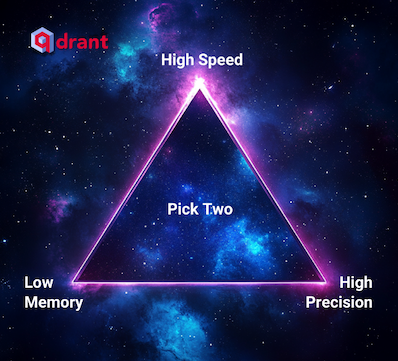
High-Speed Search + Low Memory Usage
original vectors on disk / quantized vectors in ram / scalar quantization / rescoring
- To achieve high search speed with minimal memory usage, you can store vectors on disk while minimizing the number of disk reads.
- Vector quantization is a technique that compresses vectors, allowing more of them to be stored in memory, thus reducing the need to read from disk.
- To configure in-memory quantization, with on-disk original vectors, you need to create a collection with the following parameters:
1 | PUT /collections/{collection_name} |
| Parameter | Desc |
|---|---|
| on_disk | Stores original vectors on disk. |
| quantization_config | Compresses quantized vectors to int8 using the scalar method. |
| always_ram | Keeps quantized vectors in RAM. |
Disable Rescoring for Faster Search (optional) - only quantized vectors in RAM
1 | POST /collections/{collection_name}/points/query |
- This is completely optional.
- Disabling rescoring with search params can further reduce the number of disk reads.
- Note that this might slightly decrease precision.
High Precision + Low Memory Usage
- If you require high precision but have limited RAM, you can store both vectors and the HNSW index on disk.
- This setup reduces memory usage while maintaining search precision.
- To store the vectors on_disk, you need to configure both the vectors and the HNSW index:
1 | PUT /collections/{collection_name} |
Improving Precision
- Increase the ef and m parameters of the HNSW index to improve precision, even with limited RAM:
- The speed of this setup depends on the disk’s IOPS (Input/Output Operations Per Second).
1 | ... |
High Precision + High-Speed Search
quantized vectors in ram / scalar quantization / rescoring
- For scenarios requiring both high speed and high precision, keep as much data in RAM as possible. Apply quantization with re-scoring for tunable accuracy.
- Here is how you can configure scalar quantization for a collection:
1 | PUT /collections/{collection_name} |
Fine-Tuning Search Parameters
You can adjust search parameters like hnsw_ef and exact to balance between speed and precision
| Key Parameter | Desc |
|---|---|
| hnsw_ef | Number of neighbors to visit during search (higher value = better accuracy, slower speed). |
| exact | Set to true for exact search, which is slower but more accurate. You can use it to compare results of the search with different hnsw_ef values versus the ground truth. |
1 | POST /collections/{collection_name}/points/query |
Balancing Latency and Throughput
When optimizing search performance, latency and throughput are two main metrics to consider:
- Latency: Time taken for a single request.
- Throughput: Number of requests handled per second.
The following optimization approaches are not mutually exclusive, but in some cases it might be preferable to optimize for one or another.
Minimizing Latency
- To minimize latency, you can set up Qdrant to use as many cores as possible for a single request.
- You can do this by setting the number of segments in the collection to be equal to the number of cores in the system.
- In this case, each segment will be processed in parallel, and the final result will be obtained faster.
1 | PUT /collections/{collection_name} |
Maximizing Throughput
- To maximize throughput, configure Qdrant to use as many cores as possible to process multiple requests in parallel.
- To do that, use fewer segments (usually 2) to handle more requests in parallel.
- Large segments benefit from the size of the index and overall smaller number of vector comparisons required to find the nearest neighbors.
- However, they will require more time to build the HNSW index.
1 | PUT /collections/{collection_name} |
Summary
By adjusting configurations like vector storage, quantization, and search parameters, you can optimize Qdrant for different use cases:
| Case | Desc |
|---|---|
| Low Memory + High Speed | Use vector quantization |
| High Precision + High Speed | Keep data in RAM, use quantization with re-scoring. |
| Store vectors and HNSW index on disk. | |
| Latency vs. Throughput | Adjust segment numbers based on the priority - 2 - Throughput |
Configuration
- Qdrant ships with sensible defaults for collection and network settings that are suitable for most use cases.
1 | storage: |